

Lorenz
Lorenz is a harmful computer virus that encrypts important user files with the aim to demand a ransom payment for said files’ release. Lorenz gives the user a limited period of time to pay for the private key that will unlock the files.
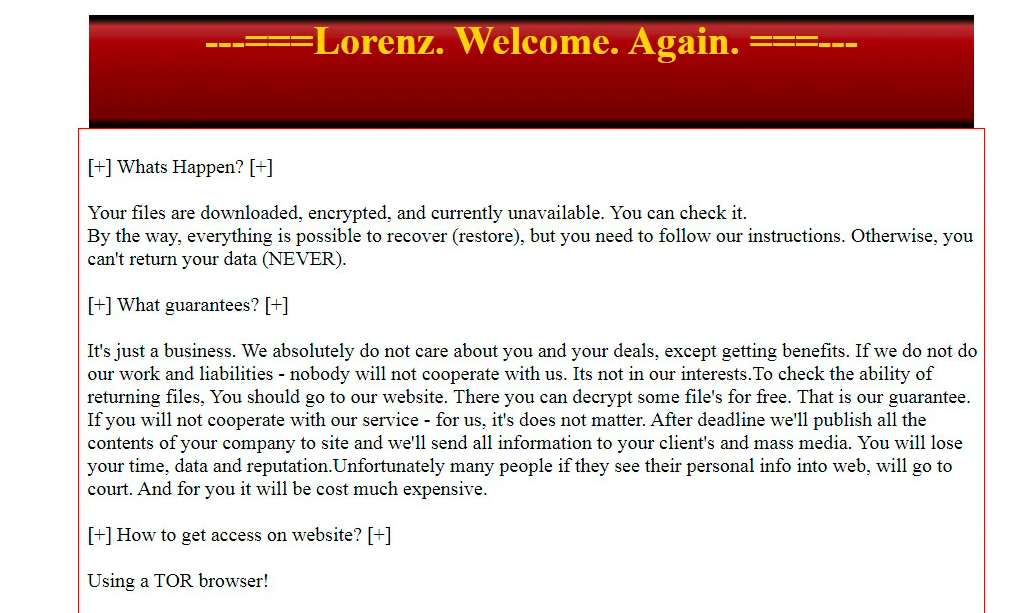
Ransomware infections like Lorenz are known for their ability to quickly and silently make all user data present in the attacked system inaccessible. The encryption rearranges the code of the targeted files so that they become unreadable pieces of data. The encryption process is reversible but in order to make the files accessible again you would need a private key that only the hackers who’ve created this malware have. And since this is Ransomware – a type of virus used for money extortion, the criminals who are behind it would want you to make a payment to them in order to “purchase” this private key. Needless to say, paying the hackers doesn’t really guarantee anything – you may still be left with no recovery solution for your data even after you make the money transfer.
The Lorenz virus
The Lorenz virus is a new malware program of the Ransomware category – a family of software threats that “kidnap” important files. The Lorenz virus won’t allow you to access any of the files in your computer until you pay a ransom.
On this page, we may be able to offer you an alternative solution to your Ransomware-related issue, but you must realize that there can be no guarantees with regard to the future of your files. You may or may not get to recover them if you try our method. Of course, the same can be said about the ransom payment course of action. However, if you decide to pay the hackers, even if you don’t get your files restored after that, your money would still remain in their hands. On the other hand, our recovery suggestions are free and it won’t cost you anything to try them out.
The Lorenz file extension
The Lorenz file extension is this virus’ unique extension that is put at the end of the name of the targeted files. The Lorenz file extension is no regular extension and no program recognizes it. The Lorenz file extension only goes away after the decryption.

Before you go to the recovery part of the guide, however, you must first ensure that Lorenz gets removed. The first section of our guide focuses on the removal steps you must follow in order to eliminate this insidious Ransomware. If you don’t get rid of the virus, the latter may get any of the data you may manage to unlock encrypted all over again. Even worse is the risk of getting your backups encrypted. It is especially important to not connect any external devices to your machine while the Ransomware is still there or the data on said devices may get locked as well, potentially destroying your best chance at recovering your encrypted data.
SUMMARY:
| Name | Lorenz |
| Type | Ransomware |
| Danger Level | High (Ransomware is by far the worst threat you can encounter) |
| Symptoms | Most users don’t notice anything prior to the locking of their files and the display of the ransom-demanding note. |
| Distribution Method | Ransomware can infect you after you open a spam message attachment, click on a clickbait ad, or download a pirated piece of software. |
| Data Recovery Tool | Not Available |
| Detection Tool |
Some threats reinstall themselves if you don’t delete their core files. We recommend downloading SpyHunter to remove harmful programs for you. This may save you hours and ensure you don’t harm your system by deleting the wrong files. |
 OFFER
OFFERRemove Lorenz Ransomware

Some of the steps will likely require you to exit the page. Bookmark it for later reference.
Reboot in Safe Mode (use this guide if you don’t know how to do it).

WARNING! READ CAREFULLY BEFORE PROCEEDING!
*Read more details in the first ad on this page, EULA, Privacy Policy, and full terms for Free Remover.
Press CTRL + SHIFT + ESC at the same time and go to the Processes Tab. Try to determine which processes are dangerous.
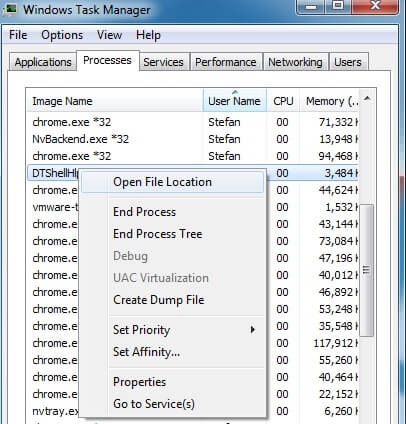
Right click on each of them and select Open File Location. Then scan the files with our free online virus scanner:


After you open their folder, end the processes that are infected, then delete their folders.
Note: If you are sure something is part of the infection – delete it, even if the scanner doesn’t flag it. No anti-virus program can detect all infections.

Hold the Start Key and R – copy + paste the following and click OK:
notepad %windir%/system32/Drivers/etc/hosts
A new file will open. If you are hacked, there will be a bunch of other IPs connected to you at the bottom. Look at the image below:
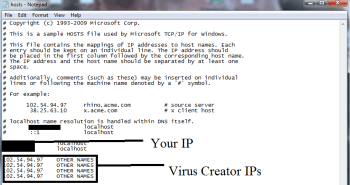
If there are suspicious IPs below “Localhost” – write to us in the comments.
Type msconfig in the search field and hit enter. A window will pop-up:
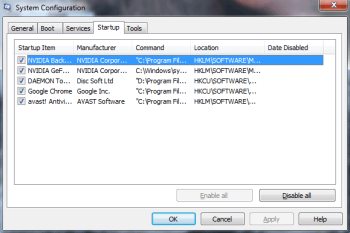
Go in Startup —> Uncheck entries that have “Unknown” as Manufacturer.
- Please note that ransomware may even include a fake Manufacturer name to its process. Make sure you check out every process here is legitimate.

Type Regedit in the windows search field and press Enter. Once inside, press CTRL and F together and type the virus’s Name.
Search for the ransomware in your registries and delete the entries. Be extremely careful – you can damage your system if you delete entries not related to the ransomware.
Type each of the following in the Windows Search Field:
- %AppData%
- %LocalAppData%
- %ProgramData%
- %WinDir%
- %Temp%
Delete everything in Temp. The rest just check out for anything recently added. Remember to leave us a comment if you run into any trouble!

How to Decrypt Lorenz files
We have a comprehensive (and daily updated) guide on how to decrypt your files. Check it out here.
If the guide doesn’t help, download the anti-virus program we recommended or try our free online virus scanner. Also, you can always ask us in the comments for help!
Leave a Reply