

If you are constantly getting bombarded by disruptive pop-ups in the center of your screen or strange notifications that appear in the bottom right, this might be a sign that your browser has been taken over by a hijacker. A recent example that many users have been complaining about is a rogue site called Garcuconte.co.in that functions as such a hijacker. It secretly gains permissions inside the browser which allows it to freely display all sorts of ads and pop-ups, many of which disguised as notifications from legitimate programs.
Garcuconte.co.in may expose your browser to redirects, ads, and persistent unwanted components. Install SpyHunter Pro to scan for risks, remove related threats, and enable real-time protection.
 OFFER
OFFER*Source of claim SH can remove it. Trial w/Credit card; image is for illustration; full terms.
Something particularly sneaky that Garcuconte.co.in and other hijackers like Holahupa and Bongbonger do is they display notifications that look like malware warnings from Norton. McAfee, or another popular AV. They warn you that there’s malware in the system and redirect you to some obscure security tool that you must download to secure your system. In reality, the tool they promote is either a scam or actual malware, so never trust such pop-ups.
The best solution is obviously to remove Garcuconte.co.in, but this can sometimes be difficult, so I’ve prepared a guide to help you get rid of it. Also, if you prefer a quicker and more streamlined method, you can also use the professional SpyHunter 5 removal program available on this page to remove this hijacker in a matter of minutes.
Garcuconte.co.in Removal Tutorial
Okay, so here’s the deal: you might be able to get rid of Garcuconte.co.in without diving into super complicated fixes. Start with the quick steps—they’re easy and worth a shot. If those don’t work, then you can move on to the more advanced stuff. Always try the simple stuff first, though. Trust me, it saves time and headaches.
Quick Steps to Remove Garcuconte.co.in
- 1.1Begin by opening your browser menu. For Chrome users, locate the three vertical dots in the top-right corner. Firefox users should look for three horizontal lines. Click on this, then navigate to the Extensions (or Add-ons) section. This is where you can manage all installed browser extensions and identify potential threats.
- 1.2Carefully review your installed extensions. If anything appears suspicious or unfamiliar, remove it immediately. If you are unsure, search for the extension’s name online. If it is malicious, it is likely that others have already reported it. Taking this step ensures that no harmful extensions remain active in your browser.
- 1.3Next, go to the Privacy and Security settings and check the Site Permissions section. Some websites request permissions to send notifications, access your camera, or track your location. This is crucial to prevent unauthorized access to your device’s features.
- 1.4Malicious sites often exploit these permissions to flood your browser with pop-ups and redirects. If you notice anything suspicious, revoke the access. Revoking permissions helps stop intrusive behavior and protects your browsing experience.
After completing these steps, restart your browser. If Garcuconte.co.in continues to cause issues, it is time to explore more advanced solutions.
SUMMARY:
| Name | Garcuconte.co.in |
| Type | Browser Hijacker |
| Detection Tool |
Some threats reinstall themselves if you don’t delete their core files. We recommend downloading SpyHunter to remove harmful programs for you. This may save you hours and ensure you don’t harm your system by deleting the wrong files. |
Alright, let’s be real—this guide isn’t exactly a walk in the park. It’s got a lot of steps, and you’ll need some basic troubleshooting skills. If that’s not your thing or you’re just short on time, there’s a shortcut: SpyHunter 5. It’s quick, safe, and does most of the heavy lifting for you. No shame in using it!
How to Remove the Garcuconte.co.in Virus
So, if the quick steps didn’t work, here’s why: Garcuconte.co.in probably slipped in a rogue third-party policy. You’ll know it’s there if you see something like “Managed by your organization” in your browser settings. That’s a classic hijacker move—they lock things down so you can’t fix it easily. Sneaky, right?
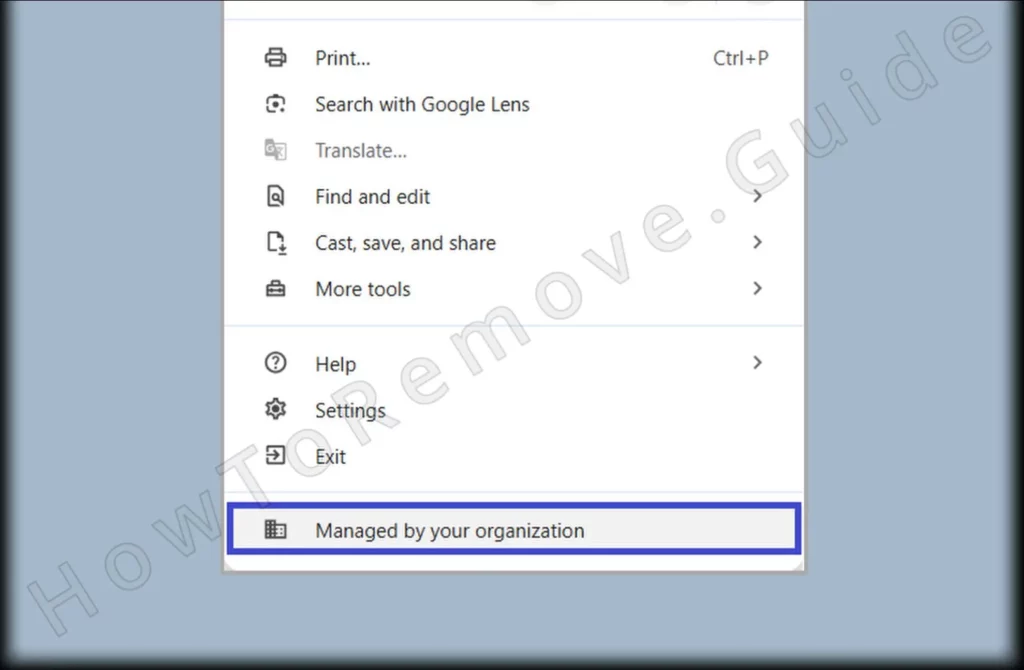
1. Identify the Garcuconte.co.in Policies
- 1.1
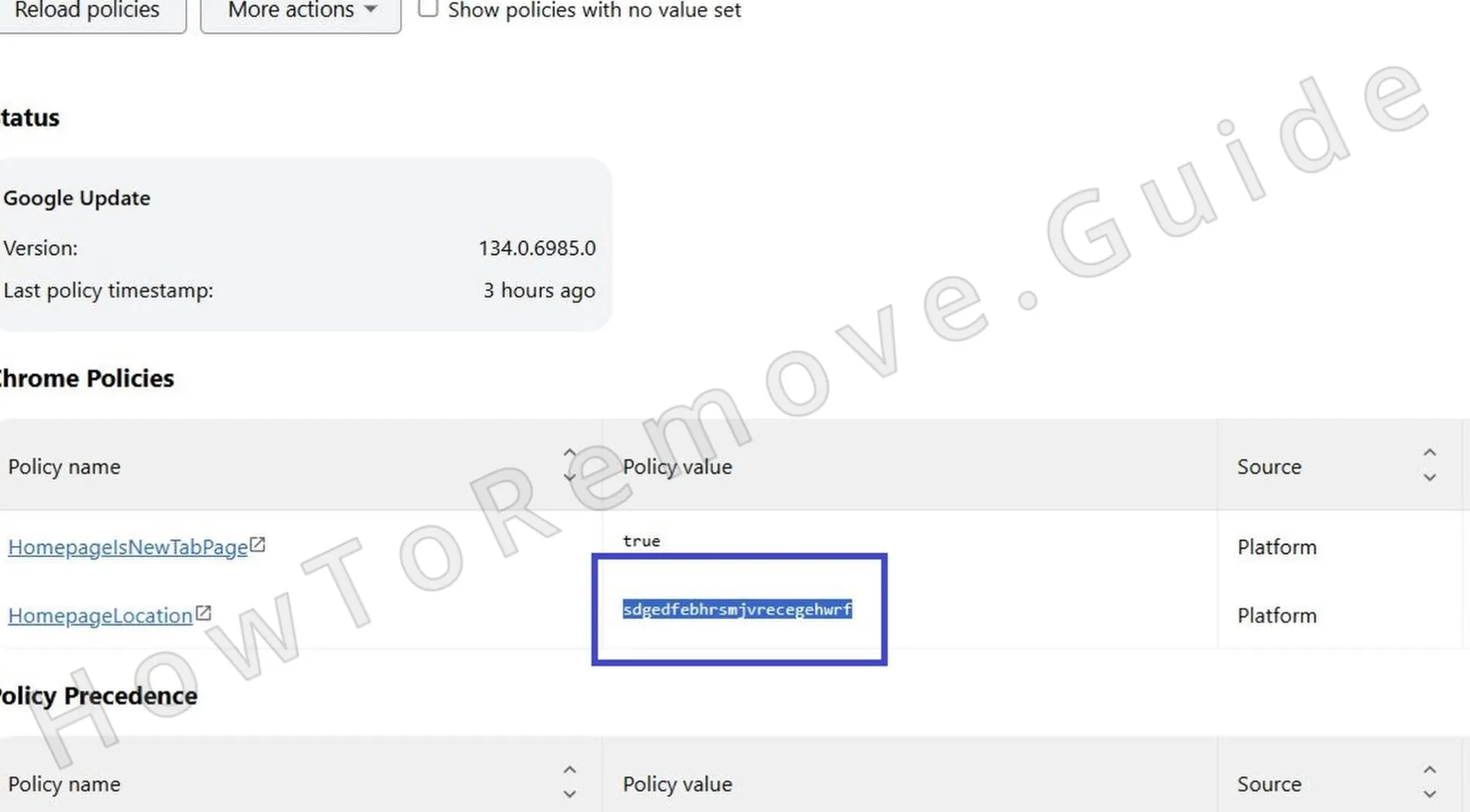 To investigate, type the following in your browser’s address bar:
► Chrome users: chrome://policy
► Edge users: edge://policy
This command will display all active policies affecting your browser. - 1.2This will open a page listing the active policies controlling your browser. If you see anything suspicious, such as a long string of random letters in the Value column, make a note of it. You will need this information for the next step. Documenting these details is essential for identifying and removing malicious policies.
- 1.3While you are here, return to the Extensions page and enable Developer Mode (toggle it on in the top-right corner). This will reveal additional details about each extension, including their unique extension ID. Write down the IDs of any suspicious extensions.
- 1.4If you cannot access the Extensions page, there is another method.
Open your file explorer and navigate to:
C:\Users[Your Username]\AppData\Local\Google\Chrome\User Data\Default\Extensions
This folder contains all installed extensions, allowing you to manually remove them. - 1.5
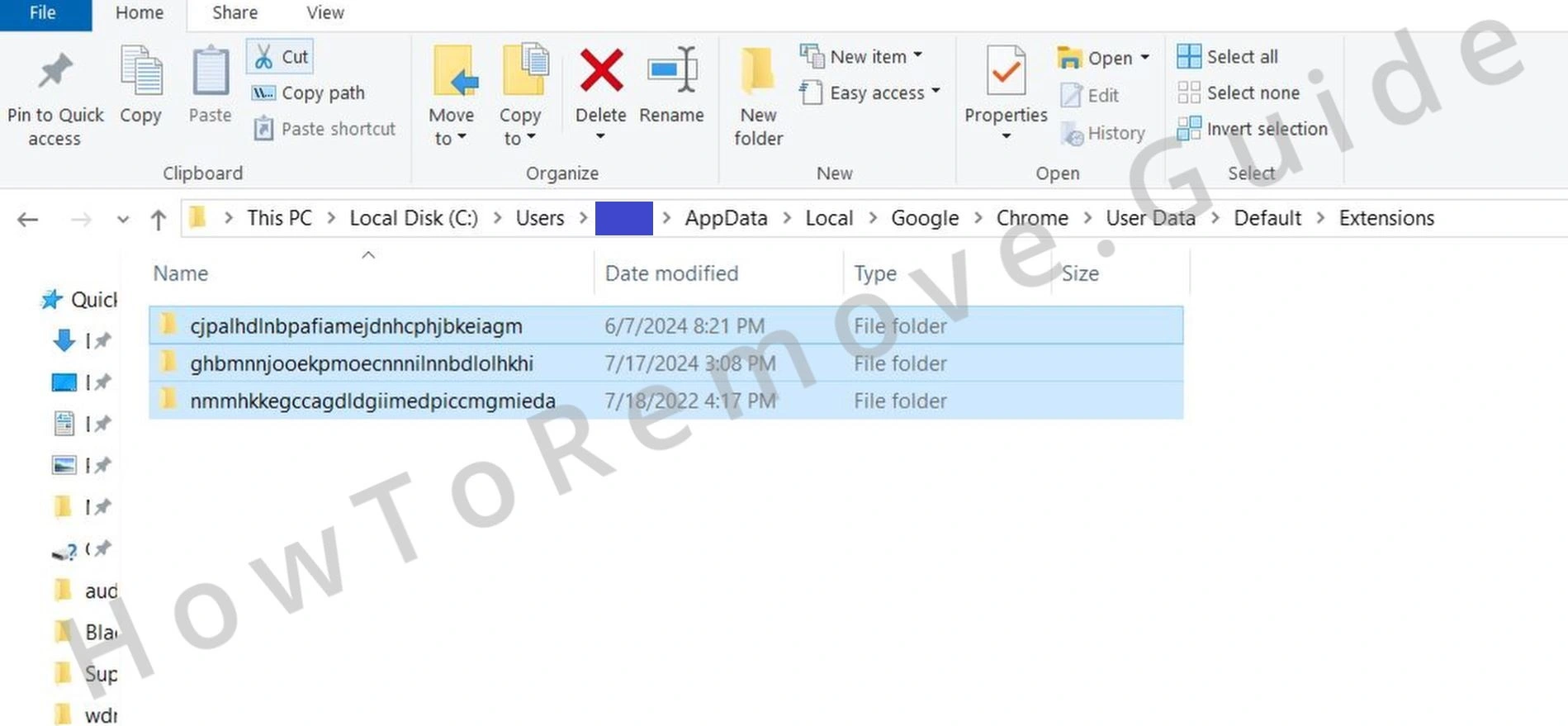 Delete everything inside this folder. This will remove all installed extensions. Clearing this folder ensures that no malicious extensions remain on your system.
 - 1.6
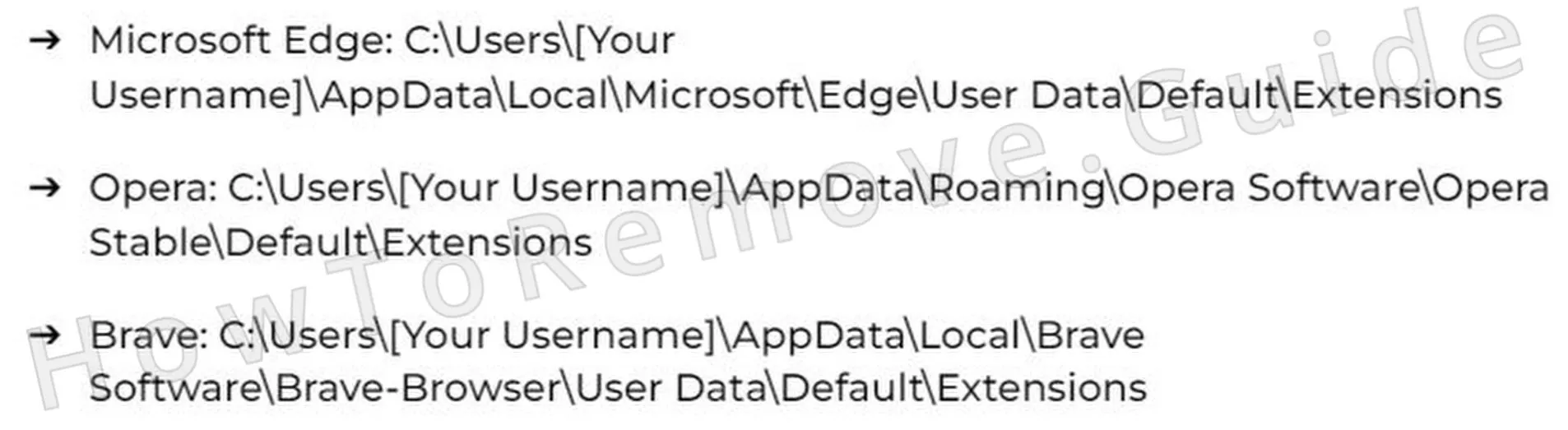 For Edge or other Chromium-based browsers, extension data is stored in a similar location. Here are the directories for several popular browsers: Each browser has a specific path where extension data is stored.
 - 1.7After completing this step, return to the Extensions page and note down the IDs of any rogue items present. This ensures you have a complete record of suspicious extensions.
Video walkthrough for this step:
Get Rid of Garcuconte.co.in Policies
Now, this next part is a bit more advanced, but don’t sweat it—I’ll walk you through it. The goal? Clean out those browser policies Garcuconte.co.in shoved into your Windows Registry. If it feels too tricky, though, just let SpyHunter 5 handle it. Sometimes, it’s better to leave the heavy lifting to the pros.
2. How to Delete Garcuconte.co.in Policies Through the Registry
- 2.1Press Win + R, type regedit, and hit Enter. This will open the Registry Editor. Be cautious when working here. The Registry Editor is a powerful tool, and incorrect changes can affect your system.
- 2.2Use the Find function (Edit > Find) to search for the policy values or extension IDs you noted earlier. If you find a match, delete it immediately. Continue searching until no related values or IDs remain. This step ensures all traces of malicious policies are removed.
- 2.3
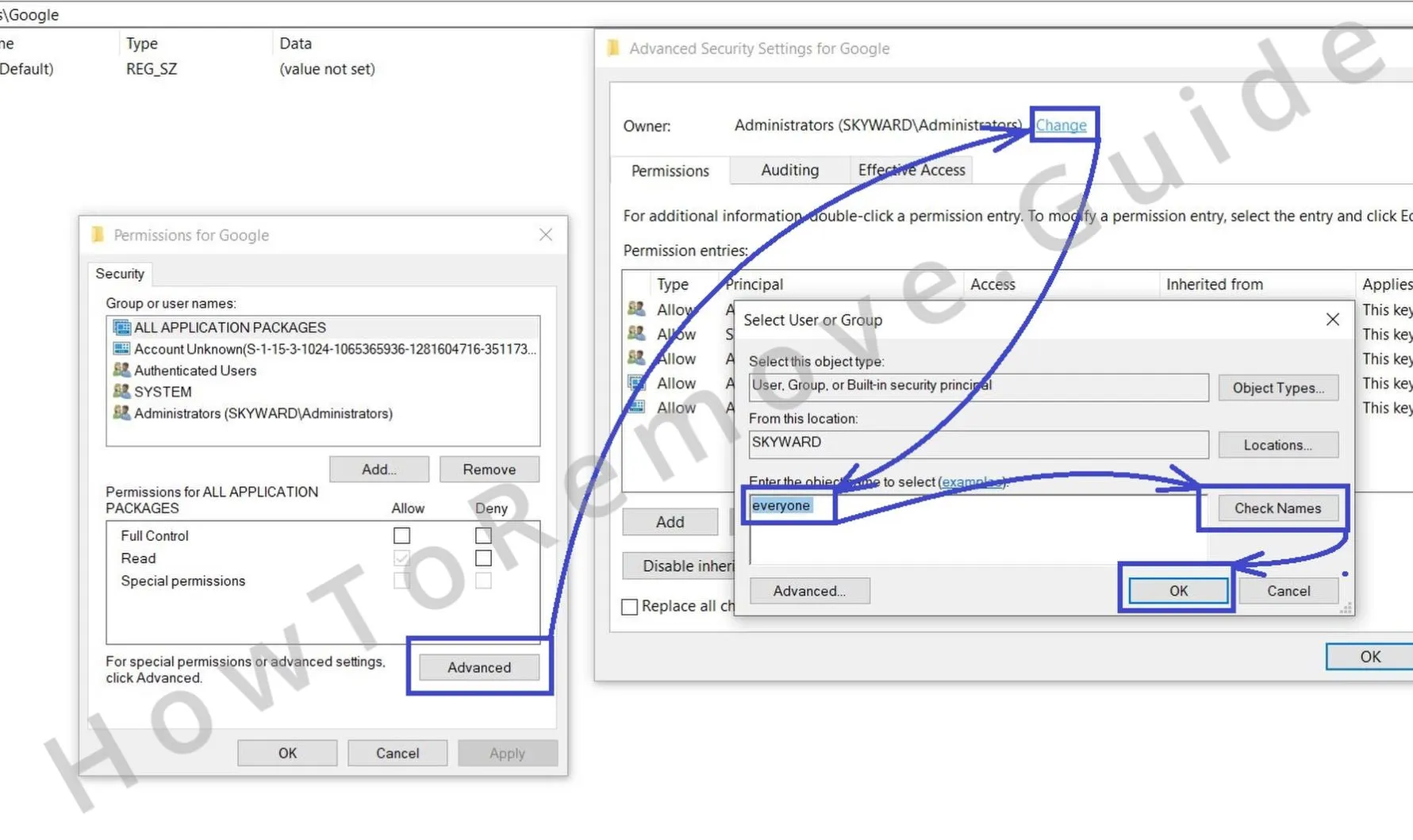 If certain registry entries cannot be deleted, you will need to override their permissions:
► Right-click the entry and select Permissions.
► Go to Advanced settings and click Change.
► Type Everyone, then click Check Names, followed by OK. This grants you full control over the registry entry. - 2.4
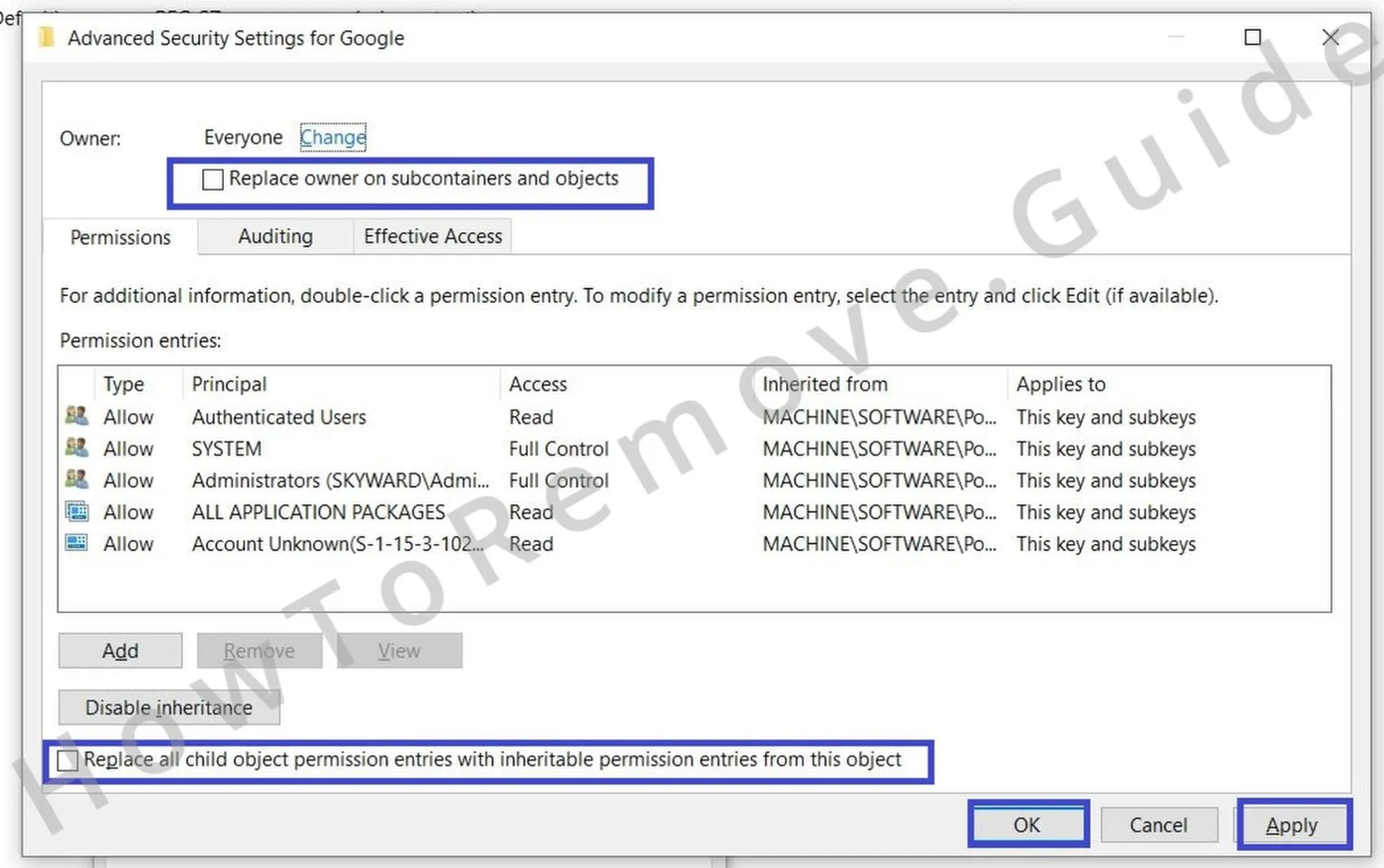 Check the two new “Replace…” options in the previous window, then select Apply and OK.
You should now be able to delete the resistant registry key. This step ensures that even stubborn entries can be removed.
Video walkthrough for this step:
Alternative Tools to Delete Garcuconte.co.in Policies
Alright, check this: go back to your browser and see if that “Managed by your organization” message is still hanging around. If it’s gone, great—move on to the next step. If it’s still there, don’t panic. There are other ways to kick Garcuconte.co.in’s policies to the curb. You’ve got options.
3. Other Ways to Get Rid of Garcuconte.co.in Policies
- 3.1
 Open the Start menu, type Edit Group Policy, and open the Group Policy Editor. Navigate to Administrative Templates. This tool allows you to manage policies affecting your system.
 - 3.2
 Right-click Administrative Templates, select the Add/Remove option, and clear out the following list. Ensure nothing remains – everything must be deleted. This step removes any rogue policies applied to your system.
 - 3.3For Chrome users, there is a free tool called the Chrome Policy Remover. This utility is designed to remove rogue policies installed by hijackers.
To use it:
► Download the tool from the provided link.
► Run it as an administrator.
► Allow it to automatically clear all Chrome policies. This tool simplifies the removal of malicious policies. - 3.4If Windows displays a security warning, do not worry – the tool is safe. Click “More Info” > “Run Anyway” to bypass the warning. This ensures the tool can execute its functions without interruption.
Video walkthrough for this step:
Manual Group Policy Removal
Automatic Group Policy Removal
Uninstall Garcuconte.co.in From Chrome, Edge, and Other Browsers
Here’s the good news: those rogue Garcuconte.co.in policies should be gone now. That means you’re back in control of your browser settings. But don’t stop there—double-check everything to make sure the hijacker’s influence is completely wiped. Miss even one thing, and they might sneak back in. Stay sharp!
4. How to Remove Garcuconte.co.in From Your Browser
- 4.1Extensions: Return to the Extensions page and perform a final review. Remove anything suspicious. This ensures no malicious extensions are left behind.
- 4.2
 Cache & Cookies: Open Clear Browsing Data, select “All Time,” and delete everything except saved passwords. This step removes any stored data that could be used by the hijacker.
 - 4.3
 Review your Site Settings and check each permission type again to ensure no unauthorized websites retain access. This prevents malicious sites from regaining control.
 - 4.4
 Search Engine: Go to Manage Search Engines and remove any unrecognized entries. Reset your default search provider. This ensures your searches are not redirected to malicious sites.
 - 4.5Startup Settings: Check On Startup and Appearance settings – hijackers often alter these. Remove any unfamiliar homepage URLs. This step restores your browser’s default behavior.
At this point, your browser should be restored to normal.
Video walkthrough for this step:
Chrome
Microsoft Edge
Mozilla Firefox
