

Did you get an email saying a trojan virus was found on your email account and that it can wipe out all your data? Okay, time out here, because that is already the first big warning sign. Real security alerts do not usually talk like that, and they do not ask you to panic-click some random button. This message is part of the “You Have Virus On Your Email” phishing scam, and the whole point is to scare you into handing over your email login.
In the version reported here, the subject says “Virus on email detected,” the message claims there is a powerful trojan on your mailbox, and the only real instruction is a button that says “Follow steps here.” Now that sounds like it should take you to a scan or a safe account page, right? But it does not. It sends victims to api.xybos.tech, where a fake “Secure Mail Server” page asks for an email address and password.
Scams like "You Have Virus On Your Email" are known to steal personal data and passwords. Install SpyHunter Pro to scan for risks, remove dangerous trackers, and enable real-time protection.
 OFFER
OFFER*Source of claim SH can remove it. Trial w/Credit card; image is for illustration; full terms.
Understanding the “You Have Virus On Your Email” Scam
The scam works because email feels important. Your inbox is where password resets go, where receipts sit, where private conversations pile up, and where your online life lives. So when someone tells you that a virus might wipe all of that out, the natural reaction is to move quickly. Similar to other email scams like ShinyHunters and Pegasus, that is exactly what the scammers want.
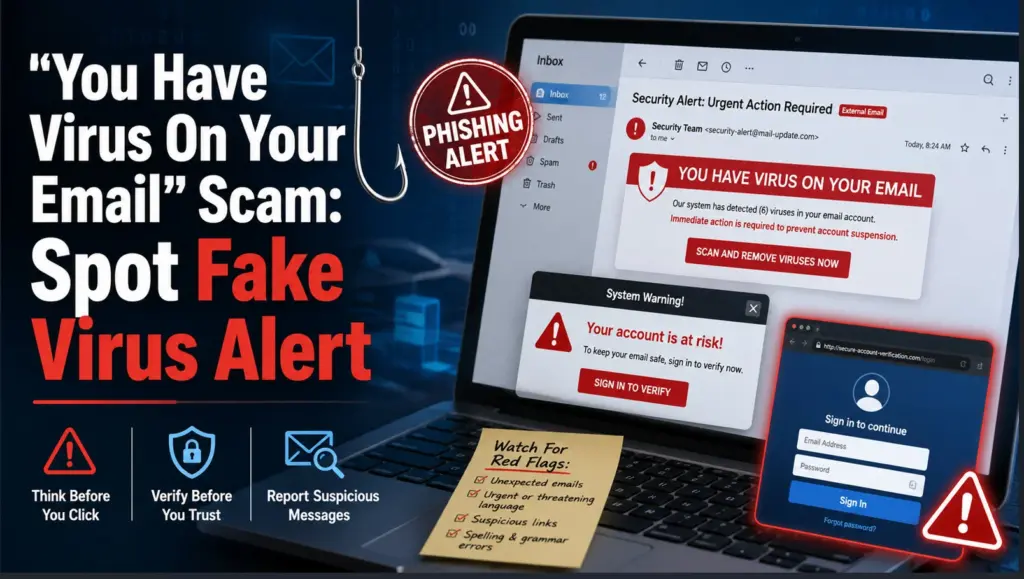
The message pretends to be a security alert from a mail provider or automated mail protection system. It talks about a trojan virus, infected data, suspicious activity, and the need to scan your account. But here is the part you need to remember: there is no real virus warning here. The “virus” is bait. The login page is the trap.
Once you click the button, the fake page may show Gmail-style branding and call itself “Secure Mail Server.” If your address uses another provider, the page may try to look like that provider instead. That matters because it makes the scam feel personal, as if the system really recognized your mailbox. It did not. It is dressing the same fake login box in a believable costume.
What to Do If You’ve Fallen for the Scam
If you clicked the link but did not type your password, close the page and do not go back. If you entered your email password, move fast, not because the warning was true, but because the scammers may now have your real login.
Change your email password first. Use a strong password you have not used anywhere else. If you reused that same password on other accounts, change those too, because attackers love trying one stolen password everywhere.
Turn on two-factor authentication next. This gives your account an extra lock, so even if someone has the password, they still have to pass another check.
Then look through your email settings. Check sign-ins, recovery options, forwarding rules, connected devices, and anything changed without you. Forwarding rules are sneaky because they can let an attacker keep reading after you change the password.
After that, check important connected accounts. Banking, shopping, social media, cloud storage, and payment accounts are worth reviewing, because email access can reset passwords elsewhere.
If you downloaded or opened anything from the message, run a legitimate antivirus scan. Not from the email. Not from the fake page. Use security software you already trust or get it directly from an official source.
How the Scam Tricks You
The first trick is fear. The email claims a very powerful trojan can wipe out all your email data, and that is meant to make your brain skip the boring but necessary step of verification.
The second trick is fake authority. The wording makes it seem like some security system has already detected the problem. Then the fake page doubles down with “Secure Mail Server,” which sounds official enough if you are already worried.
The third trick is brand imitation. Seeing familiar email branding can make people lower their guard, but anyone can copy logos, colors, and login-page layouts. A familiar look proves nothing at all.
And the final trick is the password request. This is where the scam stops being subtle. If an unexpected email sends you to an unrelated site and asks you to sign in, assume the page is there to steal the login.
Recognizing Warning Signs of the Scam
Now let’s walk through the red flags, because this is where the scam starts falling apart. The phrase “You have virus on your email” is awkward, vague, and not the kind of polished wording you would expect from a real provider. The greeting is just “Dear,” with no name, no account details, and no useful proof that the sender knows anything about you.
The threat is also strangely broad. It says there is a trojan virus, but it does not explain what was detected, where it was detected, or how you can check it through your official account dashboard. Instead, it pushes you toward one button. That is not verification. That is pressure.
Then there is the destination. The button leads to api.xybos[.]tech, not to an official Google, Gmail, or mail-provider address. So even if the page looks like a login page you recognize, the address tells a different story. Always check where a link really goes before trusting what it says on the surface.
Some versions add fake scan results, threat numbers, suspicious-login claims, or attachments pretending to be reports or security updates. Do not let those extras impress you. They are props.
How to Handle the Email Safely
The best move is boring, and good. Do not click. Do not reply. Do not download anything. Mark the message as phishing or spam, then delete it.
If the email made you worry that your account might actually have a problem, check the safe way. Open a new browser window, type your provider’s real website yourself, and review your account security from there. If there is a real alert, it should appear inside your account.
You can also scan your device separately if you are concerned. Just do it on your terms, not through a link supplied by a message that is already acting suspicious.
Reporting the Scam
Report the email through your mail app’s phishing option. That helps the provider block similar messages for other people. If the scam imitates a known service, report it to that service through its official abuse channel too.
If you entered credentials, lost access, or saw losses, report the incident to the relevant cybercrime or consumer protection authority in your country.
Useful Resources for Scam Reporting and Prevention (By Country)
Open the country-by-country reporting list
| Country / Agency | URL | Category / Use-case | Phone/Email |
| Australia – Crime Stoppers | https://www.crimestoppers.com.au | Anonymous tips about crime | 1800 333 000 |
| Australia – National Anti-Scam Center (Scamwatch) | https://www.scamwatch.gov.au/report-a-scam | General scams; phishing; texts/emails | |
| Australia – Police Assistance Line (non-emergency) | https://www.police.gov.au | Local police report | 131 444 |
| Australia – ReportCyber (ACSC) | https://www.cyber.gov.au/report | Cybercrime (hacks, fraud, extortion) | |
| Canada – Canadian Anti-Fraud Center (CAFC) | https://www.antifraudcentre-centreantifraude.ca/report-signalez-eng.htm | General scams incl. phone/text/email | |
| France – DGCCRF (SignalConso) | https://signal.conso.gouv.fr | Consumer scams/deceptive practices | |
| France – PHAROS – Internet-Signalement | https://www.internet-signalement.gouv.fr | Online content & cybercrime reports | |
| Germany – Bundeskriminalamt / Local Police | https://www.polizei.de/Polizei/DE/Home/home_node.html | Report online fraud | |
| Germany – Weißer Ring – Victim Support | https://weisser-ring.de | Victim support | 116 006 |
| India – DoT Helpline (Sanchar Saathi) | https://sancharsaathi.gov.in | Fraudulent telecom/SIM related | 155260 |
| India – National Consumer Helpline | https://consumerhelpline.gov.in | Consumer scams | 1800-11-4000 / 1915 |
| India – National Cyber Crime Reporting Portal | https://cybercrime.gov.in | Cybercrime incl. online fraud | 1930 |
| Japan – Consumer Affairs Agency (CAA) | https://www.caa.go.jp/policies/policy/consumer_policy/caution/cybercrime/ | Consumer scams | |
| Japan – National Police Agency – Cybercrime | https://www.npa.go.jp/bureau/cyber/ | Cybercrime reporting | |
| Mexico – Guardia Nacional (National Guard) | https://www.gob.mx/gn | Cybercrime reporting | |
| Mexico – Instituto Federal de Telecomunicaciones (IFT) | https://www.ift.org.mx | Telecom/online services scams | |
| Mexico – PROFECO | https://www.gob.mx/profeco | Consumer fraud & ecommerce | |
| Netherlands – AFM – Report investment fraud | https://www.afm.nl/en/consumenten/themas/beleggen/misleiding-misbruik | Investment/crypto | |
| Netherlands – Fraudehelpdesk | https://www.fraudehelpdesk.nl/melden | General scams (incl. phishing/SMS) | 088-7867372 |
| Netherlands – Politie – Meldpunt Internetoplichting | https://www.politie.nl/themas/internetoplichting.html | Online shopping fraud | |
| New Zealand – CERT NZ | https://www.cert.govt.nz/individuals/report-an-issue/ | Phishing, identity scams | |
| New Zealand – Department of Internal Affairs – Spam | https://www.dia.govt.nz/Spam-Contact-Us | Email/SMS spam | [email protected] |
| New Zealand – IDCARE | https://www.idcare.org | Victim support (identity compromise) | 0800 121 068 |
| New Zealand – Netsafe – Report | https://www.netsafe.org.nz/report/ | Online harms & scams | |
| New Zealand – New Zealand Police (non-emergency) | https://www.police.govt.nz/use-105 | Report fraud/online crime | 105 |
| Nigeria – Economic & Financial Crimes Commission (EFCC) | https://www.efcc.gov.ng | Financial scams incl. crypto/investment | [email protected] |
| Nigeria – Nigeria Police Special Fraud Unit (SFU) | https://www.specialfraudunit.org.ng | Serious fraud | Voice/SMS: 0708 227 6895; WhatsApp: 0812 760 9914 |
| Poland – CERT Polska (CERT.PL) | https://cert.pl/en/report/ | Cyber incidents & phishing | |
| Poland – Dyzurnet.pl | https://dyzurnet.pl | Illegal online content (esp. child protection) | |
| Poland – Polish Police (Policja) | https://www.policja.pl | Report scams to police | |
| Singapore – Anti-Scam Centre / Anti-Scam Helpline | https://www.scamalert.sg | General scams; texts; calls | 1800-722-6688 |
| Singapore – Monetary Authority of Singapore (MAS) | https://www.mas.gov.sg/investor-alert-list | Investment/crypto checks | |
| Singapore – Singapore Police Force | https://www.police.gov.sg/iwitness | Police report (cybercrime) | |
| South Africa – Cybersecurity Hub (CSIRT) | https://www.cybersecurityhub.gov.za | Cyber incidents incl. scams | |
| South Africa – South African Fraud Prevention Service (SAFPS) | https://www.safps.org.za | Identity fraud support | 011-867-2234 |
| South Africa – South African Police Service (SAPS) | https://www.saps.gov.za | Police report (cybercrime unit) | |
| South Korea – Korea Communications Commission (KCC) | https://www.kcc.go.kr | Telecom-related fraud | |
| South Korea – Korea Internet & Security Agency (KISA) | https://www.kisa.or.kr | Phishing, online harms | |
| South Korea – Korean National Police Agency – Cyber Bureau | https://ecrm.cyber.go.kr | Cybercrime reporting | |
| Spain – INCIBE – Oficina de Seguridad del Internauta (OSI) | https://www.osi.es/es/reporte | Cybersecurity & online fraud | |
| Spain – Policía Nacional / Guardia Civil | https://www.policia.es | Report scams to police | |
| Sweden – Crime Victim Authority (Brottsoffermyndigheten) | https://www.brottsoffermyndigheten.se | Victim support & compensation | 090–70 82 00 |
| Sweden – Polisen (Swedish Police) | https://polisen.se | Report fraud/cybercrime | 114 14 (non-emergency); 112 (emergency) |
| Sweden – Swedish Consumer Agency (Konsumentverket) | https://www.konsumentverket.se | Unfair business practices | |
| United Arab Emirates – Abu Dhabi Police – Aman Service | https://www.adpolice.gov.ae | Cybercrime tips/reporting | SMS 2828; 800 2626 |
| United Arab Emirates – Dubai Police – eCrime | https://www.dubaipolice.gov.ae | Cybercrime reporting | 04 606 1600 |
| United Arab Emirates – Ministry of Interior – Cyber Crime Dept. | https://www.moi.gov.ae | Cybercrime incl. online scams | |
| United Arab Emirates – Telecommunications Regulatory Authority (TRA) / TDRA | https://www.tra.gov.ae | Telecom-related scams/phishing | |
| United Kingdom – Action Fraud (NFIB) | https://www.actionfraud.police.uk | General scams & cybercrime (non-emergency) | 0300 123 2040 |
| United Kingdom – Citizens Advice Consumer Service | https://www.citizensadvice.org.uk/consumer/get-more-help/if-you-need-more-help-about-a-consumer-issue/ | Consumer problems & scam guidance | 0808 223 1133 |
| United Kingdom – Financial Conduct Authority (FCA) | https://www.fca.org.uk/consumers/report-scam-us | Investment/crypto & financial services | |
| United Kingdom – National Cyber Security Centre (NCSC) | https://www.ncsc.gov.uk/collection/phishing-scams | Phishing emails & suspicious websites | |
| United Kingdom – Stop Scams UK ‘159’ | https://stopscamsuk.org.uk/159 | Banking APP fraud (direct to your bank) | 159 |
| United States – AARP Fraud Watch Network Helpline | https://www.aarp.org/money/scams-fraud/ | Victim support | 833-372-8311 |
| United States – Better Business Bureau – Scam Tracker | https://www.bbb.org/scamtracker | Business/marketplace scams | |
| United States – FBI Internet Crime Complaint Center (IC3) | https://www.ic3.gov | Internet crime incl. investment/crypto | |
| United States – Federal Trade Commission – ReportFraud | https://reportfraud.ftc.gov | General scams, phishing, texts/emails | 1-877-382-4357 |
| United States – National Center for Disaster Fraud | https://www.justice.gov/disaster-fraud | Disaster-related scams | (866) 720-5721 |
| United States – SEC Tips & Complaints | https://www.sec.gov/tcr | Investment & securities/crypto-asset offerings |
Strengthening Your Email Security
Email is not just another account. It is the recovery key for much of your online life, so protect it like one. Use a unique password, enable two-factor authentication, keep recovery details current, and review sign-in activity from time to time.
And remember this simple rule: if a surprise email says your mailbox is infected, suspended, or spreading malware, do not let it rush you. The threat in this message is fake. The danger starts when you believe it, click the button, and give the scammers the keys to your inbox.
