

You are looking for a movie, you find Acermovies.fun, the title appears. Then you press download and get “Error, Refresh to try again.” You refresh, the same thing happens, and maybe try another button. Pause here, because this is where warning signs begin. When a site keeps pushing you to click, reload, or try again without giving the promised file, stop treating it like a broken movie page and start treating it like a security risk.
Scams of Acermovies.fun‘s type are known to steal personal data and passwords. Install SpyHunter Pro to scan for risks, remove any dangerous trackers, and enable real-time protection.

Try Free For 7 Days*
Buy now15% OFF if you buy straight without trial.
 OFFER
OFFERThat matters because repeated attempts increase exposure even when no download begins on the screen directly in front of you.
Users have connected Acermovies.fun with failed downloads, redirects, antivirus warnings, and malware exposure. One person said their computer became slow, ran a scan, and found a Trojan. Another said their antivirus would not let them enter. That does not reveal the source, but it justifies caution. A free movie is not worth risking your device, saved passwords, or accounts.
Understanding the Acermovies.fun Threat
Acermovies is described as an unofficial platform offering films and television series. What matters is what users encounter: deceptive advertisements, pop-ups, forced redirects, broken links, and downloads that cannot be trusted.
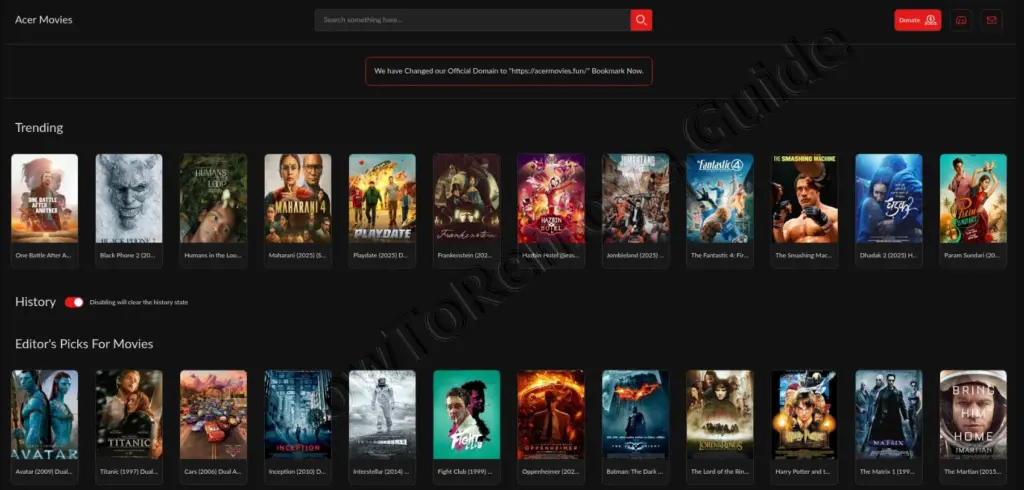
Think about the setup. You arrive for a title, the page shows it, and the site looks functional enough to keep going. People do not click because they expect danger. They click because they believe the next page or button will produce the movie.
One user said Acermovies displayed movies, but every download attempt returned the same refresh error. Another site, Light downloads, allegedly behaved similarly, except its links did not contain movies and instead led to a scam website. So the content may look available while the destination is something else. Remember that difference. A movie poster proves only that the page can display one.
The Reported Trojan Infection
The clearest warning came from a user whose computer was running slowly. They performed a complete scan with Windows Antivirus, also called Windows Defender in the discussion, and it detected a Trojan.
The user removed it and asked whether anything needed to be done. Later they said the Trojan came from Acermovies.fun and warned others about downloading there. This was not a technical report identifying the Trojan family or delivery path, so we should not claim more than the user reported. It could have involved the download, an advertisement, a pop-up, or a redirect. The source does not say.
But here is the point: you do not need the malware name before taking the warning seriously. The device slowed down, a full scan found a Trojan, and the user linked it to the site. Another commenter said their antivirus blocked the domain. Those are security signals, not usability complaints.
What to Do After Downloading From Acermovies.fun
If you downloaded something and your computer is acting strangely, do not reopen the file or revisit the site to test it. Start with the actions raised in the discussion.
Run a complete antivirus scan
The user found the Trojan during a Windows Antivirus scan. A full scan checks more broadly than a quick check. Run it and follow the program’s instructions if it finds something. Remove or quarantine the threat instead of ignoring the alert because the computer seems normal.
Use a second-opinion scanner
One commenter described Windows Defender as decent but not bulletproof and recommended a second-opinion scanner. Do not assume one removal proves everything is clean. A second scan gives you another chance to catch what the first tool missed.
Clear saved browser passwords
The discussion advised clearing browser passwords because the Trojan may have been present while the user was signed in or credentials were saved. Password theft was not confirmed, but the stored credentials were treated as potentially exposed.
Change important passwords
Change passwords for accounts used while the infection was suspected, especially accounts opened before the Trojan was removed. The concern is not that every password was definitely taken. You may not know what the malicious program accessed while running.
Consider reinstalling Windows
A commenter suggested reinstalling Windows. Another shared a video and described a reinstall that would not remove applications. Be careful with that claim because the recovery option was not identified, and not every reinstall preserves everything. The takeaway is that a Windows reinstall was proposed for greater confidence after detection.
How Acermovies.fun Draws Users In
This threat does not need a frightening message or demand for money. It begins with something ordinary: you want entertainment, the site appears to have it, and the download seems one click away.
The sequence is simple. You open the site, choose a title, press download, receive an error or redirect, refresh, and try again. Each attempt creates another chance to encounter an advertisement, pop-up, unrelated page, or unsafe file.
Notice how the error keeps things going. “Refresh to try again” sounds temporary and suggests the next attempt may work. Someone may keep clicking because leaving feels like giving up just before success. That persistence makes repeated errors dangerous.
Recognizing Warning Signs
Repeated refresh errors
If a download button keeps returning the same error, stop. The reported Acermovies download did not work after repeated refreshes.
Forced or unrelated redirects
A movie link should not send you to an unrelated scam page. Close it rather than hunting for another download button.
Pop-ups and deceptive advertisements
Buttons and alerts may be advertisements made to look like required actions. Do not assume the brightest button belongs to the movie.
Antivirus warnings or access blocks
If your antivirus blocks the site, do not disable it. The block is a warning, not an obstacle to defeat.
A suddenly slow computer
The victim noticed severe slowdown before the Trojan was found. Slowness alone proves nothing, but after a suspicious download it justifies an immediate scan.
Constantly changing domains
Such sites may change extensions after complaints or takedowns. A new domain does not mean a safer site. It may mean only that the address changed.
Promised content that never appears
A complete-looking movie page means little if the file never arrives. In the reports, titles appeared, but downloads failed or led elsewhere.
Community Link Lists Are Not a Guarantee
One user said they found Acermovies through a Reddit piracy megathread. They claimed their warning was removed and they were banned. They also suspected moderators were paid to include scam links, but no evidence supported that allegation.
Do not turn suspicion into fact, but do not treat a popular list as a safety certificate. A community link can still lead to broken downloads, deceptive advertising, redirects, or malware.
How to Handle Acermovies.fun
If you encounter Acermovies.fun, leave instead of refreshing, trying other buttons, or ignoring warnings. Do not assume another domain is safer, and do not trust the page because movie artwork is present.
If you downloaded something, run a full scan, consider a second scanner, clear saved browser passwords, change important passwords, and evaluate whether Windows needs to be reinstalled.
The lesson is simple. When a movie page gives endless errors, sends you somewhere unrelated, triggers antivirus protection, or leaves your computer slow, the answer is not one more click. Stop, close the site, and secure the device.
Useful Resources for Scam Reporting and Prevention (By Country)
Click here to report the scam in your country
| Country / Agency | URL | Category / Use-case | Phone/Email |
| Australia – Crime Stoppers | https://www.crimestoppers.com.au | Anonymous tips about crime | 1800 333 000 |
| Australia – National Anti-Scam Center (Scamwatch) | https://www.scamwatch.gov.au/report-a-scam | General scams; phishing; texts/emails | |
| Australia – Police Assistance Line (non-emergency) | https://www.police.gov.au | Local police report | 131 444 |
| Australia – ReportCyber (ACSC) | https://www.cyber.gov.au/report | Cybercrime (hacks, fraud, extortion) | |
| Canada – Canadian Anti-Fraud Center (CAFC) | https://www.antifraudcentre-centreantifraude.ca/report-signalez-eng.htm | General scams incl. phone/text/email | |
| France – DGCCRF (SignalConso) | https://signal.conso.gouv.fr | Consumer scams/deceptive practices | |
| France – PHAROS – Internet-Signalement | https://www.internet-signalement.gouv.fr | Online content & cybercrime reports | |
| Germany – Bundeskriminalamt / Local Police | https://www.polizei.de/Polizei/DE/Home/home_node.html | Report online fraud | |
| Germany – Weißer Ring – Victim Support | https://weisser-ring.de | Victim support | 116 006 |
| India – DoT Helpline (Sanchar Saathi) | https://sancharsaathi.gov.in | Fraudulent telecom/SIM related | 155260 |
| India – National Consumer Helpline | https://consumerhelpline.gov.in | Consumer scams | 1800-11-4000 / 1915 |
| India – National Cyber Crime Reporting Portal | https://cybercrime.gov.in | Cybercrime incl. online fraud | 1930 |
| Japan – Consumer Affairs Agency (CAA) | https://www.caa.go.jp/policies/policy/consumer_policy/caution/cybercrime/ | Consumer scams | |
| Japan – National Police Agency – Cybercrime | https://www.npa.go.jp/bureau/cyber/ | Cybercrime reporting | |
| Mexico – Guardia Nacional (National Guard) | https://www.gob.mx/gn | Cybercrime reporting | |
| Mexico – Instituto Federal de Telecomunicaciones (IFT) | https://www.ift.org.mx | Telecom/online services scams | |
| Mexico – PROFECO | https://www.gob.mx/profeco | Consumer fraud & ecommerce | |
| Netherlands – AFM – Report investment fraud | https://www.afm.nl/en/consumenten/themas/beleggen/misleiding-misbruik | Investment/crypto | |
| Netherlands – Fraudehelpdesk | https://www.fraudehelpdesk.nl/melden | General scams (incl. phishing/SMS) | 088-7867372 |
| Netherlands – Politie – Meldpunt Internetoplichting | https://www.politie.nl/themas/internetoplichting.html | Online shopping fraud | |
| New Zealand – CERT NZ | https://www.cert.govt.nz/individuals/report-an-issue/ | Phishing, identity scams | |
| New Zealand – Department of Internal Affairs – Spam | https://www.dia.govt.nz/Spam-Contact-Us | Email/SMS spam | [email protected] |
| New Zealand – IDCARE | https://www.idcare.org | Victim support (identity compromise) | 0800 121 068 |
| New Zealand – Netsafe – Report | https://www.netsafe.org.nz/report/ | Online harms & scams | |
| New Zealand – New Zealand Police (non-emergency) | https://www.police.govt.nz/use-105 | Report fraud/online crime | 105 |
| Nigeria – Economic & Financial Crimes Commission (EFCC) | https://www.efcc.gov.ng | Financial scams incl. crypto/investment | [email protected] |
| Nigeria – Nigeria Police Special Fraud Unit (SFU) | https://www.specialfraudunit.org.ng | Serious fraud | Voice/SMS: 0708 227 6895; WhatsApp: 0812 760 9914 |
| Poland – CERT Polska (CERT.PL) | https://cert.pl/en/report/ | Cyber incidents & phishing | |
| Poland – Dyzurnet.pl | https://dyzurnet.pl | Illegal online content (esp. child protection) | |
| Poland – Polish Police (Policja) | https://www.policja.pl | Report scams to police | |
| Singapore – Anti-Scam Centre / Anti-Scam Helpline | https://www.scamalert.sg | General scams; texts; calls | 1800-722-6688 |
| Singapore – Monetary Authority of Singapore (MAS) | https://www.mas.gov.sg/investor-alert-list | Investment/crypto checks | |
| Singapore – Singapore Police Force | https://www.police.gov.sg/iwitness | Police report (cybercrime) | |
| South Africa – Cybersecurity Hub (CSIRT) | https://www.cybersecurityhub.gov.za | Cyber incidents incl. scams | |
| South Africa – South African Fraud Prevention Service (SAFPS) | https://www.safps.org.za | Identity fraud support | 011-867-2234 |
| South Africa – South African Police Service (SAPS) | https://www.saps.gov.za | Police report (cybercrime unit) | |
| South Korea – Korea Communications Commission (KCC) | https://www.kcc.go.kr | Telecom-related fraud | |
| South Korea – Korea Internet & Security Agency (KISA) | https://www.kisa.or.kr | Phishing, online harms | |
| South Korea – Korean National Police Agency – Cyber Bureau | https://ecrm.cyber.go.kr | Cybercrime reporting | |
| Spain – INCIBE – Oficina de Seguridad del Internauta (OSI) | https://www.osi.es/es/reporte | Cybersecurity & online fraud | |
| Spain – Policía Nacional / Guardia Civil | https://www.policia.es | Report scams to police | |
| Sweden – Crime Victim Authority (Brottsoffermyndigheten) | https://www.brottsoffermyndigheten.se | Victim support & compensation | 090–70 82 00 |
| Sweden – Polisen (Swedish Police) | https://polisen.se | Report fraud/cybercrime | 114 14 (non-emergency); 112 (emergency) |
| Sweden – Swedish Consumer Agency (Konsumentverket) | https://www.konsumentverket.se | Unfair business practices | |
| United Arab Emirates – Abu Dhabi Police – Aman Service | https://www.adpolice.gov.ae | Cybercrime tips/reporting | SMS 2828; 800 2626 |
| United Arab Emirates – Dubai Police – eCrime | https://www.dubaipolice.gov.ae | Cybercrime reporting | 04 606 1600 |
| United Arab Emirates – Ministry of Interior – Cyber Crime Dept. | https://www.moi.gov.ae | Cybercrime incl. online scams | |
| United Arab Emirates – Telecommunications Regulatory Authority (TRA) / TDRA | https://www.tra.gov.ae | Telecom-related scams/phishing | |
| United Kingdom – Action Fraud (NFIB) | https://www.actionfraud.police.uk | General scams & cybercrime (non-emergency) | 0300 123 2040 |
| United Kingdom – Citizens Advice Consumer Service | https://www.citizensadvice.org.uk/consumer/get-more-help/if-you-need-more-help-about-a-consumer-issue/ | Consumer problems & scam guidance | 0808 223 1133 |
| United Kingdom – Financial Conduct Authority (FCA) | https://www.fca.org.uk/consumers/report-scam-us | Investment/crypto & financial services | |
| United Kingdom – National Cyber Security Centre (NCSC) | https://www.ncsc.gov.uk/collection/phishing-scams | Phishing emails & suspicious websites | |
| United Kingdom – Stop Scams UK ‘159’ | https://stopscamsuk.org.uk/159 | Banking APP fraud (direct to your bank) | 159 |
| United States – AARP Fraud Watch Network Helpline | https://www.aarp.org/money/scams-fraud/ | Victim support | 833-372-8311 |
| United States – Better Business Bureau – Scam Tracker | https://www.bbb.org/scamtracker | Business/marketplace scams | |
| United States – FBI Internet Crime Complaint Center (IC3) | https://www.ic3.gov | Internet crime incl. investment/crypto | |
| United States – Federal Trade Commission – ReportFraud | https://reportfraud.ftc.gov | General scams, phishing, texts/emails | 1-877-382-4357 |
| United States – National Center for Disaster Fraud | https://www.justice.gov/disaster-fraud | Disaster-related scams | (866) 720-5721 |
| United States – SEC Tips & Complaints | https://www.sec.gov/tcr | Investment & securities/crypto-asset offerings |
