

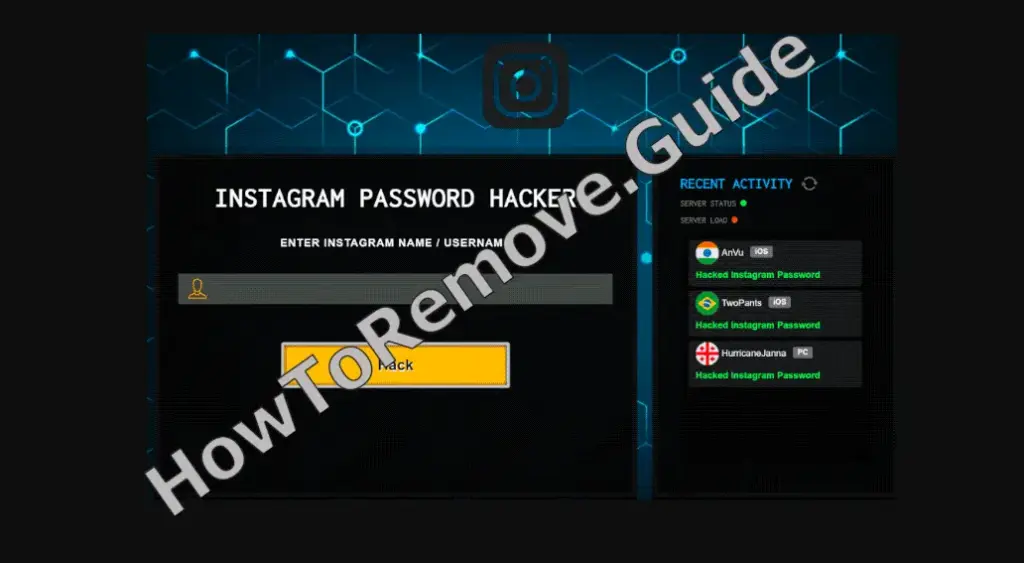
Time out for a quick reality check before you tap anything shiny. Maybe you mistyped a URL, maybe an intrusive ad shoved a new tab onto your screen, and suddenly a page labeled “Instagram Password Hacker” promises instant access. Enter a username, press one big generous “Hack” button, and apparently a password drops into your lap. That’s the pitch. It flatters curiosity, it rushes you, it banks on the thrill of shortcuts. If you’ve seen it, assume the performance isn’t for your benefit. The premise isn’t power; it’s bait with a smile, polished to disarm and hurry you along. Today.
Here’s the first red flag: the one-click miracle of the Instagram Password Hacker Scam. Any page claiming it can steal access to an account by typing a username and pressing a single button is telling you a fairy tale. Real systems don’t work like that, and the people pushing this know it. Their trick is simple – promise power, harvest victims. The moment you participate, you’re shuffled through redirects to deceptive websites that exist to collect what you type, not to deliver what they claim. The show is loud; the theft is quiet. You’re not getting a password; you’re stepping into a funnel built to vacuum your information.
Scams of Instagram Password Hacker‘s type are known to steal personal data and passwords. Install SpyHunter Pro to scan for risks, remove any dangerous trackers, and enable real-time protection.

Try Free For 7 Days*
Buy now15% OFF if you buy straight without trial.
 OFFER
OFFERWhat is the Instagram Password Hacker Scam?
Let me pause and underline how the Instagram Password Hacker scam works, because it’s slick. You think you’re the attacker, but the stage rotates, and suddenly you’re the target. After the click, no password appears. What appears are forms and prompts tuned to record names, surnames, addresses, emails, and telephone numbers. Some pages angle straight for banking account details and credit card numbers. Others dangle vague “verification” steps to keep you typing. Meanwhile, rogue apps can be involved that force-open dubious pages or inject the whole experience through intrusive advertisements, so the trap keeps reappearing even when you try to ignore it. Everywhere.
There’s a special flourish you might see that feels almost official. A page of the Instagram Password Hacker Scam announces that your file is prepared and ready for download, which quietly assumes something legitimate happened, then adds a petty toll booth: send an SMS to unlock it. That isn’t verification; that’s bait with a tripwire. Best case, you send a message and receive nothing useful. Worse, you invite something malicious onto your device. We’re talking trojans that lurk, ransomware that locks, and cryptocurrency miners that churn in the background while your battery sags and your data plan wheezes. Free isn’t free; the meter runs on you.
Also, let’s talk about the gates of the Instagram Password Hacker Scam you didn’t open that keep swinging anyway. Intrusive advertisements can spray across your screen and, once clicked, redirect you to harmful sites. Some won’t even wait for your click; they try to download or install software without asking. Browser hijackers modify your settings, swap in fake search engines, and then boomerang you back to familiar ones like Google, Yahoo, or Bing to keep suspicion low. Meanwhile, unwanted apps have data tracking abilities. They watch your browsing activity, collect IP addresses, learn your geolocation, and extract identifiable details, because your trail is profitable. To them.
Why the Instagram Password Hacker Scam Collect Your Data?
Why collect all this? Because data is currency. The information taken from you can be monetized by selling it to third parties, potentially cyber criminals, or by using it directly to tailor further scams that feel creepily personal. Financial data is the crown jewel. It can be abused by the creators of the Instagram Password Hacker, Audiolex or NoxGPT Scam to make fraudulent transactions and online purchases faster than you can refresh a statement. And that isn’t the end; once stolen, details rarely stay in one place. They circulate, they compound, and they keep paying dividends to people who didn’t earn them and will not stop unless you shut the door. Now.
What to Do if You’ve been scammed by Instagram Password Hacker?
If you’re thinking, “I might have clicked something,” don’t spiral; act. Start with money. If you provided banking or card details, call your bank or card issuer and freeze the card or request a replacement. That call isn’t overcautious; it’s standard triage. Next, change your passwords, especially if you reuse them, because reuse turns one mistake into many. Run a full antivirus or anti-malware scan. Malware can sit quietly, then cause trouble when you least expect it, and early detection matters. Clean up what you can today so you aren’t trying to mop up a much bigger mess tomorrow. Quickly.
Add two-factor authentication wherever it’s offered. A password plus a one-time code turns stolen credentials into dead ends. Keep an eye on your accounts for a while. Scan bank statements, watch email security alerts, and review sign-in logs on your social profiles. If you spot oddities, treat them as signals, not coincidences. Report what happened to your provider and to the relevant cybercrime channels. Reporting isn’t shouting into the void; it feeds the maps that help others avoid the same hole and helps patterns emerge so defenses improve the next time around. Documentation also helps when disputing fraudulent charges later.
What Are the Usual Instagram Password Hacker Red Flags?
Let’s decode the choreography so you can spot it next time.
Step one is the promise: enter a username, press “Hack,” collect a prize.
Step two is the redirect carousel, where each new page asks for a different piece of information, always framed as necessary progress.
Step three is the escalation: a download prompt, an SMS toll, a permission request. None of it delivers a password. All of it delivers your data. The costumes are convincing enough to fool an untrained eye, which is the point – they look close enough to legitimacy to keep you moving through the maze without pausing.
The warning signs aren’t subtle once you name them:
A page that guarantees stolen passwords? Impossible.
A “Hack” button that turns crime into a cartoonishly easy click? Theater.
Redirects that trigger the moment you submit anything? Classic phishing behavior.
A page claiming your file is prepared but withholding it until you send an SMS? That’s a toll for a maze full of malware. Intrusive ads that yank you sideways, tabs that auto-open like whack-a-mole, and a search engine you don’t remember choosing are the tells that your setup has been pushed around already. Treat each as a stop sign immediately.
The uncomfortable truth
Now for the uncomfortable truth hiding in the design. By chasing a shortcut to someone else’s account, you volunteer for a detour through harm. Victims don’t get passwords; they get problems: system infections, severe privacy issues, financial losses, even identity theft. Because unwanted apps often track data, the longer they sit, the more they learn. Developers monetize the harvest by sharing or selling it to third parties, likewise intent on misusing it for profit. Nobody in that chain is paid to protect you. Your privacy is not their business model; your data is the product moving down the conveyor belt.
Practical playbook
So here’s the practical playbook, and it’s boring in the way safety often is. When you land on a page promising forbidden fruit, leave. Don’t type a username, don’t send an SMS, and don’t download any “prepared” file. Audit your device. Remove suspicious applications and browser extensions, restore your preferred search engine, clear your browsing data, and update software. Patches shut doors that malware loves. Adjust the mindset: glossy pages deserve skepticism, easy wins are traps until proven otherwise, and a request for sensitive data is a negotiation you can decline. When in doubt, back out, and keep curiosity restrained.
Final Thoughts
If this all feels uncomfortably familiar because you already clicked, typed, or installed, your story isn’t over. Take the concrete steps: freeze what needs freezing, change what needs changing, scan what needs scanning, enable what needs enabling, and monitor for the next couple of weeks. Then file the report. Your report is a breadcrumb someone else can follow away from the same trap. And the next time a page claims a single click can pry open an account, remember what that button really opens is a funnel built to harvest your details while you stand there wondering where the password went.
