

Most Instagram scams don’t look like scams at all; they look like a shortcut to the one thing people want most online: certainty. Instatroid is sold as a magic window into private activity – messages, visitors, and “secret” interactions – yet the promise itself should trigger suspicion.
Curiosity is the fuel here. When a site hints that it can reveal who checks your profile or what was “deleted,” it pushes the same psychological buttons as gossip. That emotional nudge makes people click before they think.
Instatroid (and look-alikes branded as “2.0”, “3.0″ or “free”) commonly route visitors through slick pages that imitate real tools. The presentation feels professional, which lowers defenses and makes the request for “verification” seem normal.
The cost isn’t only wasted time. These funnels, similar to Snaptroid and Vadetroid, can harvest personal data, push risky downloads, and tempt you into entering credentials that attackers can reuse elsewhere. Treat it like a security incident, not an embarrassing mistake.
Scams of Instatroid‘s type are known to steal personal data and passwords. Install SpyHunter Pro to scan for risks, remove any dangerous trackers, and enable real-time protection.

Try Free For 7 Days*
Buy now15% OFF if you buy straight without trial.
 OFFER
OFFERUnderstanding the Instatroid Scam
You see… Instagram keeps “visitor” and “screenshot” signals inside its own systems, and the public interfaces it offers to outside apps don’t hand out a tidy list for strangers to query. Deleted chats aren’t a treasure chest either – once removed, they’re not something a random website can resurrect.
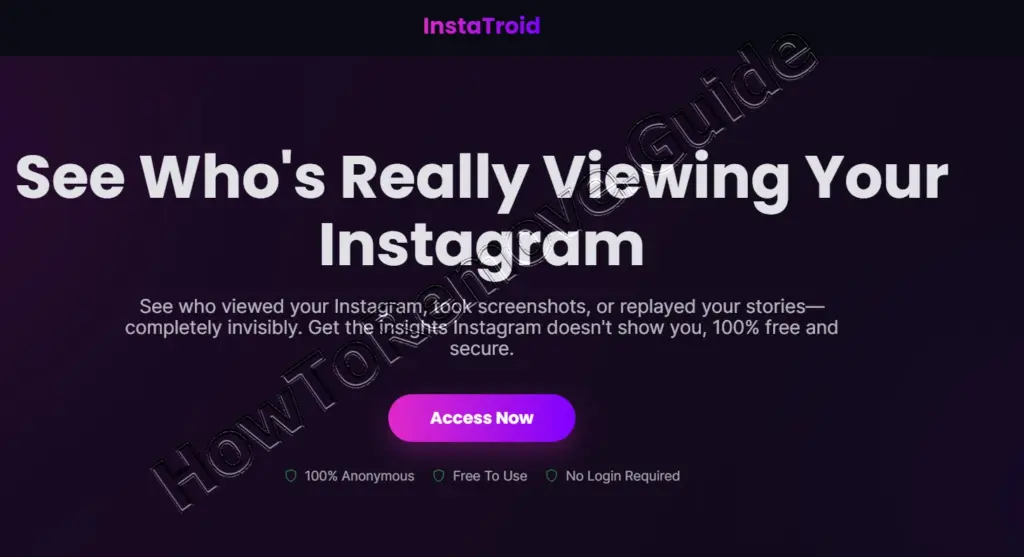
Instatroid typically plays dress-up as an insider dashboard. It advertises features like “who viewed me” or “who screenshotted,” then nudges you toward an “unlock” button that suggests the data is already waiting, just out of reach.
Instead of delivering insights, the site monetizes your attempt. The “verification” steps can produce commission for the operator through surveys, app installs, or paid sign-ups that have nothing to do with Instagram access.
The danger is layered. At best, you get fake results and more prompts. At worst, you install unwanted software, share identifying details, or hand over login information; even a failed login attempt can look “suspicious” to Instagram and trigger temporary locks or restrictions.
What to Do If You’ve Fallen for the Instatroid Scam
I mean… assume any detail you entered might be copied, even if you bailed out halfway through. The aim is to cut off account access, reverse any risky installs, and reduce the chance that the same credentials can be tried on your email, banking, or other social apps.
First, change your Instagram password inside the official app: go to your profile, tap the menu, open Accounts Center, then Password and security, and set a new password you’ve never used before. Use a password manager to create and store it.
Next, turn on two-factor authentication in the same Password and security area, choosing an authenticator app if possible. Then open Login activity and sign out of devices you don’t recognize; if something looks wrong, also change the email tied to the account.
After that, clean the device you used. Uninstall any apps you added “for verification,” and remove browser extensions: in Chrome, open Extensions > Manage Extensions, then remove anything you don’t fully trust. Restart your browser after removal.
Before doing a checklist, take a breath and document what happened while it’s fresh: the site name, any offers you subscribed to, and any downloads you approved. That record helps when you cancel subscriptions, dispute charges, or explain the incident to support teams.
- Update reused passwords everywhere you used the same login, starting with email, since email access can reset everything.
- Scan the device with reputable security software and quarantine or delete anything flagged as suspicious.
- Check your bank or card statements for new subscriptions; call the number on the back of the card to block future charges and request a replacement.
- Review Instagram’s connected apps and websites list and revoke anything unfamiliar, even if it seems harmless.
- Warn close contacts if your account sent odd DMs, and tell them not to open links “from you.”
- Place a fraud alert or credit freeze with your local credit bureau if you shared identity details beyond a username.
I mean… once the immediate fires are out, keep watch for a couple of weeks. Pay attention to password-reset emails you didn’t request, new login notifications, or sudden follow/unfollow bursts; those patterns can indicate an automated takeover attempt.
How the Instatroid Scam Tricks You
The thing is… this scheme is built like a theme park ride: shiny promises at the entrance, a queue of “one more step” gates, and a gift shop at every turn. The goal is momentum, because a moving user is more likely to install, subscribe, or share data.
Typically, you’re shown a feature page with a big button, then bounced to a “human check” screen. The language frames it as anti-bot protection, but it’s really a gate that demands actions the operator can monetize.
Those actions vary: surveys that ask for personal details, app installs that pay per download, and subscriptions that earn referral commissions. If you comply, you’re often looped into another “one last step” request, which is how the scam squeezes more value out of you.
The thing is… downloads are where the risk spikes. A browser add-on can read what you type, inject ads, or redirect pages, and a shady app can request permissions that expose contacts, files, or notifications. Even “just adware” can open doors for phishing.
Recognizing Warning Signs of the Instatroid Scam
You see… warning signs show up long before anything is installed, if you know what to look for. When a tool promises secret Instagram access, treat the claim itself as a diagnostic: legitimate platforms focus on reach, engagement, and scheduling – not surveillance.
A second clue is the endless “verification” treadmill. Real services verify identity once, clearly explain why, and then stop. If you’re being sent through repeating steps, you’re inside a monetization loop.
Another giveaway is implausible output. If the page claims people screen-recorded a feature you never used, shows DMs in a language you don’t write, or lists random strangers as top interactors, it’s generating filler to keep you engaged.
- Promises to reveal profile visitors, deleted chats, or screenshot logs “instantly”
- Requests to install extensions, APKs, or unknown apps before showing anything
- Pop-ups, redirects, and multiple domains during a single “unlock” attempt
- Blurred or generic “results” that don’t match your real activity or settings
If any of those appear, close the tab, delete anything you installed, and open Instagram directly to review security settings. The safest move is to treat the site as untrusted and to avoid giving it one more data point.
Conclusion
Instatroid works because it sells a fantasy that feels personal: the idea that your account has hidden watchers and secret logs you can uncover. In reality, it’s a pipeline that trades attention and information for someone else’s commission, while leaving you with cleanup and uncertainty.
A sensible rule is simple: if a tool claims Instagram powers that Instagram itself doesn’t offer, assume it’s bait. Stick to official Insights and reputable analytics platforms, and keep your account hardened with strong passwords and 2FA.
