

Did you just get what looks like a Paperless Post invite from a friend or someone you actually know, and now the page is asking you to log into Gmail, okay so time out here because that is where this stops being a normal invitation and starts looking like a phishing scam. Paperless Post says real invitations open directly, with no login or download, and reports say the fake emails were convincing because they appeared to come from real contacts whose accounts may already have been compromised.
That makes this one nasty. It is not some random message from a stranger. It can come from a friend’s accurate email address, or from a colleague with an event coming up, and if you are busy or excited because maybe it is a wedding invitation, you might click before your brain catches up. That is the moment scammers want.
Scams of Paperless Post Scam Email‘s type are known to steal personal data and passwords. Install SpyHunter Pro to scan for risks, remove any dangerous trackers, and enable real-time protection.

Try Free For 7 Days*
Buy now15% OFF if you buy straight without trial.
 OFFER
OFFERUnderstanding the Fake Paperless Post Invitation Scam
Setup is simple. You receive an email that looks like a Paperless Post invitation, you click, and instead of seeing the invitation you hit a fake Google login, a Gmail prompt, a slow “confirm if you’re human” screen, or a page like premierr.de. One person noticed the site had recognized they were not on a Windows computer and then asked them to create an account to open the invitation, which is a huge red flag because why would an invitation care what computer you use.
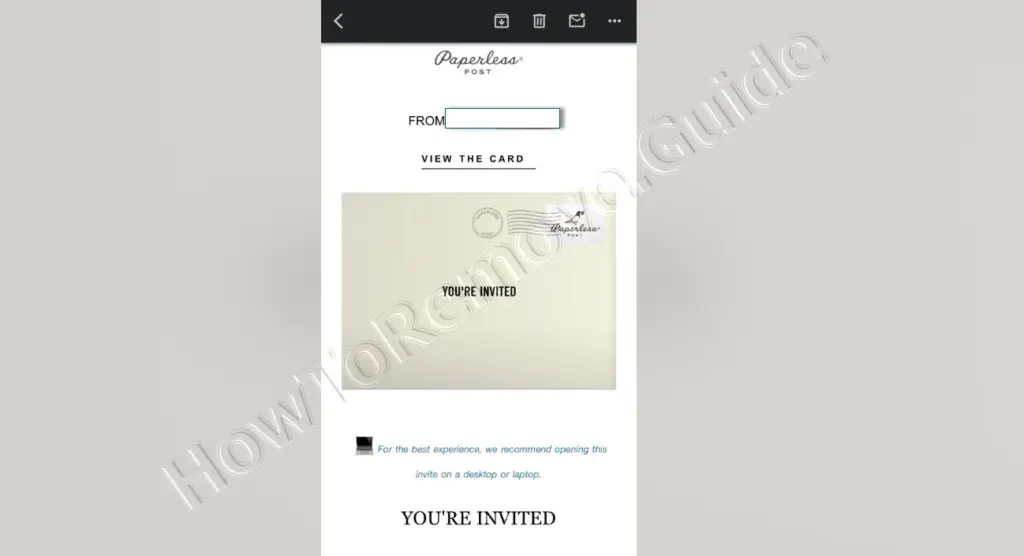
Paperless Post has said these phishing emails are being sent outside its platform, so the company cannot simply stop them from being sent there. It also says the goal is to steal credentials for email accounts or other sensitive accounts. And if it is not obvious, once someone gets into an email account, they can use that access to send more fake invitations, which is why the message may look like it came from someone real.
What to Do If You’ve Fallen for the Scam
If you clicked, or even if you entered your Gmail password, do not sit there spiraling. Move fast. Change the password for that email account right away, and if you used that same password anywhere else, change it there too because one victim was lucky because the password they gave away was not reused on other accounts, which limited the damage.
Turn on two-factor authentication if it is not already enabled. Several people only realized something was wrong because they got a second-factor request or a “someone signed into your account” alert and were able to deny it. That interruption can be the difference between a bad scare and someone walking around inside your inbox.
Now check your account sessions and devices. One person later saw a Windows device in their Google activity even though they were a Mac user, and that is exactly the mismatch you are looking for. Remove unfamiliar sessions, check whether forwarding was turned on, and look at scheduled sends too, because fake invite campaigns may use scheduled sends to keep pushing messages.
If you clicked from a Windows computer, also check installed apps. In a Punchbowl case, someone said a remote access app ended up installed and almost led to money being stolen from two accounts, so look for tools you did not install, including “logmein,” and run an antivirus scan or get an IT professional involved.
How the Scam Tricks You
This scam works because it borrows trust. The sender looks familiar, the invitation format looks familiar, and the idea of clicking a button to open a card feels normal. That is the trap. One victim said they texted the supposed sender and learned nothing had been sent. Another said it looked like one of the better scam emails they had received.
Then it adds friction that seems official. Bot verification, human checks, fake login prompts, account creation, app links that do not really go to the App Store, all of this makes the process feel like a clunky security step instead of what it really is, which is a funnel toward your login details. Remember, Paperless Post invitations do not need your Gmail password.
And the timing can be perfect. Someone had an event coming up with the person named as the sender, so they clicked. Someone else thought it might be a wedding invitation. Scammers do not need every target to fall for it, they just need a few people to be busy, hopeful, distracted, or trusting.
Recognizing Warning Signs of the Fake Paperless Post Scam
Here is the big one. If a site that is not Gmail asks you to log into Gmail just to see an invitation, close it. If the page shows a fake Google account login, close it. If the link goes somewhere strange like premierr.de, close it. Do not negotiate with the page, do not try one more click, just stop.
Also watch the link format. Paperless Post says text links should start with https://pp.events/ or come through its verified RCS business profile, and one user noticed an extra s in the URL, which was enough to make them unsure. That uncertainty is useful. Listen to it.
Attachments and downloads are another clear warning. Paperless Post says it does not send .exe, .pdf, .msi, or other downloadable files for invitations, only embedded images, so if a message wants you to download something to view a card, that is not normal.
And if someone appears to send a card “from you” that you never made, treat your email account as the first thing to secure. Paperless Post recommends changing your email password, setting up two-factor authentication, and scanning your computer or getting professional help if you suspect malicious software.
How to Handle a Suspicious Paperless Post Message
If something feels off, do not click, do not download, and do not type your password. Contact the sender another way, like by text or phone, because replying to the suspicious email may keep you inside the same compromised channel. One person did exactly that and found out the sender had not sent the invite.
You can forward the message to [email protected] so Paperless Post can investigate it, and if it confirms the message is fraudulent it says it will report the phishing link to its anti-phishing partners. If you think your Paperless Post account itself was affected, use that same address to reach out.
Useful Resources for Scam Reporting and Prevention (By Country)
Find the right reporting channel below
| Country / Agency | URL | Category / Use-case | Phone/Email |
| Australia – Crime Stoppers | https://www.crimestoppers.com.au | Anonymous tips about crime | 1800 333 000 |
| Australia – National Anti-Scam Center (Scamwatch) | https://www.scamwatch.gov.au/report-a-scam | General scams; phishing; texts/emails | |
| Australia – Police Assistance Line (non-emergency) | https://www.police.gov.au | Local police report | 131 444 |
| Australia – ReportCyber (ACSC) | https://www.cyber.gov.au/report | Cybercrime (hacks, fraud, extortion) | |
| Canada – Canadian Anti-Fraud Center (CAFC) | https://www.antifraudcentre-centreantifraude.ca/report-signalez-eng.htm | General scams incl. phone/text/email | |
| France – DGCCRF (SignalConso) | https://signal.conso.gouv.fr | Consumer scams/deceptive practices | |
| France – PHAROS – Internet-Signalement | https://www.internet-signalement.gouv.fr | Online content & cybercrime reports | |
| Germany – Bundeskriminalamt / Local Police | https://www.polizei.de/Polizei/DE/Home/home_node.html | Report online fraud | |
| Germany – Weißer Ring – Victim Support | https://weisser-ring.de | Victim support | 116 006 |
| India – DoT Helpline (Sanchar Saathi) | https://sancharsaathi.gov.in | Fraudulent telecom/SIM related | 155260 |
| India – National Consumer Helpline | https://consumerhelpline.gov.in | Consumer scams | 1800-11-4000 / 1915 |
| India – National Cyber Crime Reporting Portal | https://cybercrime.gov.in | Cybercrime incl. online fraud | 1930 |
| Japan – Consumer Affairs Agency (CAA) | https://www.caa.go.jp/policies/policy/consumer_policy/caution/cybercrime/ | Consumer scams | |
| Japan – National Police Agency – Cybercrime | https://www.npa.go.jp/bureau/cyber/ | Cybercrime reporting | |
| Mexico – Guardia Nacional (National Guard) | https://www.gob.mx/gn | Cybercrime reporting | |
| Mexico – Instituto Federal de Telecomunicaciones (IFT) | https://www.ift.org.mx | Telecom/online services scams | |
| Mexico – PROFECO | https://www.gob.mx/profeco | Consumer fraud & ecommerce | |
| Netherlands – AFM – Report investment fraud | https://www.afm.nl/en/consumenten/themas/beleggen/misleiding-misbruik | Investment/crypto | |
| Netherlands – Fraudehelpdesk | https://www.fraudehelpdesk.nl/melden | General scams (incl. phishing/SMS) | 088-7867372 |
| Netherlands – Politie – Meldpunt Internetoplichting | https://www.politie.nl/themas/internetoplichting.html | Online shopping fraud | |
| New Zealand – CERT NZ | https://www.cert.govt.nz/individuals/report-an-issue/ | Phishing, identity scams | |
| New Zealand – Department of Internal Affairs – Spam | https://www.dia.govt.nz/Spam-Contact-Us | Email/SMS spam | [email protected] |
| New Zealand – IDCARE | https://www.idcare.org | Victim support (identity compromise) | 0800 121 068 |
| New Zealand – Netsafe – Report | https://www.netsafe.org.nz/report/ | Online harms & scams | |
| New Zealand – New Zealand Police (non-emergency) | https://www.police.govt.nz/use-105 | Report fraud/online crime | 105 |
| Nigeria – Economic & Financial Crimes Commission (EFCC) | https://www.efcc.gov.ng | Financial scams incl. crypto/investment | [email protected] |
| Nigeria – Nigeria Police Special Fraud Unit (SFU) | https://www.specialfraudunit.org.ng | Serious fraud | Voice/SMS: 0708 227 6895; WhatsApp: 0812 760 9914 |
| Poland – CERT Polska (CERT.PL) | https://cert.pl/en/report/ | Cyber incidents & phishing | |
| Poland – Dyzurnet.pl | https://dyzurnet.pl | Illegal online content (esp. child protection) | |
| Poland – Polish Police (Policja) | https://www.policja.pl | Report scams to police | |
| Singapore – Anti-Scam Centre / Anti-Scam Helpline | https://www.scamalert.sg | General scams; texts; calls | 1800-722-6688 |
| Singapore – Monetary Authority of Singapore (MAS) | https://www.mas.gov.sg/investor-alert-list | Investment/crypto checks | |
| Singapore – Singapore Police Force | https://www.police.gov.sg/iwitness | Police report (cybercrime) | |
| South Africa – Cybersecurity Hub (CSIRT) | https://www.cybersecurityhub.gov.za | Cyber incidents incl. scams | |
| South Africa – South African Fraud Prevention Service (SAFPS) | https://www.safps.org.za | Identity fraud support | 011-867-2234 |
| South Africa – South African Police Service (SAPS) | https://www.saps.gov.za | Police report (cybercrime unit) | |
| South Korea – Korea Communications Commission (KCC) | https://www.kcc.go.kr | Telecom-related fraud | |
| South Korea – Korea Internet & Security Agency (KISA) | https://www.kisa.or.kr | Phishing, online harms | |
| South Korea – Korean National Police Agency – Cyber Bureau | https://ecrm.cyber.go.kr | Cybercrime reporting | |
| Spain – INCIBE – Oficina de Seguridad del Internauta (OSI) | https://www.osi.es/es/reporte | Cybersecurity & online fraud | |
| Spain – Policía Nacional / Guardia Civil | https://www.policia.es | Report scams to police | |
| Sweden – Crime Victim Authority (Brottsoffermyndigheten) | https://www.brottsoffermyndigheten.se | Victim support & compensation | 090–70 82 00 |
| Sweden – Polisen (Swedish Police) | https://polisen.se | Report fraud/cybercrime | 114 14 (non-emergency); 112 (emergency) |
| Sweden – Swedish Consumer Agency (Konsumentverket) | https://www.konsumentverket.se | Unfair business practices | |
| United Arab Emirates – Abu Dhabi Police – Aman Service | https://www.adpolice.gov.ae | Cybercrime tips/reporting | SMS 2828; 800 2626 |
| United Arab Emirates – Dubai Police – eCrime | https://www.dubaipolice.gov.ae | Cybercrime reporting | 04 606 1600 |
| United Arab Emirates – Ministry of Interior – Cyber Crime Dept. | https://www.moi.gov.ae | Cybercrime incl. online scams | |
| United Arab Emirates – Telecommunications Regulatory Authority (TRA) / TDRA | https://www.tra.gov.ae | Telecom-related scams/phishing | |
| United Kingdom – Action Fraud (NFIB) | https://www.actionfraud.police.uk | General scams & cybercrime (non-emergency) | 0300 123 2040 |
| United Kingdom – Citizens Advice Consumer Service | https://www.citizensadvice.org.uk/consumer/get-more-help/if-you-need-more-help-about-a-consumer-issue/ | Consumer problems & scam guidance | 0808 223 1133 |
| United Kingdom – Financial Conduct Authority (FCA) | https://www.fca.org.uk/consumers/report-scam-us | Investment/crypto & financial services | |
| United Kingdom – National Cyber Security Centre (NCSC) | https://www.ncsc.gov.uk/collection/phishing-scams | Phishing emails & suspicious websites | |
| United Kingdom – Stop Scams UK ‘159’ | https://stopscamsuk.org.uk/159 | Banking APP fraud (direct to your bank) | 159 |
| United States – AARP Fraud Watch Network Helpline | https://www.aarp.org/money/scams-fraud/ | Victim support | 833-372-8311 |
| United States – Better Business Bureau – Scam Tracker | https://www.bbb.org/scamtracker | Business/marketplace scams | |
| United States – FBI Internet Crime Complaint Center (IC3) | https://www.ic3.gov | Internet crime incl. investment/crypto | |
| United States – Federal Trade Commission – ReportFraud | https://reportfraud.ftc.gov | General scams, phishing, texts/emails | 1-877-382-4357 |
| United States – National Center for Disaster Fraud | https://www.justice.gov/disaster-fraud | Disaster-related scams | (866) 720-5721 |
| United States – SEC Tips & Complaints | https://www.sec.gov/tcr | Investment & securities/crypto-asset offerings |
Strengthening Your Account and Device Security
The lesson here is not that every invitation is suspicious. The lesson is that real invitations should open directly. They should not demand your Gmail password, send you to a weird domain, require a file download, or make you jump through strange hoops just to see who invited you.
Use unique passwords, enable two-factor authentication, review active sessions, and pay attention when an account alert says someone is trying to sign in. And remember that even a secondary email matters, because one victim used theirs mostly for LinkedIn and job applications, while another commenter said a hacked friend had problems across Discord, Instagram, LinkedIn, and Gmail. If the process feels wrong, stop before the password box. That pause can save you.
