Pornktube Porn is the newest browser hijacker we’re covering. Now, right away, let me stop you: do not click anything it shows you. That’s the trap. Pornktube Porn isn’t some hardcore virus that’ll destroy your system, but it is aggressive and deceptive. It pushes fake system warnings, tricks you into allowing notifications, and spams you with shady sites the moment you open your browser. Users even reported that Pornktube.porn locks certain settings using the “managed by your organization” trick, cutting off your control. I’ve seen this play out too many times, and while it’s not technically complex, it’s persistent and annoying. If you’ve got the Pornktube Porn pop-up notifications in your system right now, don’t worry – I’ll show you how to clean it out below.
Pornktube Porn may expose your browser to redirects, ads, and persistent unwanted components. Install SpyHunter Pro to scan for risks, remove related threats, and enable real-time protection.
*Source of claim SH can remove it. Trial w/Credit card; image is for illustration; full terms.
Pornktube Porn Removal Tutorial
Alright, so getting rid of Pornktube Porn? It’s not rocket science. Seriously. Start with the simple stuff first – that’s what saves you time and your sanity. Scammers want you panicking and going for complex fixes right away. Don’t. Keep it basic. Stay sharp. And don’t overthink it. That’s where they catch people slipping.
Quick Steps to Remove Pornktube Porn
- 1.1Open your browser and access the Settings menu. In Chrome, click the three vertical dots in the upper-right corner; in Firefox, choose the three horizontal lines instead.
Once inside the menu, find and click on Extensions or Add-ons, depending on your browser. Review each installed item closely to identify any unfamiliar or suspicious entries. - 1.2Go through the list of extensions, examining names, icons, and permissions for anything that feels off or out of place.
Malware often mimics legitimate tools by using official-looking branding. If anything seems untrustworthy, click Remove to immediately eliminate it. When unsure, research the extension name in quotes for trusted sources or user feedback. - 1.3Head to your browser’s Privacy and Security section and look for Site Permissions under advanced settings.
This area reveals what features websites can access – including your microphone, camera, and notifications. Scan carefully for any websites you don’t recognize or remember approving, especially those with access to sensitive features. - 1.4If any websites have been granted access that you didn’t approve, immediately revoke their permissions using the same Site Permissions menu.
This will prevent malicious or unwanted domains from continuing to send push notifications or manipulating browser behavior. Once changes are made, close your browser completely and reopen it to ensure all new settings take effect properly.
Just these simple steps can often remove Pornktube Porn. But if it’s still present afterward, that means you’re dealing with a more persistent infection. Don’t stop here – proceed to deeper removal steps until it’s fully gone.
SUMMARY:
| Name | Pornktube Porn |
| Type | Browser Hijacker |
| Detection Tool |
We tested that SpyHunter successfully removes Pornktube Porn* and we recommend downloading it. Manual removal may take hours, it can harm your system if you re not careful, and Pornktube Porn may reinstall itself at the end if you don't delete its core files. |
How to Remove the Pornktube Porn Virus
Ever seen that “Managed by your organization” message pop up in your browser? Yeah – that’s Pornktube Porn pulling strings behind the scenes. What it means is that regular fixes won’t do anything. Those settings are locked tight. So now you need to switch gears – basic tools won’t help. You’ve gotta dig deeper.

1. Identify the Pornktube Porn Policies
-
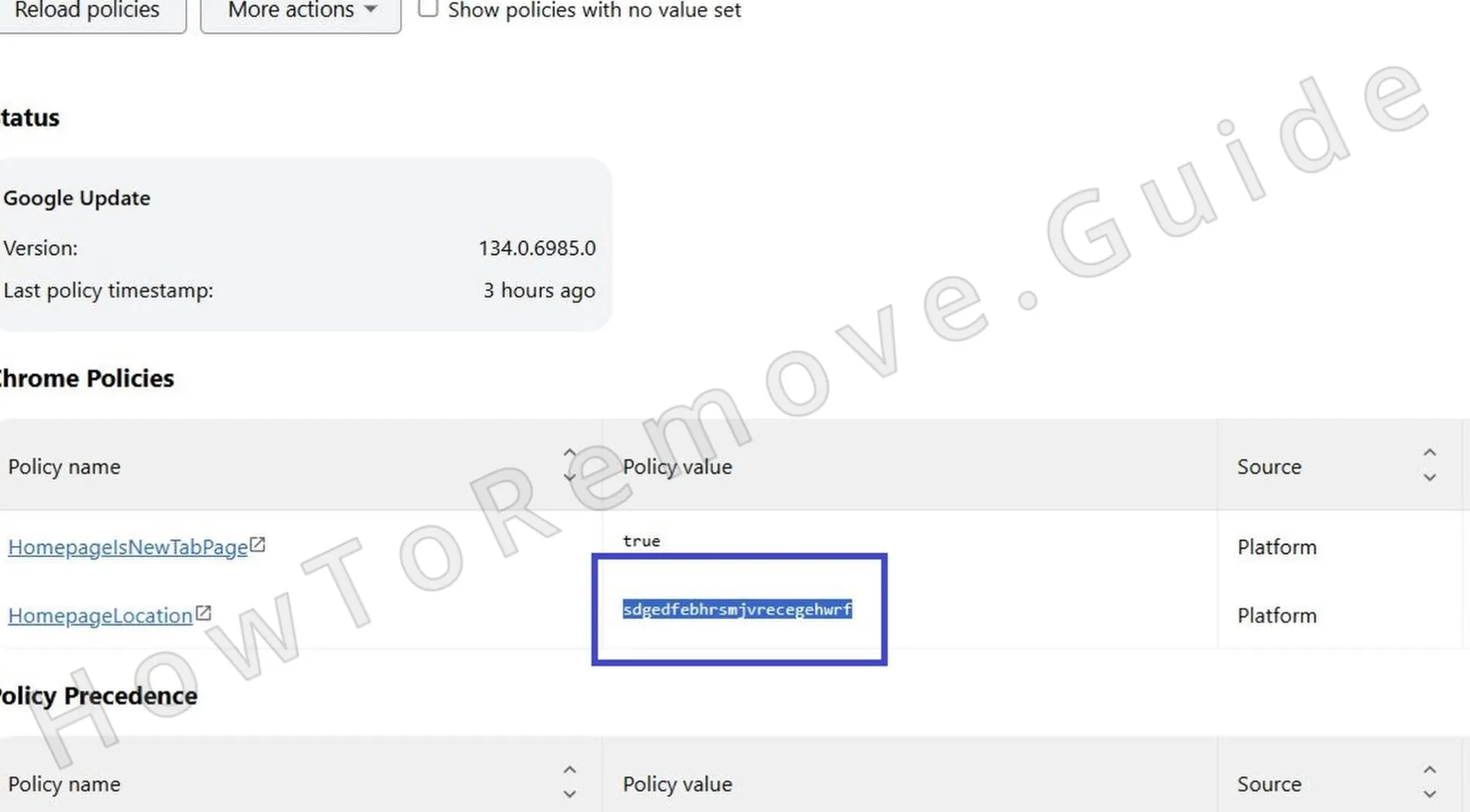
1.1To see which policies are currently active, open your browser and type the appropriate address into the URL bar:
For Chrome:chrome://policy
For Edge:edge://policy
Wait for the page to load, and review the displayed list of policies for anything unusual or unfamiliar. Focus especially on items that don’t seem tied to your typical browsing activity. - 1.2Carefully look through each entry on the policy page, identifying anything with suspicious or randomly generated names.
Malware like Pornktube Porn tends to mask its policies with nondescript strings to blend in. Take screenshots or make a detailed list of these questionable entries for reference during the next steps of the cleanup. - 1.3Go back to your browser’s Extensions page and activate Developer Mode, usually found in the top-right corner of the screen.
With it enabled, you’ll see each extension’s unique ID and its install location. Record this information – you’ll use it shortly to find and delete the malicious folders from your computer. - 1.4If the Extensions page is disabled or inaccessible due to interference from Pornktube Porn, open File Explorer instead.
Navigate manually through your system folders to locate the extension files. This step allows you to continue the cleanup without relying on potentially compromised browser interfaces. -
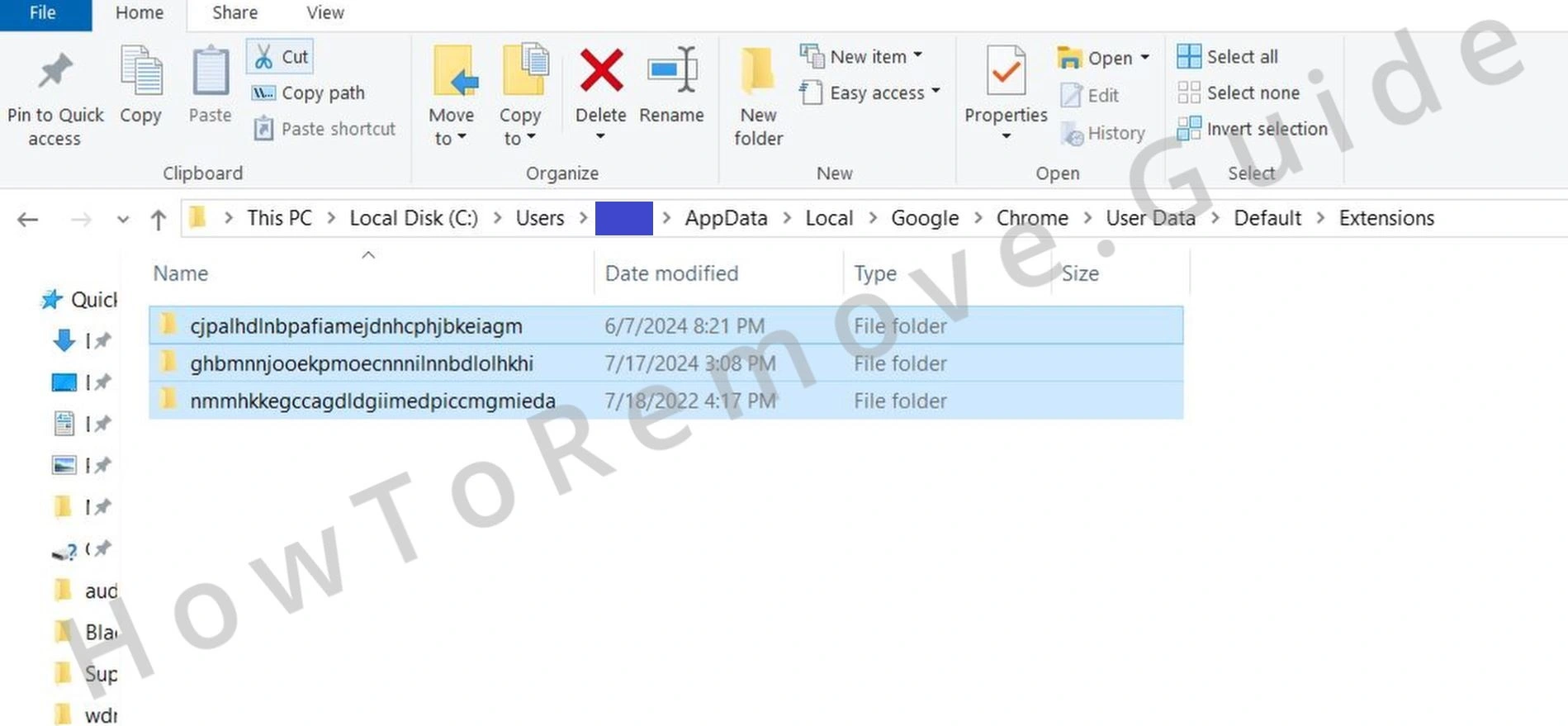
1.5In File Explorer, go to:
C:\\Users\\[Your Username]\\AppData\\Local\\Google\\Chrome\\User Data\\Default\\Extensions
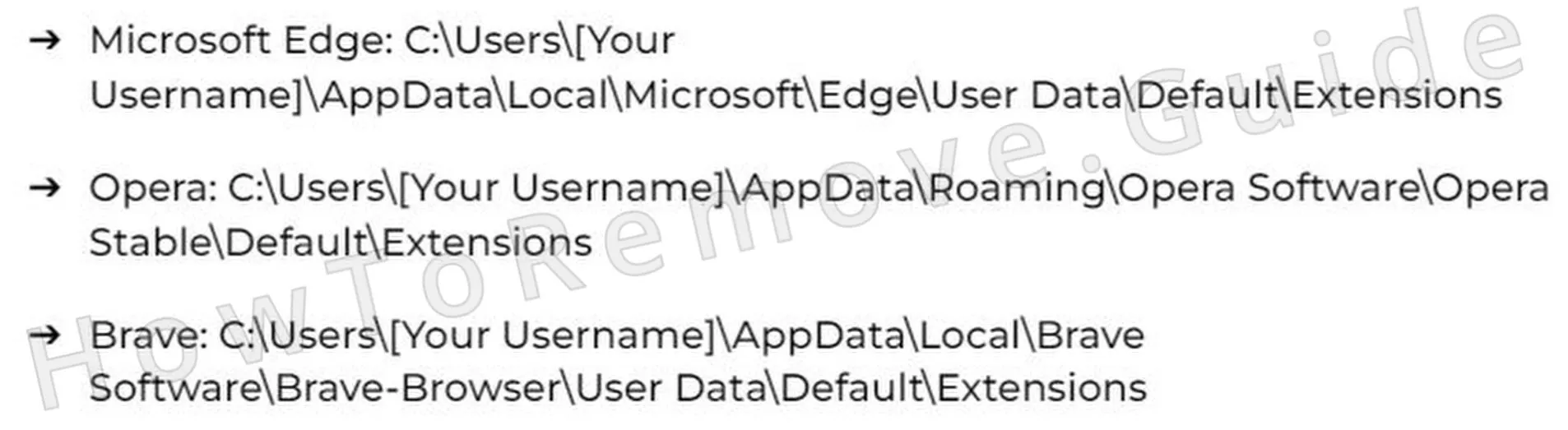
Each installed Chrome extension is stored here in its own folder named by its unique ID. Match these folder names against the IDs you saved earlier to isolate the one associated with Pornktube Porn, then delete it. - 1.6If you’re not using Chrome but another Chromium-based browser, the extension folder will be similarly located inside the AppData directory.
Manually navigate to your browser’s user profile directory, and proceed with caution. Delete only the folder linked to Pornktube Porn to avoid disrupting safe extensions that may use similar names. - 1.7Once you’ve removed the folder linked to Pornktube Porn, return to your browser, re-enable Developer Mode in the Extensions page, and inspect the list again.
Make sure no malicious entries are still present. If any remain, remove them manually to prevent Pornktube Porn from reinstalling or reactivating itself later on.
Pornktube Porn may expose your browser to redirects, ads, and persistent unwanted components. Install SpyHunter Pro to scan for risks, remove related threats, and enable real-time protection.
*Source of claim SH can remove it. Trial w/Credit card; image is for illustration; full terms.
Get Rid of Pornktube Porn Policies
If Pornktube Porn ends up buried in your Windows Registry – that’s when things get sketchy. One wrong click in there and you’re toast. Unless you know exactly what you’re doing, back off. Seriously. Let something like SpyHunter 5 handle it instead. It’s faster, safer, and honestly? Way less likely to wreck your system.
2. How to Delete Pornktube Porn Policies Through the Registry
-
2.1Launch the Registry Editor by pressing Win + R, typing
regedit, and pressing Enter. Carefully navigate its interface, since incorrect edits can destabilize your system.
Before modifying anything, go to File > Export and back up the current registry settings. This ensures you can restore everything if something goes wrong during this procedure. - 2.2While inside the Registry Editor, press Ctrl + F or use Edit > Find, then enter the suspicious extension IDs or policy names noted earlier.
Click Find Next and allow the tool to search. Once a match appears, right-click the entry and choose Delete. Continue searching until you’ve removed every entry linked to Pornktube Porn from the registry. - 2.3If certain entries resist deletion due to access restrictions, right-click the locked key, select Permissions, and then click Advanced in the dialog window.
Under the Owner section, hit Change, enter Everyone, and press Check Names followed by OK. This change gives you full control to manage that key. - 2.4Now that you’ve claimed ownership, check the boxes for Replace owner on subcontainers and objects and Replace all child object permission entries with inheritable permission entries from this object.
Click Apply, then OK, to confirm and close the dialog. Once permissions are updated, delete the registry key. Reboot your system afterward to apply these changes and verify that the “Managed by your organization” notice is gone.
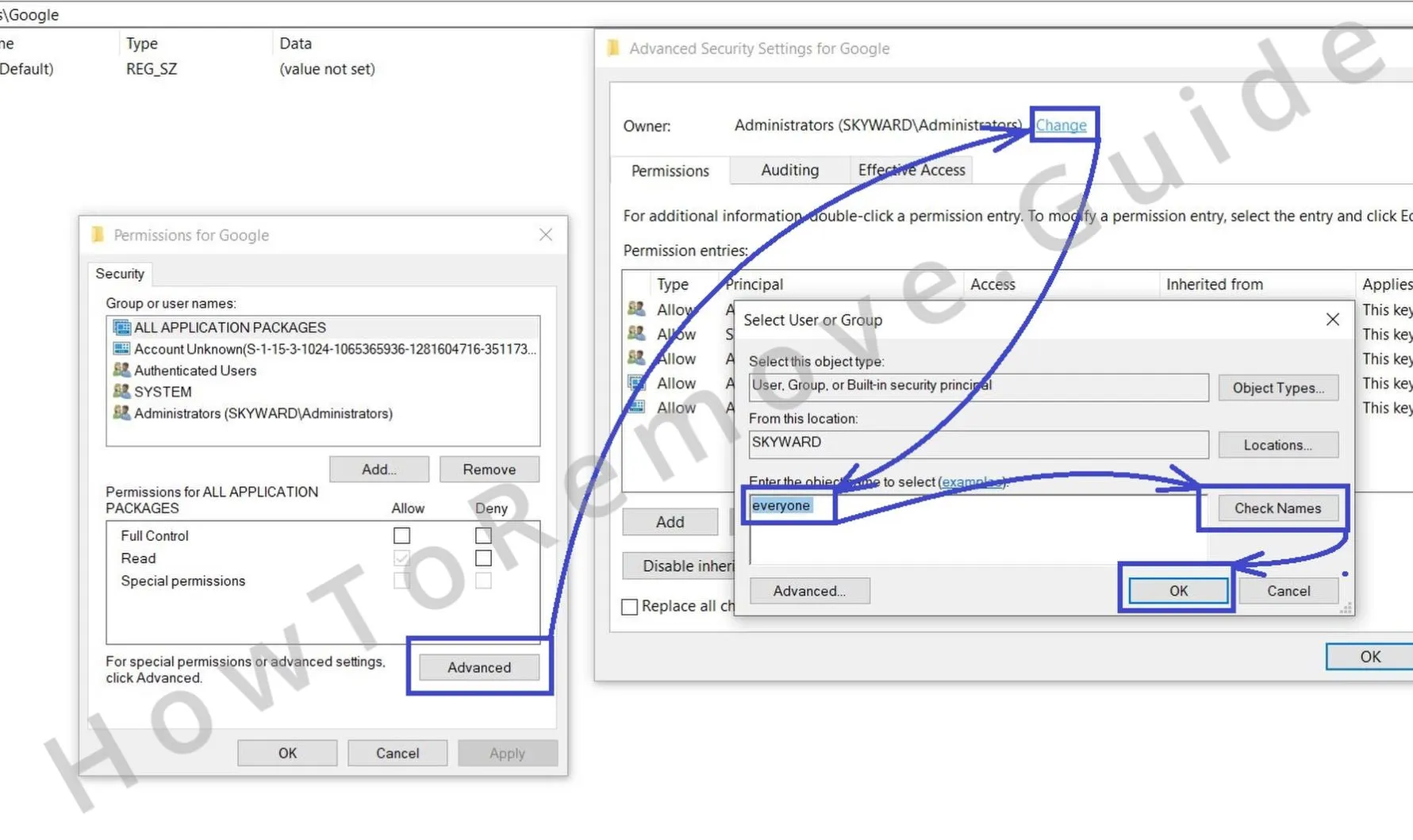
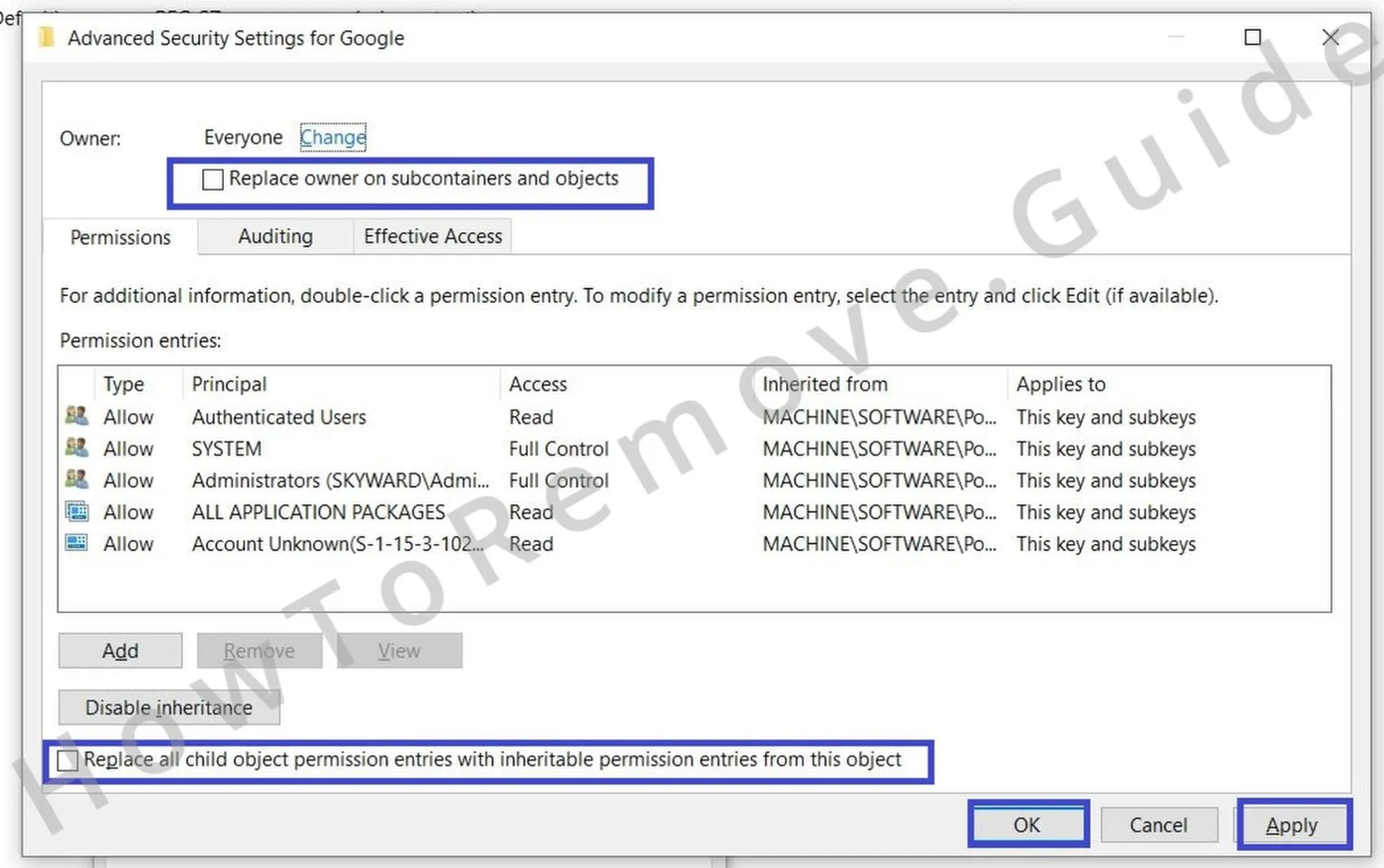
This gives you the access needed to delete the rogue key.
Alternative Tools to Delete Pornktube Porn Policies
You tried to clean out Pornktube Porn but it’s still there? Yep – that happens more often than you’d think. These scams aren’t just stubborn – they’re built to last. Don’t freak out. Just take a breath, slow down, and keep going step-by-step. That’s how you outlast it. You’re not done till it’s really gone.
3. Other Ways to Get Rid of Pornktube Porn Policies
- 3.1Open the Local Group Policy Editor by pressing Win + S, typing Edit Group Policy, and selecting the appropriate result from the search list.
In the left-hand panel, expand the folders until you find Administrative Templates, which controls various system-level browser configurations that can be exploited by malware like Pornktube Porn. - 3.2Right-click on Administrative Templates and choose Add/Remove Templates from the dropdown menu. Remove every entry unless you clearly remember adding it yourself.
Doing this helps eliminate any rogue policy files that Pornktube Porn may have embedded to override your browser or user preferences. - 3.3If you’re using Google Chrome, consider downloading the dedicated Chrome Policy Remover utility. It’s designed specifically to detect and remove unauthorized browser policy entries.
Only download the tool from a well-known and reputable source. Once it’s saved, right-click and select Run as administrator to allow full system access for scanning. - 3.4In some cases, Windows Defender SmartScreen or similar protection tools might flag the policy removal tool. If that happens, click More Info, then select Run Anyway after confirming it’s from a trusted location.
Once the tool finishes, restart your PC. After rebooting, return to both the Group Policy Editor and Registry Editor to make sure no traces of Pornktube Porn remain.


Uninstall Pornktube Porn From Chrome, Edge, and Other Browsers
So you think Pornktube Porn is gone? Cool. But here’s the thing – that’s exactly how it sneaks back in. People drop their guard at the end and that’s the trap. One leftover setting and boom – game over. Go through everything again. Be annoying about it. No shortcuts. You’ve only won when it’s gone for real.
4. How to Remove Pornktube Porn From Your Browser
- 4.1Reopen your browser’s Extensions or Add-ons page and conduct a final detailed scan of all entries.
If you discover any new or reappearing add-ons, especially those you previously deleted, remove them right away. These could be hidden reinstallation mechanisms trying to restore Pornktube Porn via browser syncing or background scripts. - 4.2Navigate to your browser’s Clear Browsing Data tool from the Settings or Privacy and Security section. Choose All Time from the Time Range dropdown and select every checkbox except Saved Passwords.
Then click Clear Data to eliminate cookies, site data, cached images, and other artifacts that could still contain redirect scripts or remnants of Pornktube Porn operations. - 4.3Return to Privacy and Security, then open Site Settings and locate categories like Notifications, Microphone, and Camera access.
Carefully examine the list for unfamiliar domains or websites that shouldn’t have these permissions. If you find anything out of place, click the entry and choose Remove or Block to immediately revoke their access and stop any hidden monitoring. - 4.4Go to your browser’s Search Engine Settings and click Manage Search Engines to review the full list.
Scan for unknown or unauthorized search tools, especially ones set as default without your input. Delete any suspicious entries and make sure a reliable option like Google, Bing, or DuckDuckGo is set as your primary engine to prevent automatic redirects. - 4.5Visit the On Startup and Appearance sections under your browser’s Settings menu.
Check for any unfamiliar URLs listed as your homepage or startup site and remove them. Replace them with a trusted, familiar webpage. This guarantees that Pornktube Porn doesn’t use browser launch settings to regain a foothold or redirect you on startup.


