

If you’re seeing a drumbeat of “suspicious connection blocked” alerts tied to sync.contextualadv.com, you’re dealing with an ad-driven nuisance that behaves like a browser hijacker/redirector (similar to Zongzonger, and Newstrend.in), not a classic file-infecting virus.
Reports show the connection attempts fire during normal browsing – especially on Yahoo/AOL webmail, Yahoo Finance AU, Tumblr, WordPress embeds, and even Fandom pages – often multiple times per day.
Here’s what’s happening: a page or extension tries to call sync.contextualadv.com, whose HTTPS certificate doesn’t match the hostname in Firefox and Chrome, so the request gets blocked and no download occurs. Still, the goal is ugly: ad tracking/syncing, push-notification spam, and redirects to ads, fake updates, or unwanted programs.
We tested that SpyHunter successfully removes Sync.contextualadv.com* and we recommend using it. It will block Sync.contextualadv.com from reinstalling itself and it will make sure your device is clean from any malware.
 Try Free For 7 Days*
Buy now15% OFF if you buy straight without trial.
 OFFER
OFFERAccess typically starts either when users click “Allow” on a fake prompt or via bundled installs that add unwanted extensions, tweak homepage/search, and flip notification permissions. In many cases, it’s simply page-embedded ad code; in others, a browser-level pest keeps re-triggering the calls until settings/permissions are cleaned up. In some instances, you may even get fake BitDefender malware warnings (even if BitDefender isn’t installed). Those are fake, and you shouldn’t interact with them because they come from the hijacker.
Don’t interact with any prompts it surfaces. The guide below – or the recommended removal tool (SpuHunter 5) – will walk you through stopping the redirects and restoring your browser.
Sync.contextualadv.com Removal Tutorial
Look, browser hijackers like Sync.contextualadv.com might seem scary, but sometimes they’re actually pretty easy to deal with. First, give the quick and easy removal steps a shot – often that’s all it takes to kick these annoying intruders out. If the easy way doesn’t work, don’t panic. There’s a detailed guide further down that’ll help handle even stubborn cases.
Quick Steps to Remove Sync.contextualadv.com
- 1.1Start by launching your preferred web browser – whether it’s Chrome, Edge, or Firefox. Locate the settings icon, typically found in the upper-right corner, appearing as dots, lines, or an ellipsis depending on the browser version you’re using.
- 1.2Next, proceed carefully to the Extensions or Add-ons section within the settings menu. Browser hijackers frequently conceal themselves as harmless extensions, so thoroughly examine each installed item to identify any suspicious programs.
- 1.3If you encounter any extensions or add-ons that appear unfamiliar, unnecessary, or suspicious – particularly those claiming to “improve performance,” “enhance security,” or offer similar promises – immediately uninstall or disable these questionable items.
- 1.4Afterwards, navigate to the Privacy & Security settings area and specifically locate Site Permissions. Browser hijackers often exploit permissions granted here, especially those related to notifications, pop-ups, or website access.
- 1.5Carefully review permissions and promptly revoke any granted to suspicious, unknown, or undesired websites. Remove permission from any entry that seems unfamiliar or untrustworthy to restore control over your browser.
After completing these steps, restart your browser. If your problem is resolved, excellent. If not, your issue may require the more advanced methods described below.
SUMMARY:
| Name | Sync.contextualadv.com |
| Type | Browser Hijacker |
| Detection Tool |
Some threats reinstall themselves if you don’t delete their core files. We recommend downloading SpyHunter to remove harmful programs for you. This may save you hours and ensure you don’t harm your system by deleting the wrong files. |
Important! Read Before Continuing
Okay, real talk – the advanced method to remove a hijacker like Sync.contextualadv.com can take an hour or more and needs a bit of tech savvy. If you’re short on time or not super comfortable digging into technical stuff, you’re better off using specialized software like SpyHunter 5. It’ll clear out these tricky infections faster and safer.
How to Remove Contextualadv Pop-up Notifications
Huge red flag alert: if your browser settings say “Managed by your organization,” and you know you’re not on a work-managed device, something shady’s going on. This almost definitely means a hijacker like Sync.contextualadv.com took control, locked down your settings, and is messing with your browser. Take action quickly – this isn’t normal behavior.
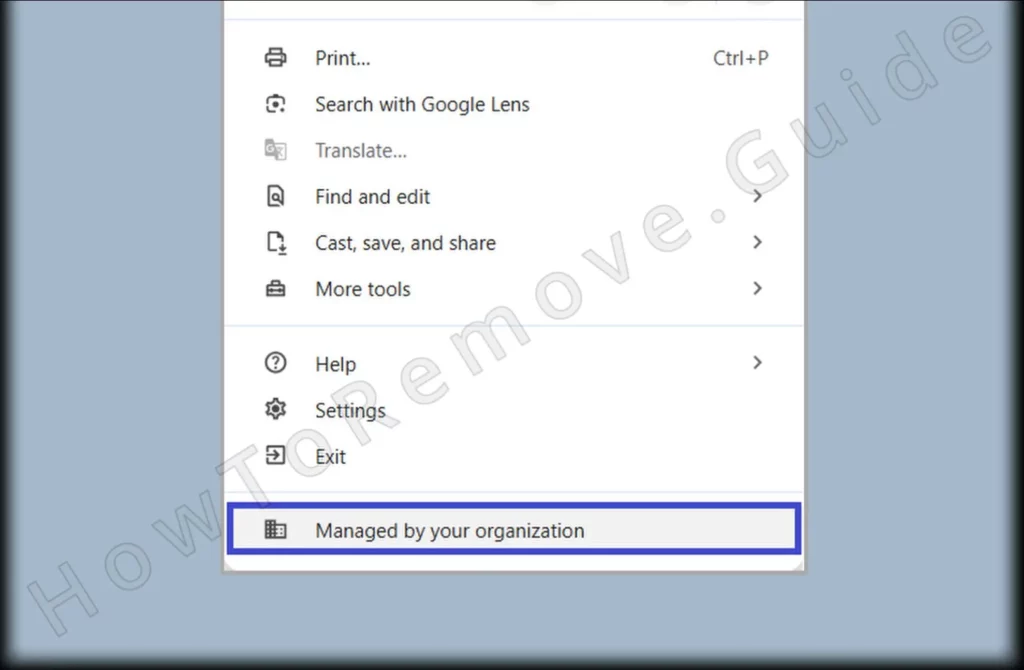
1. Identify the Sync.contextualadv.com Policies
- 1.1
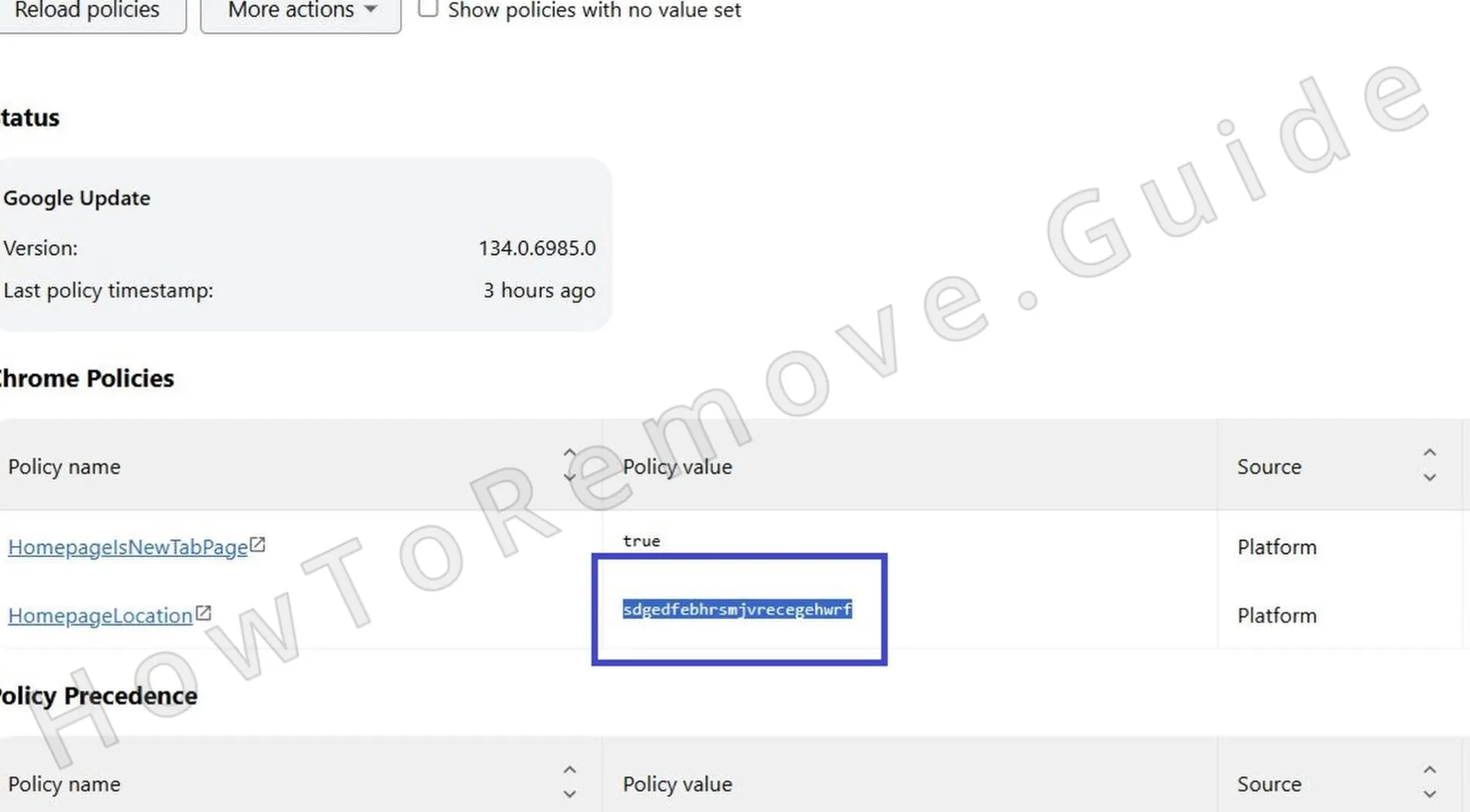 Enter the following URL directly into your browser’s address bar to inspect policies currently applied:
– Chrome users type chrome://policy
– Edge users enter edge://policyFor other browsers, follow the same URL format, replacing the browser name accordingly.
- 1.2A detailed list of active policies will now be shown. Carefully examine this list. Note anything unusual or unexpected, particularly focusing on lengthy, random-looking strings in the Value column. Record these suspicious values carefully into a separate text document for reference.
- 1.3Once again, revisit the Extensions section in your browser settings, but this time pay closer attention. Activate Developer mode, if available, allowing you to better identify suspicious extensions by revealing additional details like IDs or hidden developer names.
- 1.4
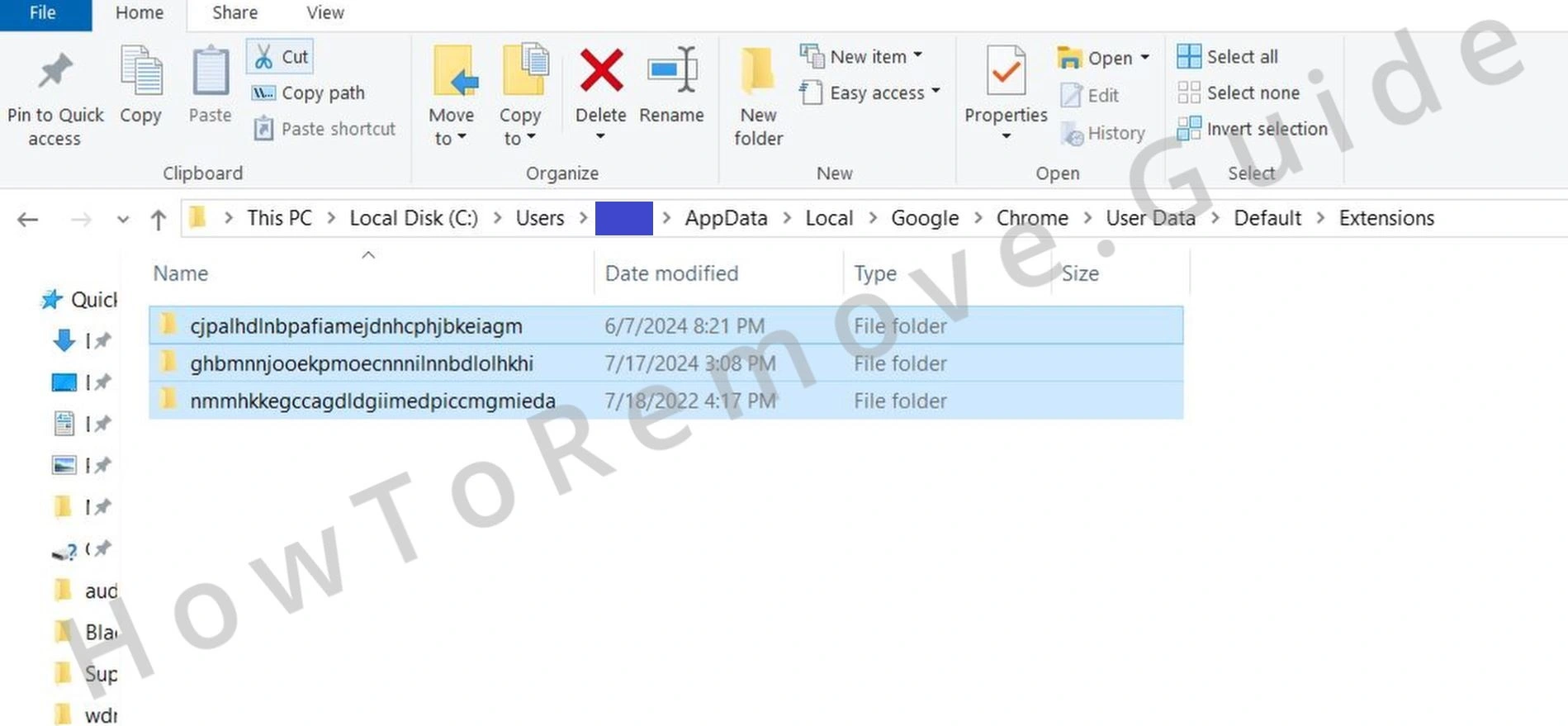 If direct removal of suspicious extensions via settings proves ineffective, manually delete them through your system’s file directory. For Chrome users specifically, navigate to the folder:
– C:\Users[Your Username]\AppData\Local\Google\Chrome\User Data\Default\Extensions
Delete all contents found within this directory.
- 1.5
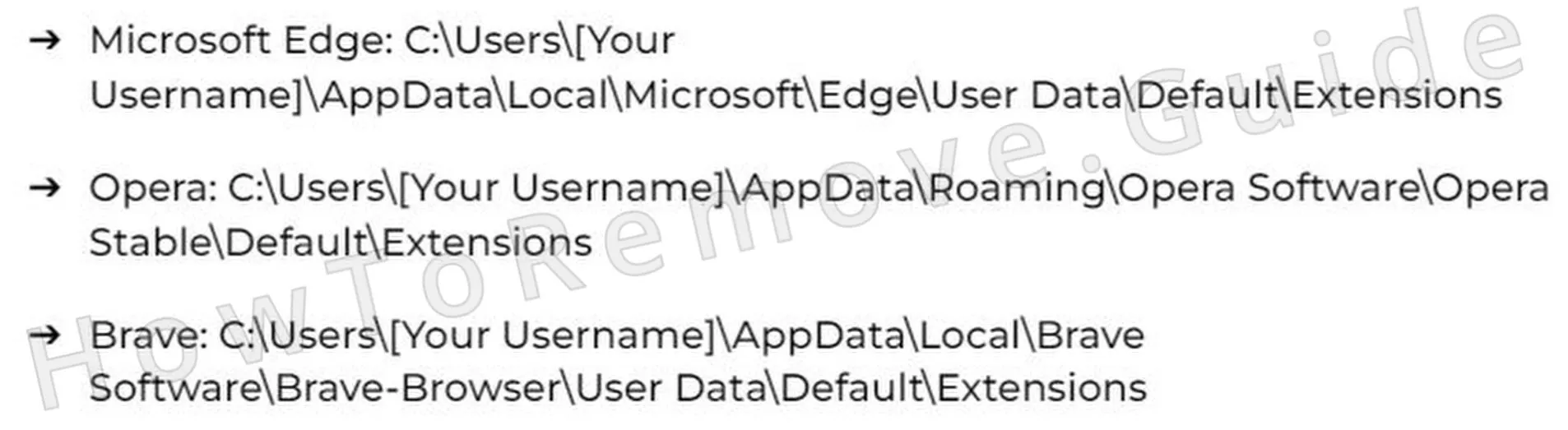 For other popular browsers, locate their respective extensions folders as indicated here, accessing them similarly through your system directories, and manually clear out all folders inside.
 - 1.6Having done this, return again to your browser’s Extensions settings menu to verify all undesired items are now completely gone. Confirm that no unfamiliar extensions remain installed or active.
Get Rid of Contextualadv Policies
When you’re ready to clean your registry, be really careful. Delete only the stuff you’re 100% sure is tied to the hijacker. If you’re not positive, don’t touch it – you could break something important. If manual editing feels risky, let trusted software like SpyHunter 5 handle this step safely and avoid accidentally making things worse with Sync.contextualadv.com.
2. How to Delete Sync.contextualadv.com Policies Through the Registry
- 2.1Launch the Windows Registry Editor application by pressing Win + R to open the Run dialog, then typing regedit, and confirming with Enter. Registry Editor will now appear on your screen.
- 2.2Within Registry Editor, click on the menu item Edit and then choose Find. Search carefully for registry entries you previously noted as suspicious (from earlier steps). Repeat the search several times to guarantee you’ve removed all occurrences.
- 2.3
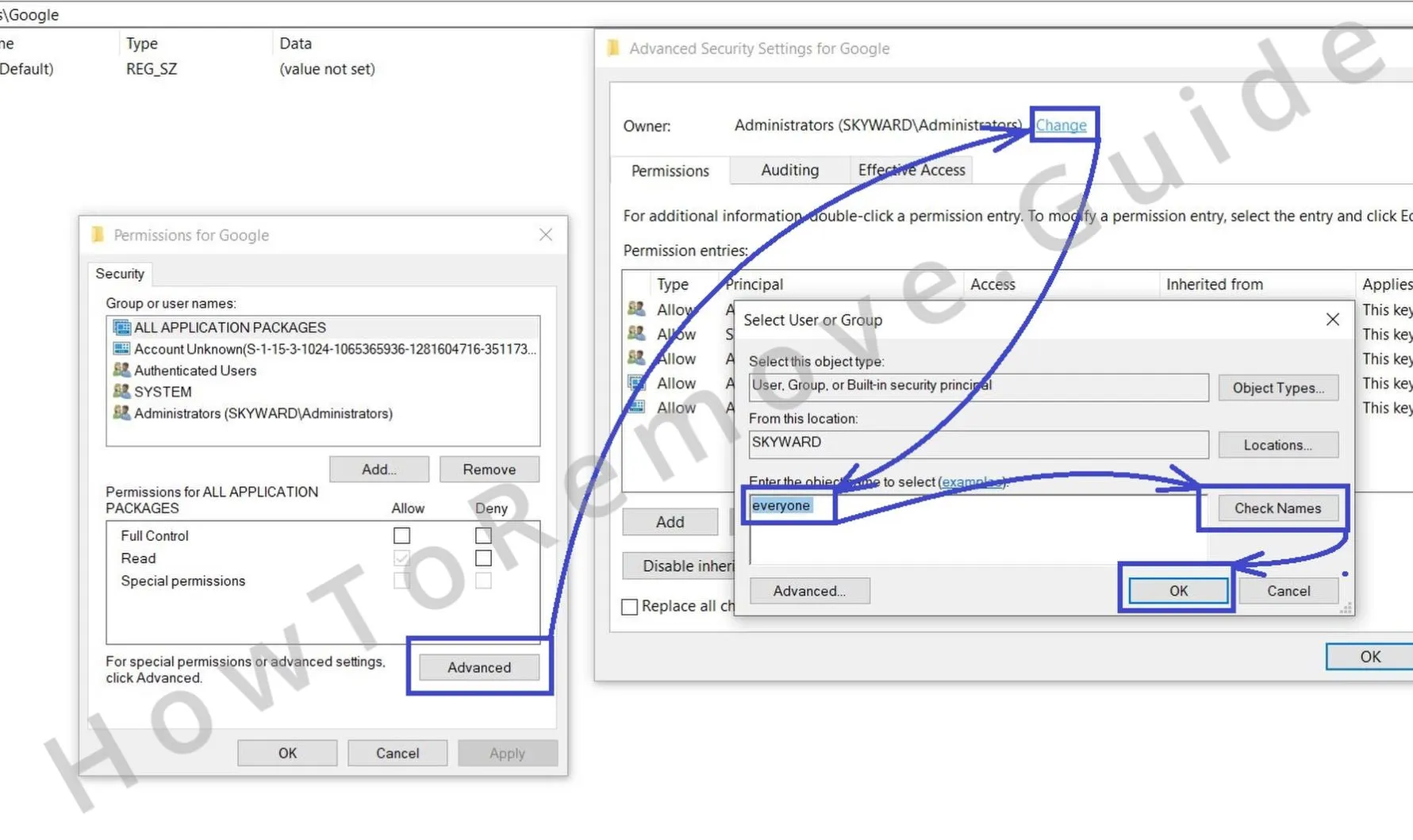 If certain registry entries refuse deletion due to permission restrictions, override them by adjusting permissions. Right-click the problematic entry, choose Permissions, click on Advanced, and then select Change. Type the word Everyone, select Check Names, confirm your choice with OK, and close this dialog.
 - 2.4
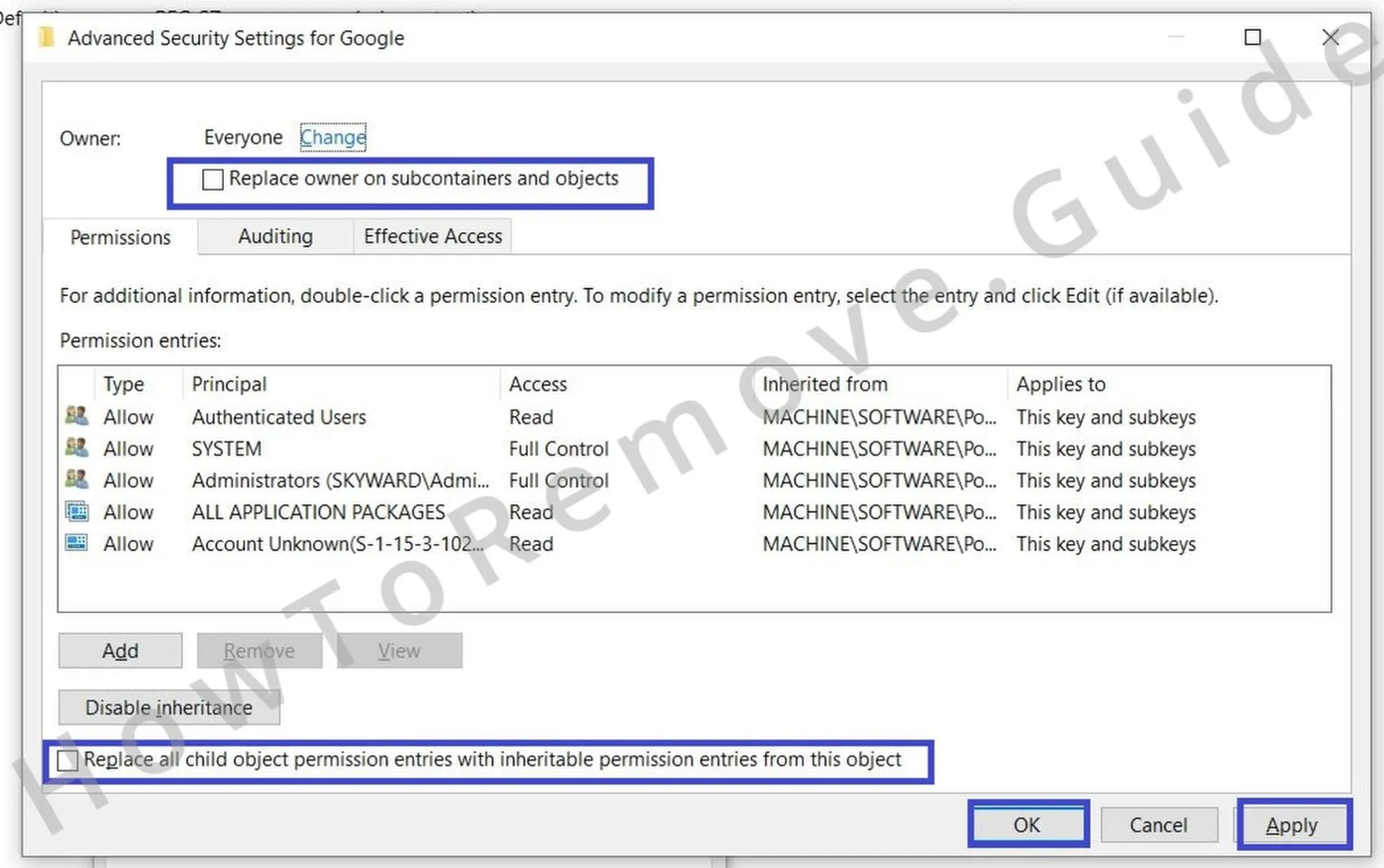 After changing permissions, activate both Replace options (for inheritable permissions) within the permissions window. Finish by selecting Apply, followed by OK, effectively overriding permission restrictions and allowing you to delete persistent entries.
This gives you the access needed to delete the rogue key.
Alternative Tools to Delete Sync.contextualadv.com Policies
After you’ve finished the registry cleanup, double-check your browser. Is that frustrating “Managed by your organization” message still hanging around? If so, those sneaky Sync.contextualadv.com policies are still active. But don’t worry – just move on to the next methods listed in the guide. Keep going until every last bit of the hijacker is gone.
1. Other Ways to Get Rid of Sync.contextualadv.com Policies
- 1.1
 Click on the Windows Start Menu, type “Edit group policy”, and open the matching application. Within it, expand settings and carefully navigate to Administrative Templates, which lists policies managing system and browser behavior.
 - 1.2
 Once there, locate the list of active templates. Remove or disable any suspicious or unknown entries found. Clearing these policies helps eliminate lingering restrictions or browser hijacks imposed by malware like Sync.contextualadv.com.
 - 1.3For Chrome users specifically, you can download a specialized program known as the Chrome Policy Remover. Once downloaded, execute it with administrator privileges to swiftly and automatically erase any remaining Chrome-specific policies installed by hijackers.
- 1.4Windows might present a warning message upon launching the Policy Remover due to security protections. To continue safely and bypass this notice, select More Info and then click on Run Anyway to proceed with policy removal.
Uninstall Sync.contextualadv.com From Chrome, Edge, and Other Browsers
At this point, you’ve finally gotten rid of the hijacker’s policies, but you’re not quite done yet. Now it’s time to fix all those sneaky changes Sync.contextualadv.com made to your browser. Check your extensions, homepage, default search engine, startup tabs, and permissions, and reset them all to their pre-hijack state. That’s how you fully recover.
2. How to Remove Sync.contextualadv.com From Your Browser
- 2.1Return once more to the Extensions menu of your browser to ensure it remains entirely free from unwanted software or lingering suspicious extensions.
- 2.2
 Next, thoroughly clear your browser’s stored data by opening Clear Browsing Data settings. Select the time frame “All Time”, and erase everything listed except for saved passwords, ensuring no residual hijacker data remains.
 - 2.3
 Review Site Permissions settings again thoroughly. Verify no questionable websites retain permissions, particularly those related to notifications or pop-ups, and revoke permissions from any untrusted or unfamiliar entries.
 - 2.4
 Reset your browser’s default search provider through Manage Search Engines. Within settings, restore the default engine you prefer. Verify that hijacker-added search providers have been removed completely.
 - 2.5Finally, double-check your browser’s On Startup and Appearance settings. Restore the homepage or default startup tabs to their original or your preferred state. This final action ensures no hijacker modifications persist.
To combat the problem, resetting the browser and carefully reviewing installed extensions to remove any unfamiliar or suspicious items. The above article explores the warning signs of such browser-based threats, how to respond effectively, and what steps can be taken to prevent similar disruptions in the future.
What Is Sync.contextualadv.com?
Despite the alarming “suspicious connection blocked” warnings that security software throws up, Sync.contextualadv.com is not a traditional computer virus. A virus is malicious code that spreads by infecting files or programs.
What we see here is something different: a browser-based hijacker/redirector that attaches itself to normal browsing sessions. Instead of breaking into your system files, it lives in the browser layer – surfacing through unwanted extensions, altered notification settings, or advertising scripts hidden on pages like Yahoo Mail, AOL, Tumblr, WordPress embeds, and finance portals.
The repeated connection attempts are triggered when these sites (or hijacker add-ons) try to fetch resources from sync.contextualadv.com. The problem is that its SSL certificate doesn’t match its hostname.
In both Firefox and Chrome this creates a red flag, which is why security software intercepts it before any content is loaded.
Technically, this makes Sync.contextualadv.com more of an adware/redirect nuisance than a virus. It’s engineered to serve ads, push notifications, and generate redirects – sometimes to sites promoting fake updates or shady software downloads – but not to overwrite or replicate system files.
This is why users see it daily or multiple times a day without ever downloading a malicious executable. It’s part of the broader category of potentially unwanted programs (PUPs) and browser hijackers, designed to cash in on ad impressions and tracking rather than to directly damage the operating system.
How Dangerous Is Sync.contextualadv.com?
While not a virus, the risks are real. At its most basic, Sync.contextualadv.com disrupts browsing with endless redirects and blocked connection attempts. But the danger escalates if it manages to plant itself more firmly in your browser. When bundled into extensions or granted notification rights, it can tamper with your homepage and search engine, flood you with push-notification spam, and lure you toward scam pages posing as software updates or security alerts.
The scareware angle is particularly nasty: users may see pop-ups warning of fake threats that push them to install useless or harmful “security tools.”
Even if you don’t fall for those tricks, constant exposure increases the odds of a misclick.
And because the domain is tied to ad tech and tracking, there’s also a privacy cost: browsing habits may be monitored or used for targeting.
In short, Sync.contextualadv.com isn’t going to encrypt your files or behave like ransomware. But it will undermine browser security, erode user trust, and potentially steer you into much more dangerous territory if you let it linger. That’s why it should be treated as a hijacker/adware infection that requires cleaning, not ignored as harmless noise.
How to Avoid Sync.contextualadv.com in the Future
Everyone knows the basics: don’t click “Allow” on suspicious prompts, don’t install bundled freeware without checking what’s inside, and don’t wander into pirated or shady corners of the internet. But Sync.contextualadv.com has shown up even on mainstream sites like Yahoo Mail, AOL, Tumblr, and WordPress embeds. That means you need to go beyond the obvious if you want to avoid running into it again.
- Disable Automatic Downloads
This hijacker often piggybacks on sneaky installers or hidden scripts. To stop anything from slipping through without your say-so, go into your browser’s Settings > Downloads and enable the option to always ask where to save a file before downloading. This way, nothing can land on your system without your explicit approval. - Use Enhanced Browser Security
Sync.contextualadv.com triggers repeated blocked connections thanks to its bad SSL certificate. Stronger privacy and security settings make sure your browser won’t even try to load that junk. In Firefox, switching from “Standard” to “Strict” Privacy mode has already been shown to suppress the Yahoo-injected ads that cause the alerts. In Chrome and Edge, go to Privacy & Security and enable “Enhanced protection” and “Always use secure connections.” - Install an Ad-Blocker
Because this domain is tied to ad tracking and redirects, an ad-blocker is your best shield. It cuts off hazardous pop-ups and background calls to domains likesync.contextualadv.combefore they ever get a chance to bother you. It also helps keep your browsing experience clean, even on ad-heavy platforms.
Taking these steps won’t just block Sync.contextualadv.com – it will raise your defenses against the entire ecosystem of browser hijackers and adware.
