

Did you get an email that looked like Microsoft was telling you to reset your password, and did the sender or link say rnicrosoft.com instead of microsoft.com? Okay pause right there, because that is the trick. The fake domain is not random gibberish. It is built to fool your eyes, because the letters r and n sit together and can look like an m, especially if you are reading quickly, on a phone.
So the message may feel normal. It may have the familiar password reset tone, the clean layout. But that tiny domain change is not a typo you should forgive. It is the red flag. And it really matters a lot.
Scams of rnicrosoft Scam‘s type are known to steal personal data and passwords. Install SpyHunter Pro to scan for risks, remove any dangerous trackers, and enable real-time protection.

Try Free For 7 Days*
Buy now15% OFF if you buy straight without trial.
 OFFER
OFFERUnderstanding the rnicrosoft Scam
The rnicrosoft.com scam is a phishing setup pretending to be Microsoft, and the example that was shared around looked like a legitimate password reset message. If a scam email looked terrible, most people would ignore it, but this one relies on looking just good enough for you to stop thinking and click.
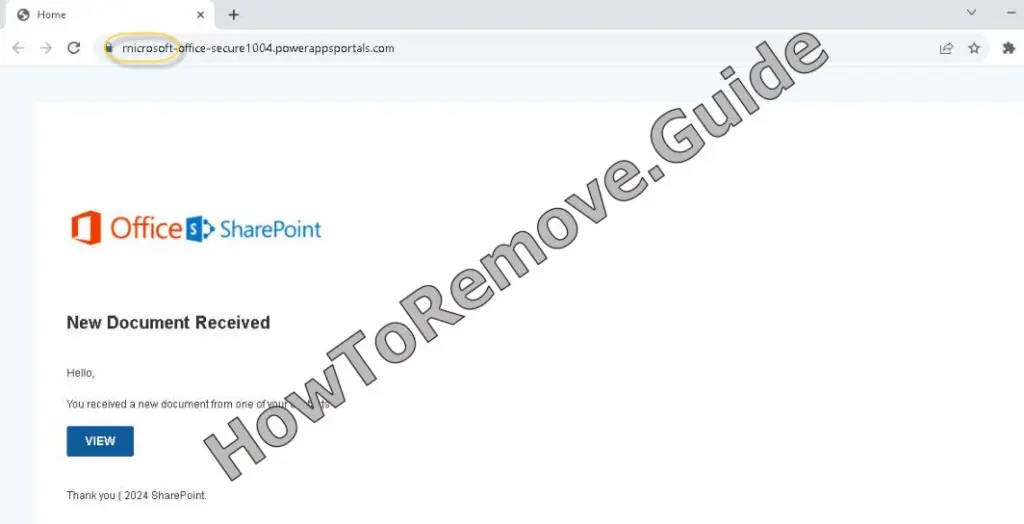
Now here is where people get caught. You think you are protecting your account by following a security prompt, but the prompt sends you toward a fake Microsoft-looking login or reset page. You enter your username or password, and from your side it feels like you did the responsible thing, but on the other side the scammers now have the details they wanted.
This is called typosquatting, which sounds technical, but the idea is simple. They use a web address that looks close enough to the real one that your brain fills in the rest. rnicrosoft.com is not microsoft.com. grnail.com is not Gmail. micros0ft.com, with a zero standing in for the second o, is another example of the same visual trick. The scam is not magic. It is just abusing speed, habit, and trust.
What to Do If You’ve Fallen for the rnicrosoft Scam
If you already clicked the link or typed details into a suspicious page, do not sit there replaying the moment over and over. Act. First, write down what happened while you still remember it. Was it in Outlook, Teams, email, a text message, or somewhere else. What did you type in. A username. A password. An account number. Anything like that matters.
Then change the password on the affected account immediately, and if you used that same password anywhere else, change it there too. I know that is annoying, but reused passwords are exactly how one mistake turns into five different account problems. Make each password unique.
Turn on multifactor authentication, also called two-step verification, wherever you can. That extra step can make stolen passwords much less useful. If this was a work or school account, tell IT support. If you entered bank details, card details, or anything financial, contact the company involved and warn them about possible fraud. If money was lost or identity theft happened, report it to local law enforcement.
How the rnicrosoft.com Scam Tricks You
The first trick is brand trust. Microsoft is a name people recognize, so when a message looks like it comes from Microsoft, a lot of users lower their guard. That is what scammers want. They do not need you to love the email. They only need you to believe it long enough to click once.
The second trick is visual deception. rnicrosoft.com is ugly once you notice it, but before that it blends in. The r and n are doing all the work. Your brain sees the shape, assumes Microsoft, and moves on.
The third trick is the password reset theme. Password resets feel urgent and serious. Nobody wants to lose access to an account, especially one tied to Outlook, Microsoft 365, Teams, Windows, or other everyday services. So you follow the instruction because it sounds protective, when really the page is only there to collect your login.
And then there is pressure. These messages often push you to click now, call now, open this attachment now, or fix the issue immediately. That pressure is not there to help you. It is there to stop you from hovering over the link, checking the sender, opening a new tab, or asking someone else if the message looks real.
Recognizing Warning Signs of the rnicrosoft.com Scam
The biggest warning sign is simple: rnicrosoft.com. Not microsoft.com. Look at it slowly. If the m is really an r and an n, walk away from the message. Do not click just to see what happens, because that curiosity is exactly the kind of tiny step scammers depend on.
Another warning sign is any Microsoft message coming from a mismatched domain. If it claims to be a major company but the address looks slightly off, unofficial, or unrelated, treat it as suspicious. Microsoft-related examples include microsoftsupport.ru and micros0ft.com, and the point is not to memorize every fake address in the world, because you cannot. The point is to check whether the domain actually matches the real company.
Also watch for first time senders, infrequent senders, or anything marked External. If Outlook says it could not verify the sender, that is not decoration. It is a warning to slow down. Generic greetings like Dear sir or madam, strange spelling, bad grammar, unexpected attachments, and requests for passwords, PINs, bank information, credit card numbers, or account numbers are all signs you should stop.
Suspicious links are another giveaway. Hover over a link before clicking and look at the address that appears. On Android, long press can show more details. On iOS, use the light long press. If the preview does not match the company you expected, do not open it.
How to Handle a Suspicious Microsoft Message
If you get a message like this, your safest move is boring, and boring is good here. Do not reply. Do not click. Do not open attachments. Open a new browser tab and go to Microsoft’s official site yourself, through a saved favorite, a typed address, or a web search.
If the message seems to come from someone you know, check with them another way, like a text message or phone call. Do not use the suspicious message as proof of itself. That is like asking the fox if the henhouse is secure.
After that, report it and delete it.
Reporting the rnicrosoft.com Phishing Scam
If you use Microsoft 365 Outlook or Outlook.com, select the suspicious message and choose Report, then Report phishing. If it appears in Microsoft Teams, hover over the message without selecting it, go to More options, then More actions, then Report this message, and choose Security risk, spam, phishing, or malicious content.
If you use another email client, attach the phishing message to a new email and send it to [email protected]. Do not simply forward it. If you land on a suspicious page in Microsoft Edge, use Settings and More, then Help and feedback, then Report unsafe site. ALT+F opens that menu.
Useful Resources for Scam Reporting and Prevention (By Country)
Find the right reporting channel below
| Country / Agency | URL | Category / Use-case | Phone/Email |
| Australia – Crime Stoppers | https://www.crimestoppers.com.au | Anonymous tips about crime | 1800 333 000 |
| Australia – National Anti-Scam Center (Scamwatch) | https://www.scamwatch.gov.au/report-a-scam | General scams; phishing; texts/emails | |
| Australia – Police Assistance Line (non-emergency) | https://www.police.gov.au | Local police report | 131 444 |
| Australia – ReportCyber (ACSC) | https://www.cyber.gov.au/report | Cybercrime (hacks, fraud, extortion) | |
| Canada – Canadian Anti-Fraud Center (CAFC) | https://www.antifraudcentre-centreantifraude.ca/report-signalez-eng.htm | General scams incl. phone/text/email | |
| France – DGCCRF (SignalConso) | https://signal.conso.gouv.fr | Consumer scams/deceptive practices | |
| France – PHAROS – Internet-Signalement | https://www.internet-signalement.gouv.fr | Online content & cybercrime reports | |
| Germany – Bundeskriminalamt / Local Police | https://www.polizei.de/Polizei/DE/Home/home_node.html | Report online fraud | |
| Germany – Weißer Ring – Victim Support | https://weisser-ring.de | Victim support | 116 006 |
| India – DoT Helpline (Sanchar Saathi) | https://sancharsaathi.gov.in | Fraudulent telecom/SIM related | 155260 |
| India – National Consumer Helpline | https://consumerhelpline.gov.in | Consumer scams | 1800-11-4000 / 1915 |
| India – National Cyber Crime Reporting Portal | https://cybercrime.gov.in | Cybercrime incl. online fraud | 1930 |
| Japan – Consumer Affairs Agency (CAA) | https://www.caa.go.jp/policies/policy/consumer_policy/caution/cybercrime/ | Consumer scams | |
| Japan – National Police Agency – Cybercrime | https://www.npa.go.jp/bureau/cyber/ | Cybercrime reporting | |
| Mexico – Guardia Nacional (National Guard) | https://www.gob.mx/gn | Cybercrime reporting | |
| Mexico – Instituto Federal de Telecomunicaciones (IFT) | https://www.ift.org.mx | Telecom/online services scams | |
| Mexico – PROFECO | https://www.gob.mx/profeco | Consumer fraud & ecommerce | |
| Netherlands – AFM – Report investment fraud | https://www.afm.nl/en/consumenten/themas/beleggen/misleiding-misbruik | Investment/crypto | |
| Netherlands – Fraudehelpdesk | https://www.fraudehelpdesk.nl/melden | General scams (incl. phishing/SMS) | 088-7867372 |
| Netherlands – Politie – Meldpunt Internetoplichting | https://www.politie.nl/themas/internetoplichting.html | Online shopping fraud | |
| New Zealand – CERT NZ | https://www.cert.govt.nz/individuals/report-an-issue/ | Phishing, identity scams | |
| New Zealand – Department of Internal Affairs – Spam | https://www.dia.govt.nz/Spam-Contact-Us | Email/SMS spam | [email protected] |
| New Zealand – IDCARE | https://www.idcare.org | Victim support (identity compromise) | 0800 121 068 |
| New Zealand – Netsafe – Report | https://www.netsafe.org.nz/report/ | Online harms & scams | |
| New Zealand – New Zealand Police (non-emergency) | https://www.police.govt.nz/use-105 | Report fraud/online crime | 105 |
| Nigeria – Economic & Financial Crimes Commission (EFCC) | https://www.efcc.gov.ng | Financial scams incl. crypto/investment | [email protected] |
| Nigeria – Nigeria Police Special Fraud Unit (SFU) | https://www.specialfraudunit.org.ng | Serious fraud | Voice/SMS: 0708 227 6895; WhatsApp: 0812 760 9914 |
| Poland – CERT Polska (CERT.PL) | https://cert.pl/en/report/ | Cyber incidents & phishing | |
| Poland – Dyzurnet.pl | https://dyzurnet.pl | Illegal online content (esp. child protection) | |
| Poland – Polish Police (Policja) | https://www.policja.pl | Report scams to police | |
| Singapore – Anti-Scam Centre / Anti-Scam Helpline | https://www.scamalert.sg | General scams; texts; calls | 1800-722-6688 |
| Singapore – Monetary Authority of Singapore (MAS) | https://www.mas.gov.sg/investor-alert-list | Investment/crypto checks | |
| Singapore – Singapore Police Force | https://www.police.gov.sg/iwitness | Police report (cybercrime) | |
| South Africa – Cybersecurity Hub (CSIRT) | https://www.cybersecurityhub.gov.za | Cyber incidents incl. scams | |
| South Africa – South African Fraud Prevention Service (SAFPS) | https://www.safps.org.za | Identity fraud support | 011-867-2234 |
| South Africa – South African Police Service (SAPS) | https://www.saps.gov.za | Police report (cybercrime unit) | |
| South Korea – Korea Communications Commission (KCC) | https://www.kcc.go.kr | Telecom-related fraud | |
| South Korea – Korea Internet & Security Agency (KISA) | https://www.kisa.or.kr | Phishing, online harms | |
| South Korea – Korean National Police Agency – Cyber Bureau | https://ecrm.cyber.go.kr | Cybercrime reporting | |
| Spain – INCIBE – Oficina de Seguridad del Internauta (OSI) | https://www.osi.es/es/reporte | Cybersecurity & online fraud | |
| Spain – Policía Nacional / Guardia Civil | https://www.policia.es | Report scams to police | |
| Sweden – Crime Victim Authority (Brottsoffermyndigheten) | https://www.brottsoffermyndigheten.se | Victim support & compensation | 090–70 82 00 |
| Sweden – Polisen (Swedish Police) | https://polisen.se | Report fraud/cybercrime | 114 14 (non-emergency); 112 (emergency) |
| Sweden – Swedish Consumer Agency (Konsumentverket) | https://www.konsumentverket.se | Unfair business practices | |
| United Arab Emirates – Abu Dhabi Police – Aman Service | https://www.adpolice.gov.ae | Cybercrime tips/reporting | SMS 2828; 800 2626 |
| United Arab Emirates – Dubai Police – eCrime | https://www.dubaipolice.gov.ae | Cybercrime reporting | 04 606 1600 |
| United Arab Emirates – Ministry of Interior – Cyber Crime Dept. | https://www.moi.gov.ae | Cybercrime incl. online scams | |
| United Arab Emirates – Telecommunications Regulatory Authority (TRA) / TDRA | https://www.tra.gov.ae | Telecom-related scams/phishing | |
| United Kingdom – Action Fraud (NFIB) | https://www.actionfraud.police.uk | General scams & cybercrime (non-emergency) | 0300 123 2040 |
| United Kingdom – Citizens Advice Consumer Service | https://www.citizensadvice.org.uk/consumer/get-more-help/if-you-need-more-help-about-a-consumer-issue/ | Consumer problems & scam guidance | 0808 223 1133 |
| United Kingdom – Financial Conduct Authority (FCA) | https://www.fca.org.uk/consumers/report-scam-us | Investment/crypto & financial services | |
| United Kingdom – National Cyber Security Centre (NCSC) | https://www.ncsc.gov.uk/collection/phishing-scams | Phishing emails & suspicious websites | |
| United Kingdom – Stop Scams UK ‘159’ | https://stopscamsuk.org.uk/159 | Banking APP fraud (direct to your bank) | 159 |
| United States – AARP Fraud Watch Network Helpline | https://www.aarp.org/money/scams-fraud/ | Victim support | 833-372-8311 |
| United States – Better Business Bureau – Scam Tracker | https://www.bbb.org/scamtracker | Business/marketplace scams | |
| United States – FBI Internet Crime Complaint Center (IC3) | https://www.ic3.gov | Internet crime incl. investment/crypto | |
| United States – Federal Trade Commission – ReportFraud | https://reportfraud.ftc.gov | General scams, phishing, texts/emails | 1-877-382-4357 |
| United States – National Center for Disaster Fraud | https://www.justice.gov/disaster-fraud | Disaster-related scams | (866) 720-5721 |
| United States – SEC Tips & Complaints | https://www.sec.gov/tcr | Investment & securities/crypto-asset offerings |
Final Reminder
The rnicrosoft.com scam works because it is small. One tiny letter trick. One rushed click. One fake reset page. So slow down. The real domain is microsoft.com, and if a message asks for your Microsoft password anywhere else, assume something is wrong until you prove otherwise.
