

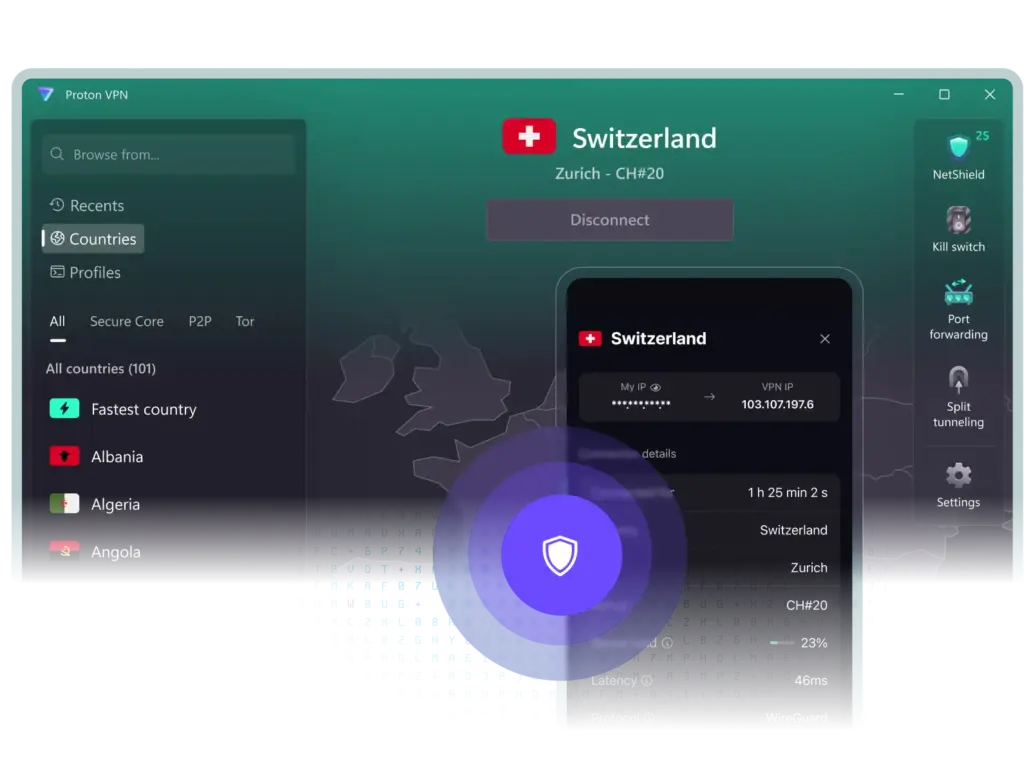
In recent years, Proton VPN has shifted from niche privacy tool to a mainstream pick that balances audited privacy, modern protocols, and day-to-day performance. It ships with WireGuard, OpenVPN, IKEv2/IPSec, and a Stealth protocol for tough networks, plus Secure Core multi-hop, NetShield filtering, and optional port forwarding.
You see, the whole service is built by the team behind Proton Mail, so the privacy posture feels consistent across products. Apps are open-source, independently audited, and easy to use after a recent UI refresh.
The network scale is substantial, with coverage across well over a hundred countries and a large pool of high-capacity servers. Streaming access is strong on eligible plans, and P2P is allowed on designated locations.
I mean, support isn’t 24/7 yet, but response quality is solid and live chat hours cover most of the day in Europe. Altogether, Proton VPN belongs on any shortlist where privacy and streaming must coexist.

Why It’s Important to Have VPN These Days
Daily Internet use leaks more than you may realize: IP address, location hints, device traits, and a trail of DNS queries. A VPN wraps traffic in encryption and swaps your apparent IP for a server’s, reducing tracking across networks you don’t control. That matters on café Wi-Fi, school networks, airports, and rentals.
Furthermore, many services now geo-fence content, price, or features. A reputable VPN lets you choose a region to regain a consistent experience while still encrypting transport. You see, even at home, your ISP can monetize DNS lookups or throttle certain traffic. A VPN’s private DNS and tunneling blunt both behaviors.
I mean, a VPN isn’t a cure-all: it won’t fix malware, weak passwords, or scam sites. But combined with a password manager and updates, it forms a practical baseline.
But not all VPNs are made equal, and you’ll want one with independent audits, modern ciphers, and clear policies rather than marketing slogans.
Safety Tips While Using VPN
Using a VPN safely is mostly about configuration and habits. Think of the tunnel as a strong corridor; it still matters what doors you open. Below are practical, step-by-step tips that map to how Proton VPN – and similar services – actually work in the real world, including public Wi-Fi, streaming, and P2P scenarios.
Lock in a kill switch before anything else
Turn on the kill switch so traffic stops if the tunnel drops. In Proton VPN, open Settings → Connection and enable Kill Switch (consider Advanced Kill Switch if you want “VPN only” networking). Test it: connect, pull your internet briefly, and confirm apps pause rather than leak.
Match protocol to your network conditions
Start with WireGuard for speed and stability. If a network blocks VPNs, switch to the Stealth option to disguise traffic as standard HTTPS. On restrictive corporate or school networks, let “Smart Protocol” auto-select, then override manually only if you see failures or captchas.
Use split tunneling intentionally, not by default
Split tunneling routes selected apps outside the VPN. Enable it only when necessary – for example, to let a banking app use your real region while the browser stays tunneled. After setup, revisit rules monthly and keep the kill switch requirements in mind when splitting traffic.
Pick server types for your task
For streaming, select Plus-labeled or streaming-optimized locations. For P2P, connect to P2P servers and then enable port forwarding where supported. For maximum privacy, use Secure Core even though it’s slower. Favor nearby servers for gaming or video calls to keep latency down.
Pair the VPN with protective DNS filtering
Turn on NetShield to block known malware, trackers, and ad domains at the DNS layer. This reduces drive-by downloads and cuts page noise. If a site breaks, temporarily downgrade the filtering level rather than disabling the VPN entirely, then re-enable protection afterward.
Mind account, devices, and telemetry
Use a unique email and a strong password for your VPN account, plus two-factor authentication if available. In the app, disable optional usage/crash analytics if you prefer extra quiet. Periodically review signed-in devices and revoke ones you don’t recognize.
Re-check tunnel status during server changes
When you switch servers or protocols, the tunnel briefly re-establishes. Pause sensitive actions during that transition. In desktop apps, wait for the “Connected” state and a new VPN IP before resuming downloads, admin sessions, or streaming logins.
Pros and Cons of Proton VPN
Proton VPN targets privacy first without giving up consumer features like streaming and app polish. Below is how that balance shakes out in practice; the highlights reflect audits, protocol breadth, and special servers, while constraints touch support hours and a few platform quirks.
- Pros
- Cons
► Audited no-logs policy and open-source apps
► Modern protocols (WireGuard, OpenVPN, IKEv2) plus Stealth
► Secure Core multi-hop, NetShield, port forwarding
► Strong streaming access on eligible servers
► Large, globally distributed server network
► Generous device support and clear apps
► No true 24/7 live chat yet
► Free plan excludes streaming, P2P, Secure Core
► P2P allowed only on selected locations
► Occasional captchas/blocks on popular sites
► macOS kill-switch behavior during server swaps can confuse newcomers
► Long-term best pricing requires advance commitment
Expect quick connects, steady throughput on nearby nodes, and reliable streaming unblocks with Plus servers. If you need multi-hop or Tor over VPN, speeds drop as privacy layers increase. The free tier is practical for light use, but the full experience really starts with VPN Plus.
Proton VPN Prices
There are three tiers. Free costs nothing and focuses on basic privacy. VPN Plus unlocks the core feature set most people want. Proton Unlimited bundles the VPN with Proton Mail, Drive, Calendar, and Pass for an all-in privacy stack. Pricing varies with term and promotions.
On long terms, VPN Plus often lands in the low single digits monthly, while month-to-month sits near the standard premium rate. Expect ten simultaneous devices on paid plans, access to the full global network, all protocols including Stealth, streaming unblocking, P2P with port forwarding, Secure Core, NetShield, and Tor over VPN.
Free users connect one device and use a smaller set of locations with unlimited data but without streaming/P2P features. Refunds include a 30-day window, typically prorated by usage. If you’re testing waters, begin monthly, verify the features you care about, then switch to a discounted multi-year plan when confident.
Here’s a more detailed breakdown of the different tiers offered by Proton VPN, including their current pricing (as publicly listed) and what features they unlock.
| Plan | Typical Price* | What You Get |
|---|---|---|
| Free | $0/month | One device, access to a limited set of server locations (e.g., US, Japan, Netherlands, Poland, Romania)
Unlimited data but: |
| VPN Plus | ~$9.99/month if billed monthly ~$4.49/month (~$107 for 2 years) on long-term deal |
Up to 10 simultaneous devices, full access to server network (15,000+ servers in 125+ countries)
Streaming support (Netflix, BBC iPlayer, Disney+, etc.) P2P/torrent support with port forwarding Secure Core multi-hop, NetShield ad/malware filtering. |
| Unlimited (Bundle) | ~ $12.99/month if billed monthly ~$7.99/month on some deals (~$96/year) |
Includes everything in VPN Plus, plus the full suite of Proton products: ► ProtonMail (encrypted email) ► ProtonDrive (secure cloud storage) ► ProtonCalendar ► ProtonPass (password manager). |
You see, selecting the right plan depends on how many devices you have, whether you stream or torrent, and how much value you want beyond just the VPN. I mean, the Free plan is genuinely usable – but if you want full access, you’ll likely move to the paid tier. And also long-term commitments often reduce the monthly cost significantly.
How Good Is the Proton VPN Free
As free VPNs go, Proton’s offering is unusually usable. It has no data cap, avoids ads, and uses the same encryption and audited apps as paid tiers. You’ll get a handful of entry locations and one device at a time. Performance fluctuates at peak hours because free servers carry heavier load.
Streaming libraries and torrenting are intentionally excluded, and advanced toggles like Secure Core or NetShield are locked. For everyday privacy on public Wi-Fi, that’s acceptable; you’ll still encrypt traffic and hide your IP. If you plan to stream regularly or seed torrents, stepping up to VPN Plus is the straightforward move.
In practice, casual users report smooth browsing, light streaming on open sites, and stable connects – especially with WireGuard. If a captive portal or network blocks VPNs, try the Stealth protocol. If speed dips, reconnect to rotate within the free pool; that often lands you on a less busy server without extra tinkering.
Conclusion
Proton VPN nails the fundamentals: audited no-logs, open-source apps, modern protocols, and strong specialty servers. It also performs where consumers notice – snappy connects, reliable unblocking on Plus servers, and practical UI. I mean, support could extend to 24/7 and macOS guidance could be clearer, but the core service is excellent.
If your priorities are privacy with credible transparency, smooth streaming access, and optional P2P with port forwarding, Proton VPN is an easy recommendation. The free plan is genuinely useful for casual protection, and VPN Plus is the sweet spot for most people. The thing is… few VPNs combine privacy pedigree and everyday convenience this well.

Leave a Reply