

If you are seeing strange pop-ups on your PC screen that warn you of expiring antimalware subscriptions (for programs you don’t even use), or if your browser has started to misbehave and to randomly redirect you to odd-looking pages, then you are probably dealing with a browser hijacker.
More specifically, you probably have the Rovno.xyz hijacker currently attached to your browser that’s trying to farm your clicks or get you to engage with the pages and sites that it’s supposed to promote.
We tested that SpyHunter successfully removes Rovno.xyz* and we recommend using it. It will block Rovno.xyz from reinstalling itself and it will make sure your device is clean from any malware.
 Try Free For 7 Days*
Buy now15% OFF if you buy straight without trial.
 OFFER
OFFERNever click anything this hijacker serves you – at best, it will send you to some useless site, and at worst, it could expose you to scams, phishing content, and malware.
On this site, we’ve dealt with annoyances like Rovno.xyz many times before. Touristcore.com and Zarygift.store are two other recent examples of hijackers with a similar goal, and we can confirm that the guide below and the attached professional removal tool – SpyHunter 5 – can help you clean your system and browser and Rovno.xyz from disrupting you.
Rovno.xyz Removal Guide
This tutorial begins with a shorter version that covers the quickest fixes worth trying first. In many cases, those checks are enough to stop the unwanted browser changes. If Rovno.xyz is still present after that, continue with the full guide, which covers the deeper policy and system cleanup.
Quick Checks to Remove Rovno.xyz
- 1.1Open your browser’s Extensions page and inspect it for anything that Rovno.xyz may have added without your approval.
- 1.2If you notice an extension you do not recognize, remove it. Unexpected add-ons are often behind browser changes, so anything that appeared without a clear reason should be deleted.
- 1.3After that, open Privacy and Security settings and check Site Permissions. This area controls things like notifications and pop-ups, which suspicious sites often keep enabled.
- 1.4Remove access for sites you do not know or trust. When you finish, restart the computer and launch the browser again.
Quite often, this shorter cleanup is enough to fix the problem. If Rovno.xyz is still affecting the browser, move on to the full removal steps below.
SUMMARY:
How to Remove the Rovno.xyz Hijacker
The full guide starts by gathering policy information connected to Rovno.xyz inside the browser. You will need those details later when searching for the related records in the system, so write them down carefully before you continue to the deletion steps.
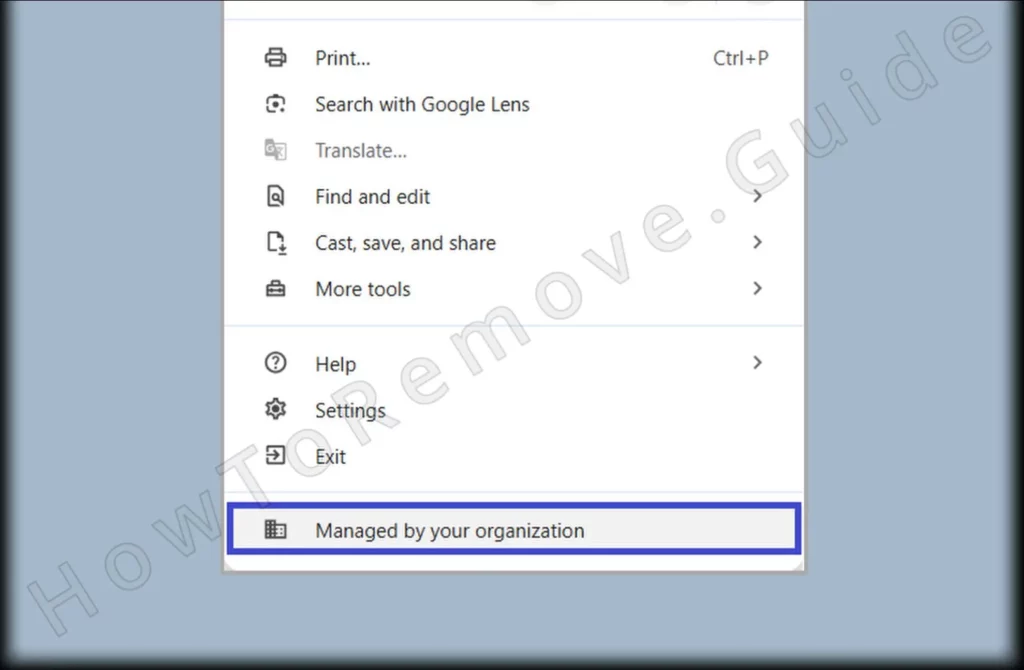
1. Find the Rovno.xyz Policies
- 1.1
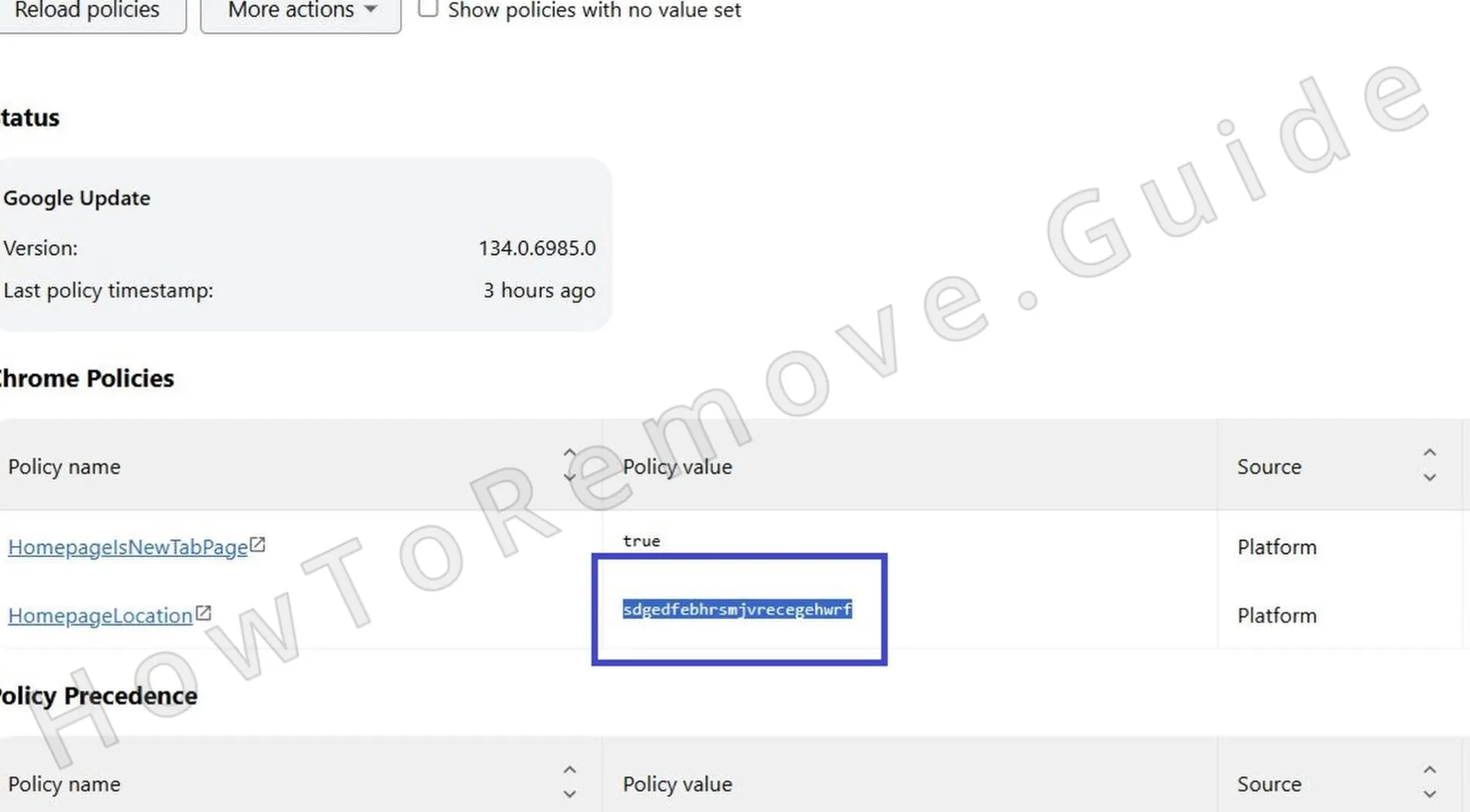 To check whether Rovno.xyz has added rogue policies, type chrome://policy into Chrome’s address bar. If you use another Chromium-based browser, replace chrome with that browser’s name.
 - 1.2A list of active policies will appear there. Entries with random characters or meaningless text in the Value column are the ones that matter, so write them down for the next steps.
- 1.3Also return to the Extensions page to collect more details tied to the hijacker policy. Turn on Developer Mode, copy the IDs of suspicious or unwanted extensions, and save them next to the rogue policy values.
- 1.4If the browser blocks access to the Extensions page, use this manual method instead. Open File Explorer and go to this location:
C:\Users[Your Username]\AppData\Local\Google\Chrome\User Data\Default\Extensions - 1.5
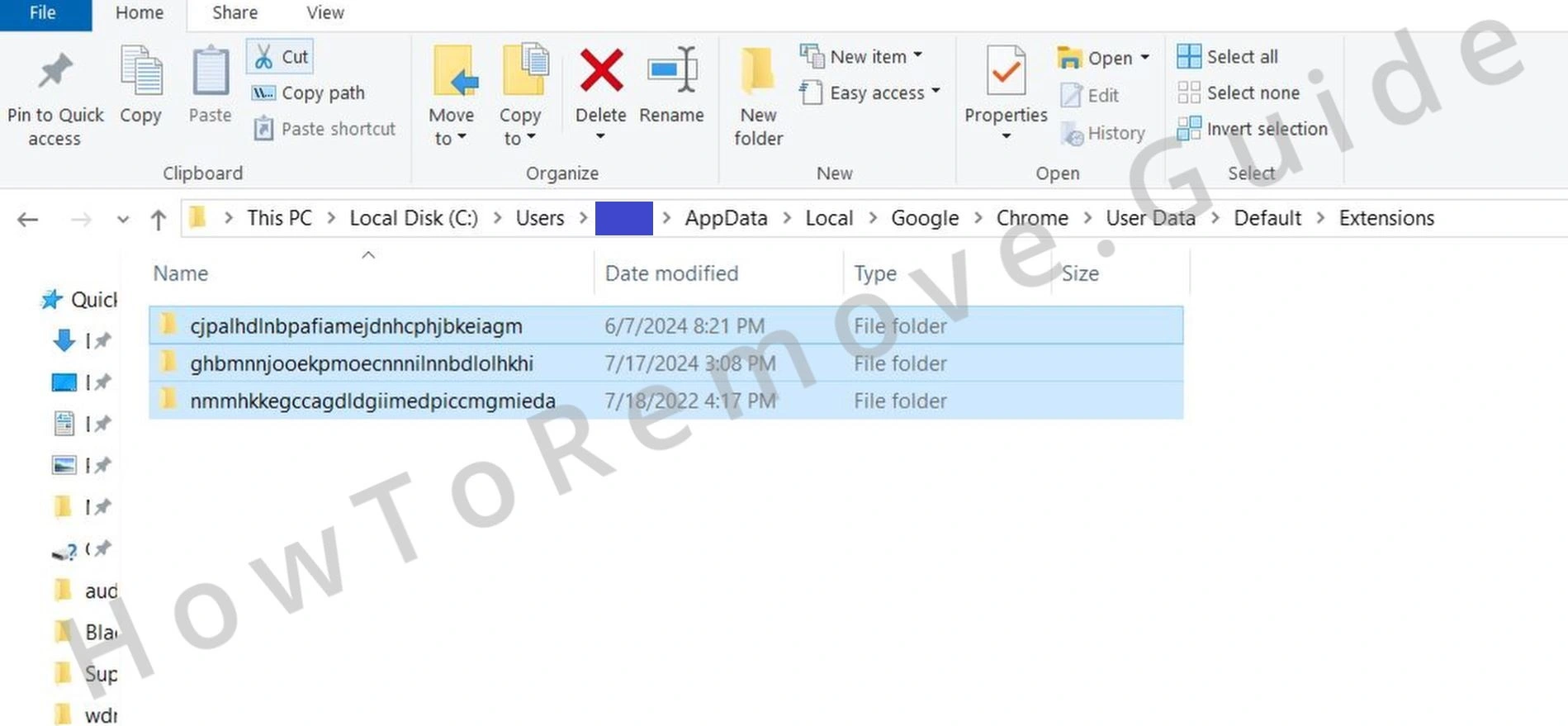 Delete everything in this folder to remove all installed extensions, including any hidden ones that may still be causing browser problems.
 - 1.6
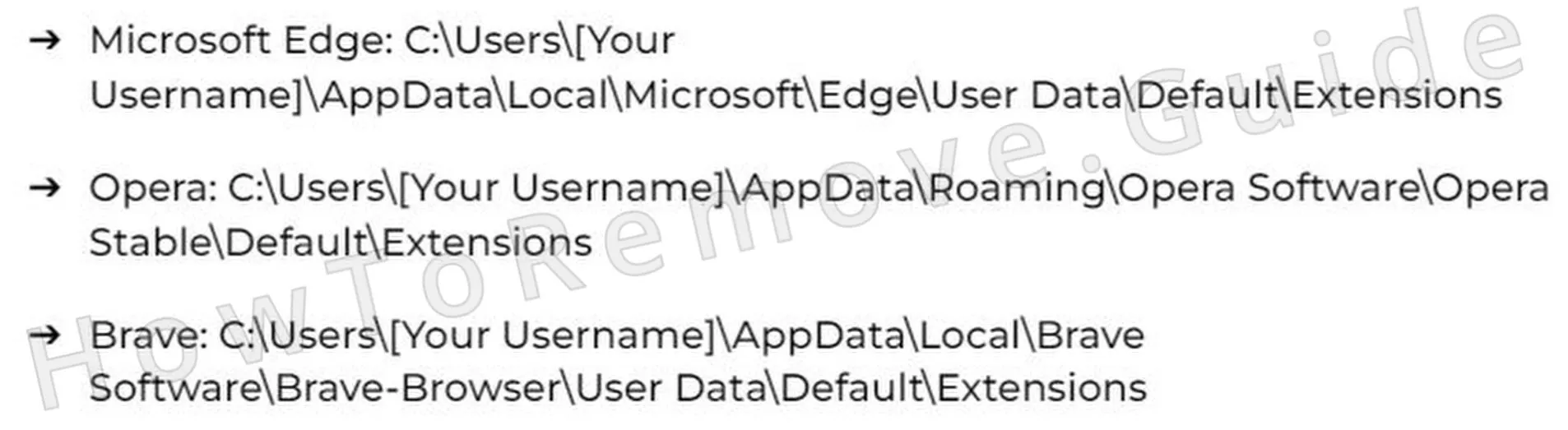 Other browsers have similar extension directories:
 - 1.7After that, return to the Extensions Manager page in your browser.
We tested that SpyHunter successfully removes Rovno.xyz* and we recommend using it. It will block Rovno.xyz from reinstalling itself and it will make sure your device is clean from any malware.
Try Free For 7 Days*
Buy now15% OFF if you buy straight without trial.
Remove Rovno.xyz Policies
This step uses the information collected earlier to locate hijacker policies in the Registry and remove them manually. Be careful while doing this, because deleting the wrong registry entry can cause system issues. If you want the recommended automatic option instead, use the attached SpyHunter 5 tool.
2. Delete Rovno.xyz Policies Through the Registry
- 2.1To begin removing Rovno.xyz through the Registry, open the Registry Editor by typing regedit into the Start Menu and pressing Enter.
- 2.2Once it opens, use Edit > Find to search for the rogue values you saved earlier. Carefully delete each matching entry, then repeat the search a few times so nothing connected to the hijacker stays behind.
- 2.3
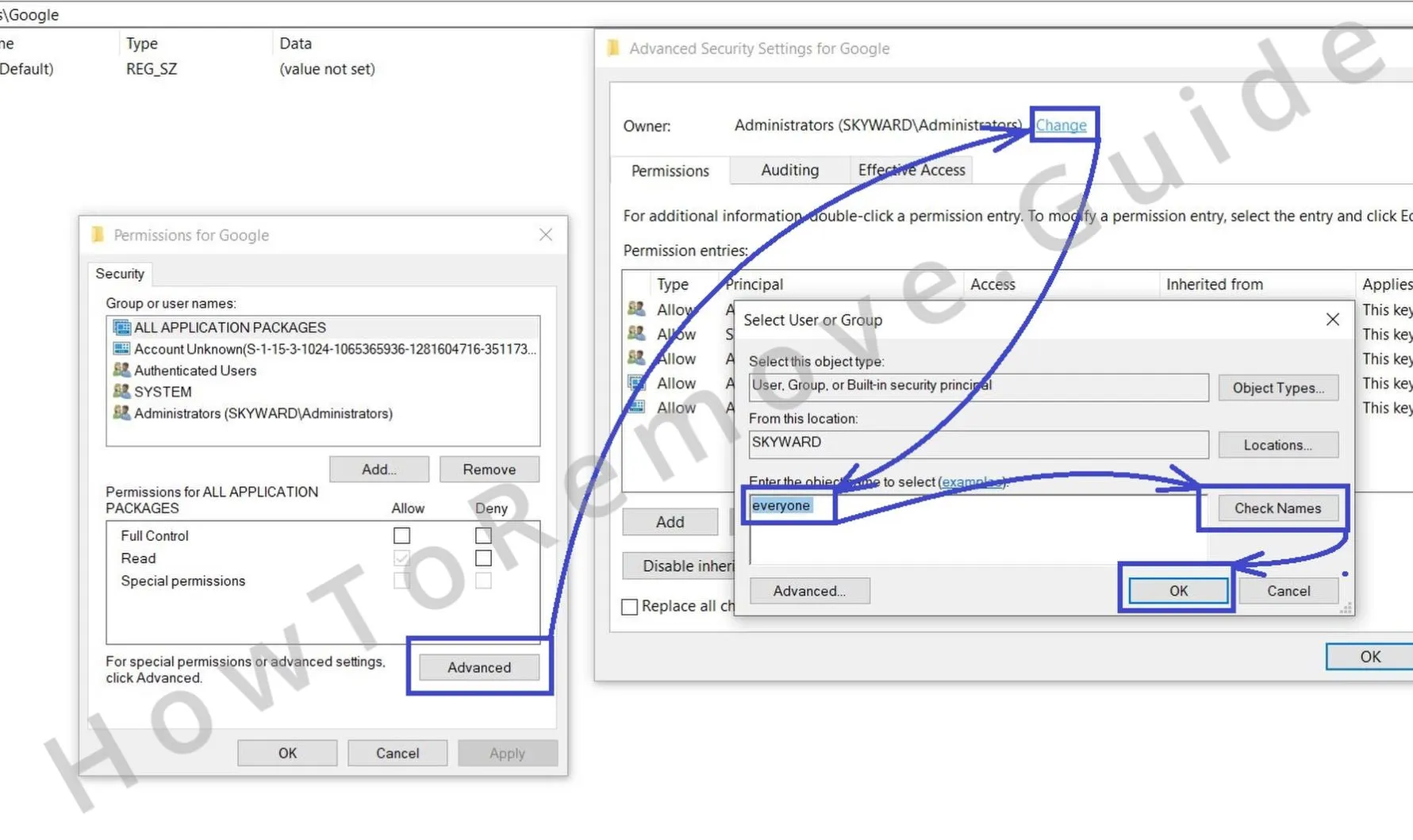 If some entries refuse to be deleted, adjust their permissions. Right-click the blocked key, select Permissions > Advanced > Change, and grant access to “everyone.”
 - 2.4
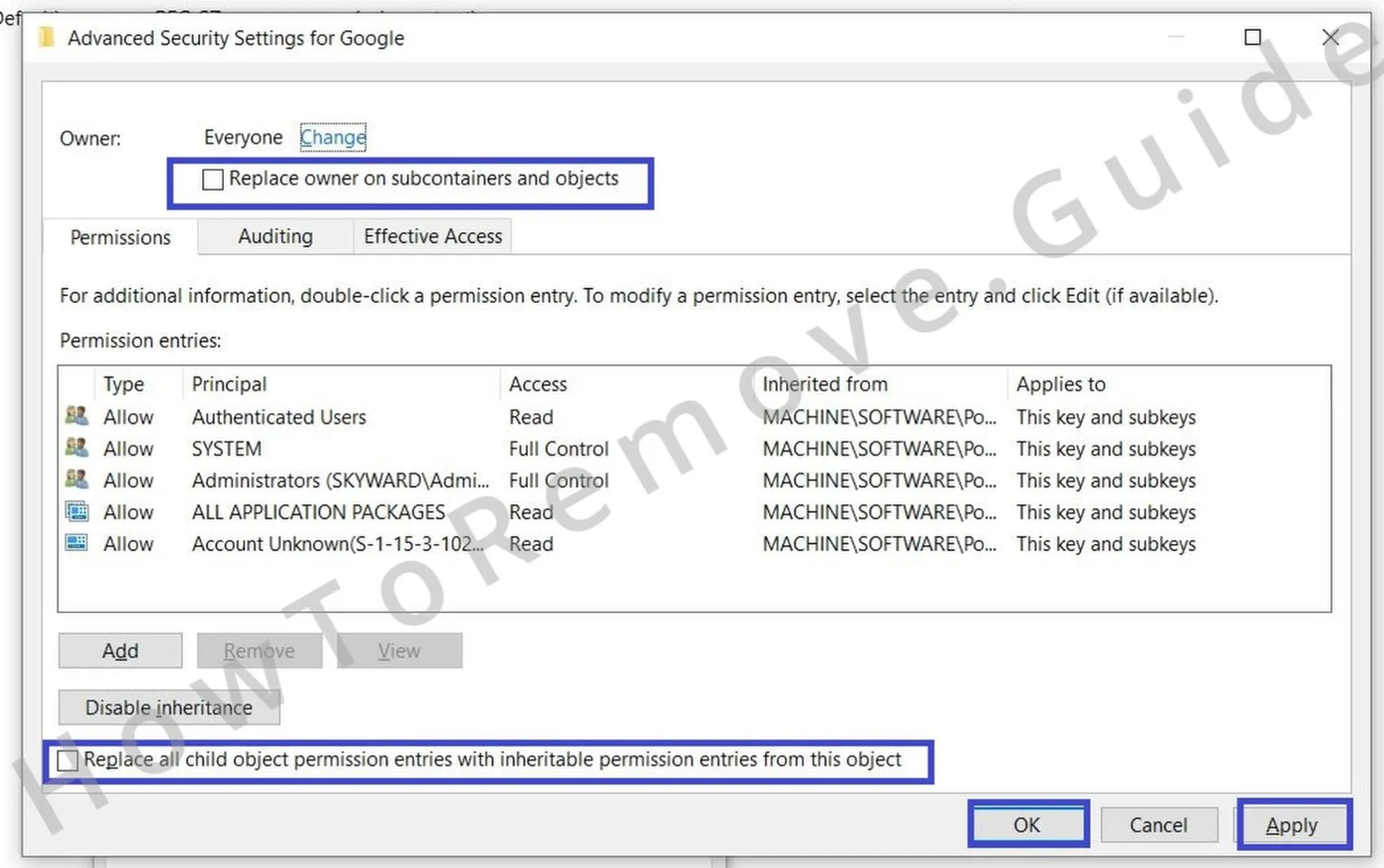 Check both “Replace…” options in the previous window, then click Apply and OK.
This gives you the access needed to delete the rogue key.
Alternative Tools to Delete Rovno.xyz Policies
If the Registry cleanup does not remove every policy linked to Rovno.xyz, use the alternative methods below to search for leftover traces. This extra check is recommended even if the earlier step seemed successful, because some policy entries can remain elsewhere and continue to lock browser settings after the main cleanup.
3. Additional Ways to Remove Rovno.xyz Policies
- 3.1
 Another place to check for Rovno.xyz policy leftovers is the Group Policy Editor, a built-in tool for managing local system policies. Search for edit group policy in the Start Menu, open it, and then go to Administrative Templates.
 - 3.2
 Right-click Administrative Templates and select Add/Remove Templates. Then remove any entries listed in the next window.
 - 3.3Another useful option for Chrome users is the Chrome Policy Remover. Download it from the provided link.
- 3.4After downloading it, run it as an administrator. If Windows shows a warning, select More Info > Run Anyway, and let the tool complete its task.
Uninstall Rovno.xyz From Chrome, Edge, and Other Browsers
This is the final browser cleanup stage, and it works properly only after the hijacker policies have been removed. The steps below cover the main settings areas that Rovno.xyz commonly changes, so go through all of them instead of stopping after the first fix, or some unwanted behavior may remain active.
4. How to Remove Rovno.xyz From Your Browser
- 4.1Start by deleting any browser extensions connected to Rovno.xyz. At this point, they should be removable without the restrictions you saw earlier.
- 4.2
 Next, clear your browsing data. Cached files and cookies often keep traces of unwanted activity. When clearing the data, choose the All Time range so nothing remains.
 - 4.3
 Then return to Privacy and Security settings and focus on Site Permissions. Check that no suspicious sites still keep permissions for notifications or redirects.
 - 4.4
 Do not forget the browser’s search engine settings. Replace any unfamiliar provider with a normal option such as Google or Bing.
 - 4.5Finally, check the On Startup and Appearance tabs for rogue URLs and remove them. Once you finish, the browser should be back under your control.
