

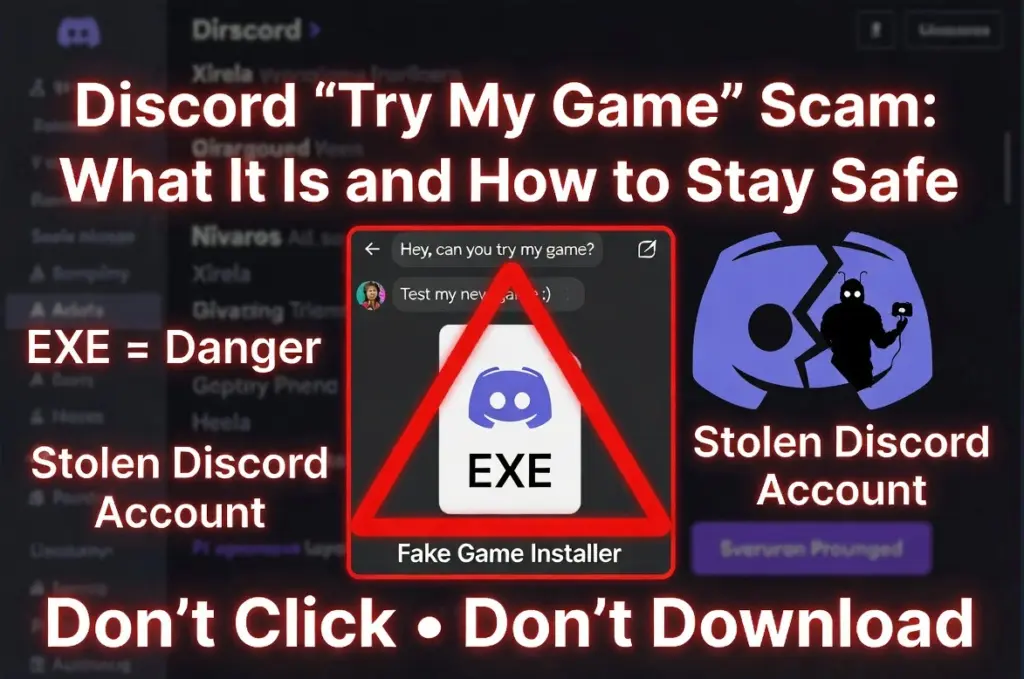
Did you recently receive a Discord DM from a friend, mutual server member, or random account asking you to “try my game,” “test my game,” or help with a small indie project? If so, be very careful before clicking anything, downloading a file, or running an installer. This request may be part of the long-running Discord “Try My Game” scam, a fake game-testing lure used to steal Discord accounts, browser passwords, cookies, payment access, and sometimes more.
The message often seems harmless. It may come from someone you know. It may claim the sender made a game, needs feedback for a project, wants help with a birthday surprise, or urgently needs someone to test a beta. Some victims reported fake game names such as Xirela, StarNovas Beta, DeadTrigger, Nivaros, Livarox, Norelia, Sean Journey, and Inner Evil. Others described fake itch.io-style pages with screenshots, developer blurbs, and download buttons that looked convincing.
Scams like "Try My Game" are known to steal personal data and passwords. Install SpyHunter Pro to scan for risks, remove dangerous trackers, and enable real-time protection.
 OFFER
OFFER*Source of claim SH can remove it. Trial w/Credit card; image is for illustration; full terms.
But the “game” is not the real point. The download may be an EXE, MSI, RAR, ZIP, or fake installer such as Setup Game.exe. Once run, victims have reported Discord crashing, being logged out, losing access to their account, receiving email-change alerts, and seeing PayPal or card activity shortly afterward. This is not a simple prank or harmless link. It is, similar to Microsoft Single Use Code Scam, a serious account-theft and malware scam.
Understanding the Discord “Try My Game” Scam
The Discord “Try My Game” scam works because it exploits trust. Instead of sending an obvious spam message from a stranger, scammers often use accounts they have already stolen. That means the message may come from a real friend, an old contact, a game developer you know, or someone who shares servers with you. One victim said they trusted the request because the person who messaged them had made games before. Another said the sender was an old friend who was plausibly into game development.
The usual premise is simple: someone has made a game and needs you to test it. They may send you to a fake game page, a Blogspot or Blogger-hosted site, a cloud link, a Dropbox download, or a page designed to look like itch.io. Some fake pages impersonated the real indie game Archimoulin. Reported suspicious domains included cakewind[.]blogspot[.]com, carnagev1[.]blogspot[.]com, kelarigame[.]blogspot[.]com, klorigame[.]blogspot[.]com, meraliagame[.]blogspot[.]com, ravielchy[.]blogspot[.]com, ravielchygame[.]blogspot[.]com, tamunagame[.]blogspot[.]com, and veriliagame[.]blogspot[.]com. Other victim reports mentioned sean-journey[.]com and playinnerevil[.]pages[.]dev.
Once the file is run, victims and researchers described several possible outcomes: Discord session tokens may be stolen, saved browser passwords and cookies may be copied, Discord may be modified or forced to log out, and login details or 2FA codes may be captured if the victim logs back in on the infected computer. Some reports also mentioned stolen payment access, Nitro purchases, extortion attempts, and other account compromises involving Gmail, Microsoft, Steam, Spotify, Battle.net, Facebook, and PayPal.
This is why simply saying “I only lost Discord” can be risky. Several victims later realized that saved browser credentials, cookies, and payment-linked accounts may also have been exposed.
What to Do If You’ve Fallen for the “Try My Game” Scam
If you clicked a link, downloaded the file, or ran the fake game, act quickly. The most important point repeated across victim reports is this: do not continue logging into accounts on the infected computer. Use a clean device first.
Disconnect the affected computer: Turn off Wi-Fi, unplug Ethernet, or otherwise isolate the device if you ran the file.
Change passwords from another device: Start with Discord, your email, PayPal, Steam, Google, Microsoft, and any account with saved browser credentials. One victim said the attacker sent them a text file containing Chrome usernames and passwords in plain text, so treat saved browser passwords seriously.
Enable or reset 2FA: Add 2FA to important accounts, but remember that some victims reported attackers bypassing protection through stolen session tokens or by capturing codes after login on an infected Discord client.
Log out all sessions: Revoke active sessions where possible, especially for Discord, Google, Steam, and email accounts.
Check payment activity: Look for PayPal, card, Nitro, Nitro Classic, gift, boost, or voucher purchases. Report suspicious transactions immediately. Victims reported losses or attempted charges such as $15, over $70, and purchases for 3 months of Nitro.
Warn your friends: If your Discord account was taken, tell contacts through another channel not to click links from your account.
Contact Discord support: Victims reported recovery times ranging from 12 hours to 3 days, 8 days, 10 days, and in some cases much longer. Include clear details that your account was compromised through a fake game download.
Clean the device: Run full security scans. Also fully uninstall Discord, remove Discord AppData/cache traces, and remove suspicious fake game files. If compromise appears deeper or continues, many victims chose a clean Windows reinstall.
How the “Try My Game” Scam Tricks You
The scam uses familiar social-engineering techniques, but the Discord setting makes them especially convincing.
It comes from someone you trust: The strongest trick is the compromised-friend effect. A message from a friend feels safer than a message from a stranger. One victim said the scam spread through DMs after accounts were stolen, causing people to receive the malicious link from contacts they had spoken to for years.
It sounds like a normal favor: “Can you try my game?” is casual and low-pressure at first. Other messages add emotional pressure, such as helping with a school project, supporting a job-hunting developer, or contributing to a birthday surprise.
It creates urgency: One reported message said testing would “only take 10 minutes” and was “very urgent.” This discourages careful checking.
It uses fake legitimacy: Some pages include game screenshots, a developer blurb, a download button, itch.io-style design, or even a fake trailer. One scammer allegedly tried to prove the file was safe by showing it on a malware-testing site.
It targets gamers and creators: Indie game communities are built around testing, feedback, and sharing builds. The scam abuses that culture.
Recognizing Warning Signs
Watch out for these specific red flags:
Unexpected game-testing DMs: Messages like “Can you try my game?”, “Can you test my game?”, “I made a game come test it :)”, or “Test my game on Steam” should be treated carefully, even from friends.
Odd behavior from the sender: The person may answer none of your normal questions, speak differently than usual, edit messages after being challenged, delete the link, or pressure you when you hesitate.
Suspicious hosting: A fake indie game hosted on Blogspot, Blogger, Dropbox, Pages.dev, or a random new domain is a major warning sign, especially if it imitates itch.io.
Dangerous file types: Be cautious with EXE, MSI, RAR, and ZIP downloads sent through Discord. Several victims only realized something was wrong after seeing that the “game” was a Node.js-style application or a strange installer.
No search results for the game: Victims reported searching game names like Xirela and finding nothing, then assuming it was safe. Lack of information can itself be suspicious.
Mismatch in names: One user saw a contact mention Nivaros, send a link with the same name, then provide a trailer for Livarox and edit the messages after being asked.
After-running symptoms: Discord crashing, forced logout, QR login not loading, strange login errors, email/password change alerts, PayPal alerts, command windows, browser crashes, or friends receiving scam messages from your account are all urgent warning signs.
How to Handle a Suspicious “Try My Game” Message
If you receive one of these messages, do not click the link, download the file, or run anything. Ask the sender about it through another channel, such as a phone call, text message, or another app. If the account was compromised, the real person may not know their Discord is being used.
If you already clicked the page but did not download or run the file, the extracted reports repeatedly treated that as lower risk than running the executable. Still, do not enter Discord credentials on any fake sign-in page, and do not provide 2FA codes.
If you downloaded the file but did not run it, delete it. Do not open it “just to check.” Several victims were compromised only after running the EXE or installer.
Reporting the Scam
Report the suspicious Discord account, message, and link. If the page is hosted on Blogger, Dropbox, Steam, Discord, or another platform, report it there too. If your account was stolen, submit a Discord support ticket as soon as possible and explain that it was compromised through a fake game download.
Also report fraudulent PayPal or card charges immediately. One victim said PayPal refunded them exactly 4 hours after opening a case; another advised contacting PayPal support directly if the initial dispute fails.
Useful Resources for Scam Reporting and Prevention (By Country)
Find the right reporting channel below
| Country / Agency | URL | Category / Use-case | Phone/Email |
| Australia – Crime Stoppers | https://www.crimestoppers.com.au | Anonymous tips about crime | 1800 333 000 |
| Australia – National Anti-Scam Center (Scamwatch) | https://www.scamwatch.gov.au/report-a-scam | General scams; phishing; texts/emails | |
| Australia – Police Assistance Line (non-emergency) | https://www.police.gov.au | Local police report | 131 444 |
| Australia – ReportCyber (ACSC) | https://www.cyber.gov.au/report | Cybercrime (hacks, fraud, extortion) | |
| Canada – Canadian Anti-Fraud Center (CAFC) | https://www.antifraudcentre-centreantifraude.ca/report-signalez-eng.htm | General scams incl. phone/text/email | |
| France – DGCCRF (SignalConso) | https://signal.conso.gouv.fr | Consumer scams/deceptive practices | |
| France – PHAROS – Internet-Signalement | https://www.internet-signalement.gouv.fr | Online content & cybercrime reports | |
| Germany – Bundeskriminalamt / Local Police | https://www.polizei.de/Polizei/DE/Home/home_node.html | Report online fraud | |
| Germany – Weißer Ring – Victim Support | https://weisser-ring.de | Victim support | 116 006 |
| India – DoT Helpline (Sanchar Saathi) | https://sancharsaathi.gov.in | Fraudulent telecom/SIM related | 155260 |
| India – National Consumer Helpline | https://consumerhelpline.gov.in | Consumer scams | 1800-11-4000 / 1915 |
| India – National Cyber Crime Reporting Portal | https://cybercrime.gov.in | Cybercrime incl. online fraud | 1930 |
| Japan – Consumer Affairs Agency (CAA) | https://www.caa.go.jp/policies/policy/consumer_policy/caution/cybercrime/ | Consumer scams | |
| Japan – National Police Agency – Cybercrime | https://www.npa.go.jp/bureau/cyber/ | Cybercrime reporting | |
| Mexico – Guardia Nacional (National Guard) | https://www.gob.mx/gn | Cybercrime reporting | |
| Mexico – Instituto Federal de Telecomunicaciones (IFT) | https://www.ift.org.mx | Telecom/online services scams | |
| Mexico – PROFECO | https://www.gob.mx/profeco | Consumer fraud & ecommerce | |
| Netherlands – AFM – Report investment fraud | https://www.afm.nl/en/consumenten/themas/beleggen/misleiding-misbruik | Investment/crypto | |
| Netherlands – Fraudehelpdesk | https://www.fraudehelpdesk.nl/melden | General scams (incl. phishing/SMS) | 088-7867372 |
| Netherlands – Politie – Meldpunt Internetoplichting | https://www.politie.nl/themas/internetoplichting.html | Online shopping fraud | |
| New Zealand – CERT NZ | https://www.cert.govt.nz/individuals/report-an-issue/ | Phishing, identity scams | |
| New Zealand – Department of Internal Affairs – Spam | https://www.dia.govt.nz/Spam-Contact-Us | Email/SMS spam | [email protected] |
| New Zealand – IDCARE | https://www.idcare.org | Victim support (identity compromise) | 0800 121 068 |
| New Zealand – Netsafe – Report | https://www.netsafe.org.nz/report/ | Online harms & scams | |
| New Zealand – New Zealand Police (non-emergency) | https://www.police.govt.nz/use-105 | Report fraud/online crime | 105 |
| Nigeria – Economic & Financial Crimes Commission (EFCC) | https://www.efcc.gov.ng | Financial scams incl. crypto/investment | [email protected] |
| Nigeria – Nigeria Police Special Fraud Unit (SFU) | https://www.specialfraudunit.org.ng | Serious fraud | Voice/SMS: 0708 227 6895; WhatsApp: 0812 760 9914 |
| Poland – CERT Polska (CERT.PL) | https://cert.pl/en/report/ | Cyber incidents & phishing | |
| Poland – Dyzurnet.pl | https://dyzurnet.pl | Illegal online content (esp. child protection) | |
| Poland – Polish Police (Policja) | https://www.policja.pl | Report scams to police | |
| Singapore – Anti-Scam Centre / Anti-Scam Helpline | https://www.scamalert.sg | General scams; texts; calls | 1800-722-6688 |
| Singapore – Monetary Authority of Singapore (MAS) | https://www.mas.gov.sg/investor-alert-list | Investment/crypto checks | |
| Singapore – Singapore Police Force | https://www.police.gov.sg/iwitness | Police report (cybercrime) | |
| South Africa – Cybersecurity Hub (CSIRT) | https://www.cybersecurityhub.gov.za | Cyber incidents incl. scams | |
| South Africa – South African Fraud Prevention Service (SAFPS) | https://www.safps.org.za | Identity fraud support | 011-867-2234 |
| South Africa – South African Police Service (SAPS) | https://www.saps.gov.za | Police report (cybercrime unit) | |
| South Korea – Korea Communications Commission (KCC) | https://www.kcc.go.kr | Telecom-related fraud | |
| South Korea – Korea Internet & Security Agency (KISA) | https://www.kisa.or.kr | Phishing, online harms | |
| South Korea – Korean National Police Agency – Cyber Bureau | https://ecrm.cyber.go.kr | Cybercrime reporting | |
| Spain – INCIBE – Oficina de Seguridad del Internauta (OSI) | https://www.osi.es/es/reporte | Cybersecurity & online fraud | |
| Spain – Policía Nacional / Guardia Civil | https://www.policia.es | Report scams to police | |
| Sweden – Crime Victim Authority (Brottsoffermyndigheten) | https://www.brottsoffermyndigheten.se | Victim support & compensation | 090–70 82 00 |
| Sweden – Polisen (Swedish Police) | https://polisen.se | Report fraud/cybercrime | 114 14 (non-emergency); 112 (emergency) |
| Sweden – Swedish Consumer Agency (Konsumentverket) | https://www.konsumentverket.se | Unfair business practices | |
| United Arab Emirates – Abu Dhabi Police – Aman Service | https://www.adpolice.gov.ae | Cybercrime tips/reporting | SMS 2828; 800 2626 |
| United Arab Emirates – Dubai Police – eCrime | https://www.dubaipolice.gov.ae | Cybercrime reporting | 04 606 1600 |
| United Arab Emirates – Ministry of Interior – Cyber Crime Dept. | https://www.moi.gov.ae | Cybercrime incl. online scams | |
| United Arab Emirates – Telecommunications Regulatory Authority (TRA) / TDRA | https://www.tra.gov.ae | Telecom-related scams/phishing | |
| United Kingdom – Action Fraud (NFIB) | https://www.actionfraud.police.uk | General scams & cybercrime (non-emergency) | 0300 123 2040 |
| United Kingdom – Citizens Advice Consumer Service | https://www.citizensadvice.org.uk/consumer/get-more-help/if-you-need-more-help-about-a-consumer-issue/ | Consumer problems & scam guidance | 0808 223 1133 |
| United Kingdom – Financial Conduct Authority (FCA) | https://www.fca.org.uk/consumers/report-scam-us | Investment/crypto & financial services | |
| United Kingdom – National Cyber Security Centre (NCSC) | https://www.ncsc.gov.uk/collection/phishing-scams | Phishing emails & suspicious websites | |
| United Kingdom – Stop Scams UK ‘159’ | https://stopscamsuk.org.uk/159 | Banking APP fraud (direct to your bank) | 159 |
| United States – AARP Fraud Watch Network Helpline | https://www.aarp.org/money/scams-fraud/ | Victim support | 833-372-8311 |
| United States – Better Business Bureau – Scam Tracker | https://www.bbb.org/scamtracker | Business/marketplace scams | |
| United States – FBI Internet Crime Complaint Center (IC3) | https://www.ic3.gov | Internet crime incl. investment/crypto | |
| United States – Federal Trade Commission – ReportFraud | https://reportfraud.ftc.gov | General scams, phishing, texts/emails | 1-877-382-4357 |
| United States – National Center for Disaster Fraud | https://www.justice.gov/disaster-fraud | Disaster-related scams | (866) 720-5721 |
| United States – SEC Tips & Complaints | https://www.sec.gov/tcr | Investment & securities/crypto-asset offerings |
Strengthening Your Device and Account Security
After interacting with this scam, assume the damage may extend beyond Discord if you ran the file. Change saved browser passwords from a clean device, revoke sessions, monitor email alerts, and check financial accounts. Fully remove and reinstall Discord only after deleting old Discord folders and cache. Some victims found that simply regaining the account was not enough because the local Discord installation could still be compromised.
The safest lesson is simple: a friendly Discord DM is not proof that a file is safe. Pause, verify the sender outside Discord, check the real source of the download, and never run an unexpected “game” file just because it came from someone you know.
