

If your browser suddenly says it’s “managed by your organization,” when you try to change some of your settings you’re probably dealing with Nowosama.com. This thing is a BH – a browser hijacker – whose entire goal is to control what you see online. It probably sneaked in with a bundled installer or a fake CAPTCHA (if you were careless enough to allow such a thing) that tricked you into clicking Allow. Once inside, Nowosama.com, similar to Alphazero1-endscape.cc and Api-microservice-us1.com, starts pushing redirects, fake antivirus alerts, and links to shady services that want your money and personal data.
On its own, Nowosama.com doesn’t act like ransomware or a Trojan, but it absolutely exposes you to risky sites and potential malware downloads. That’s why you shouldn’t trust anything promoted by it and should focus on removing Nowosama.com completely as soon as possible. In the guide below, I’ll show you how to take your browser back.
We tested that SpyHunter successfully removes Nowosama.com* and we recommend using it. It will block Nowosama.com from reinstalling itself and it will make sure your device is clean from any malware.
 Try Free For 7 Days*
Buy now15% OFF if you buy straight without trial.
 OFFER
OFFERNowosama.com Removal Tutorial
Move deliberately: make one change, verify the outcome, and note what you altered in case you need to undo it. This measured process eliminates Nowosama.com, silences recurring prompts and redirects, and reduces the chance of re-enabling unwanted settings during cleanup or after a reboot.
Quick Actions to Reverse Nowosama.com Browser Tweaks
- 1.1Open Settings in your browser to begin rolling back changes left by Nowosama.com.
In Chrome, open the ⋮ menu (top-right). In Firefox, use the ≡ menu.
Open Extensions or Add-ons, review every entry, and note anything unfamiliar for later comparison. - 1.2Evaluate each extension: verify the name, icon, requested permissions, and full description.
Copycats often mimic popular add-ons – choose Remove when details don’t line up.
Unsure? Search the exact “extension name” to confirm the vendor and user reports. - 1.3Open Privacy and security, then Site permissions.
Review access to your microphone, camera, location, and notifications.
Disable items you don’t remember approving and keep a brief list so valid ones can be restored later. - 1.4Remove site entries with privileges you never intended under Site permissions.
This cuts off repeated prompts, alerts, and launch-time redirects.
When finished, restart the browser to apply changes and confirm nothing reverted.
If pop-ups and redirects stop now, you’re done. If they persist, components outside the browser may be enforcing policies. Continue to locate and remove the remaining pieces without unnecessary edits.
SUMMARY:
| Name | Nowosama.com |
| Type | Browser Hijacker |
| Detection Tool |
Some threats reinstall themselves if you don’t delete their core files. We recommend downloading SpyHunter to remove harmful programs for you. This may save you hours and ensure you don’t harm your system by deleting the wrong files. |
How to Remove the Nowosama.com Virus
When you see “Managed by your organization,” a policy is enforcing startup settings that a normal reset won’t touch. Follow the steps below to find and remove that control so Nowosama.com can’t restore its preferences. Take your time, verify each change, and keep short notes for checks after reboot.
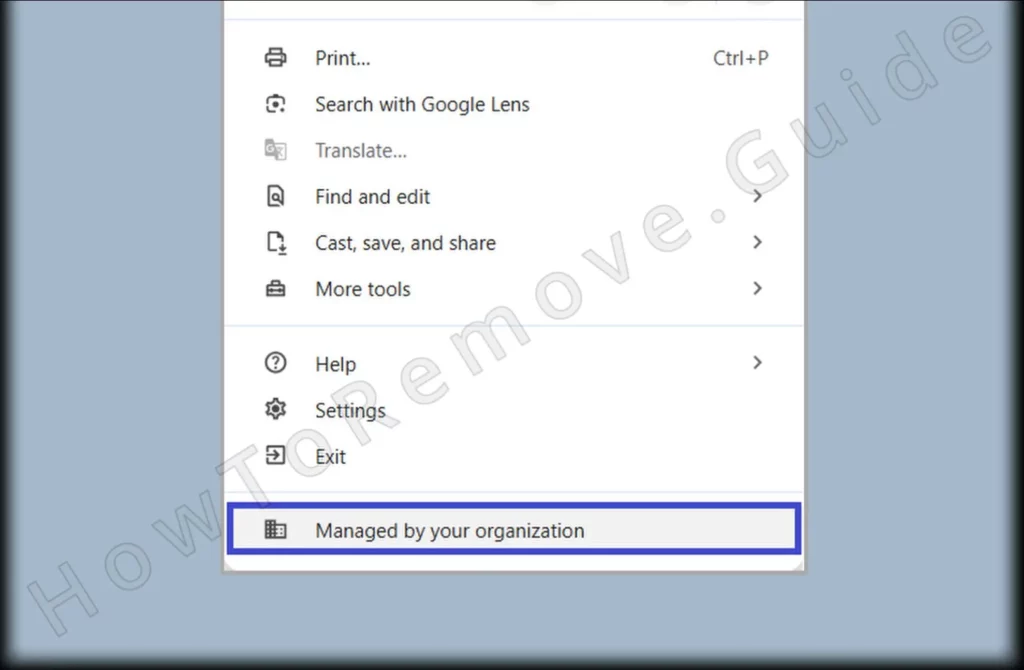
1. Identify Active Nowosama.com Browser Policies
- 1.1
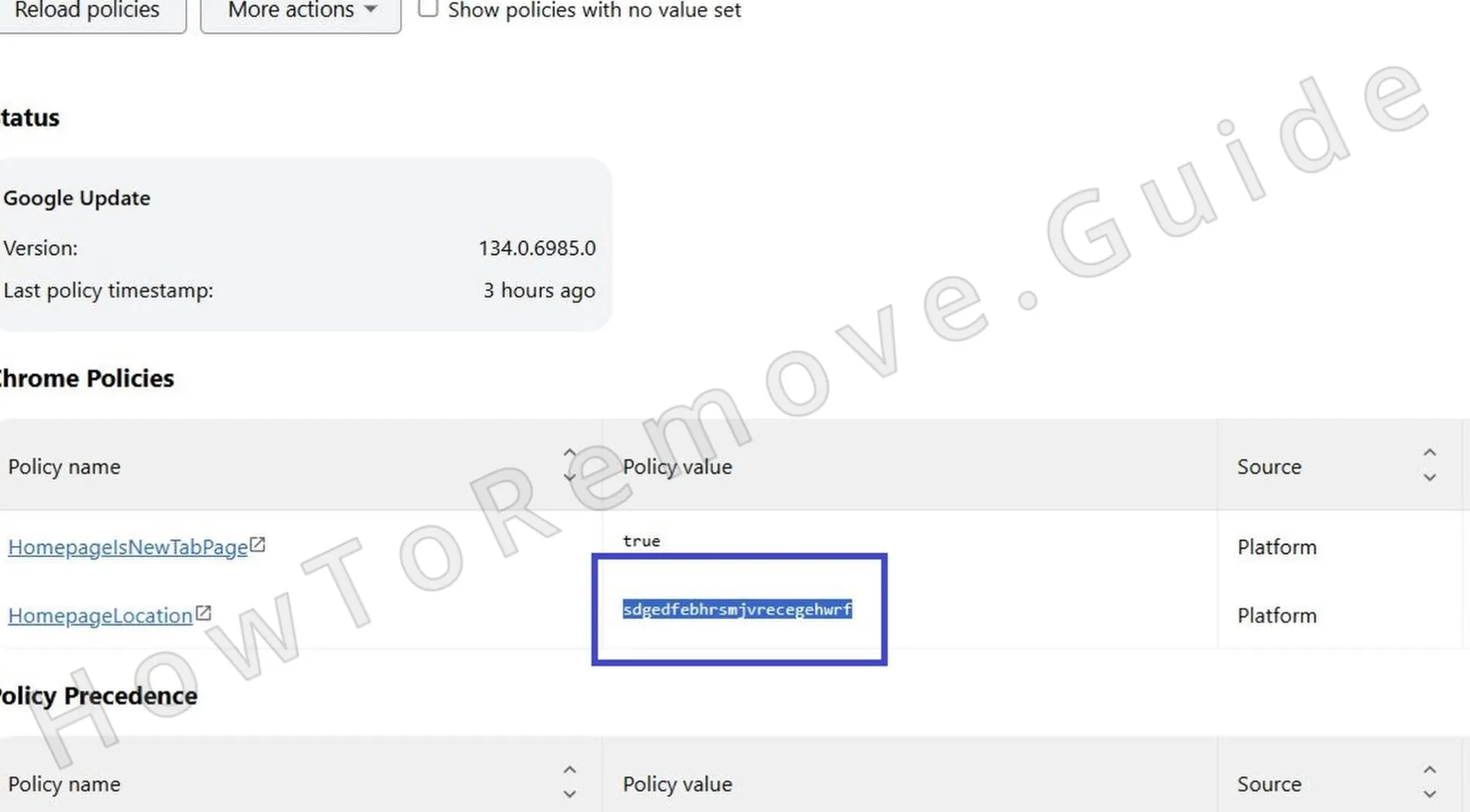 Open the browser policy page to identify entries related to Nowosama.com.
In Chrome: chrome://policy
In Edge: edge://policy
Wait for the list to load, review unusual items, and use Reload policies to refresh or export for comparison. - 1.2Inspect each policy and look for odd identifiers or random strings.
Write down suspect entries so you can match files and folders later.
Record the exact policy Name and Value; these often map to storage paths you’ll remove. - 1.3Open the browser’s Extensions page and enable Developer mode with the top-right toggle.
This reveals extension IDs and install paths for manual cleanup.
Copy each suspect ID into a text file to cross-reference directories later. - 1.4If the Extensions page is blocked or unresponsive, open File Explorer instead.
Review browser files directly to bypass interface issues.
Turn on View > Show > Hidden items so AppData profile folders are visible. - 1.5
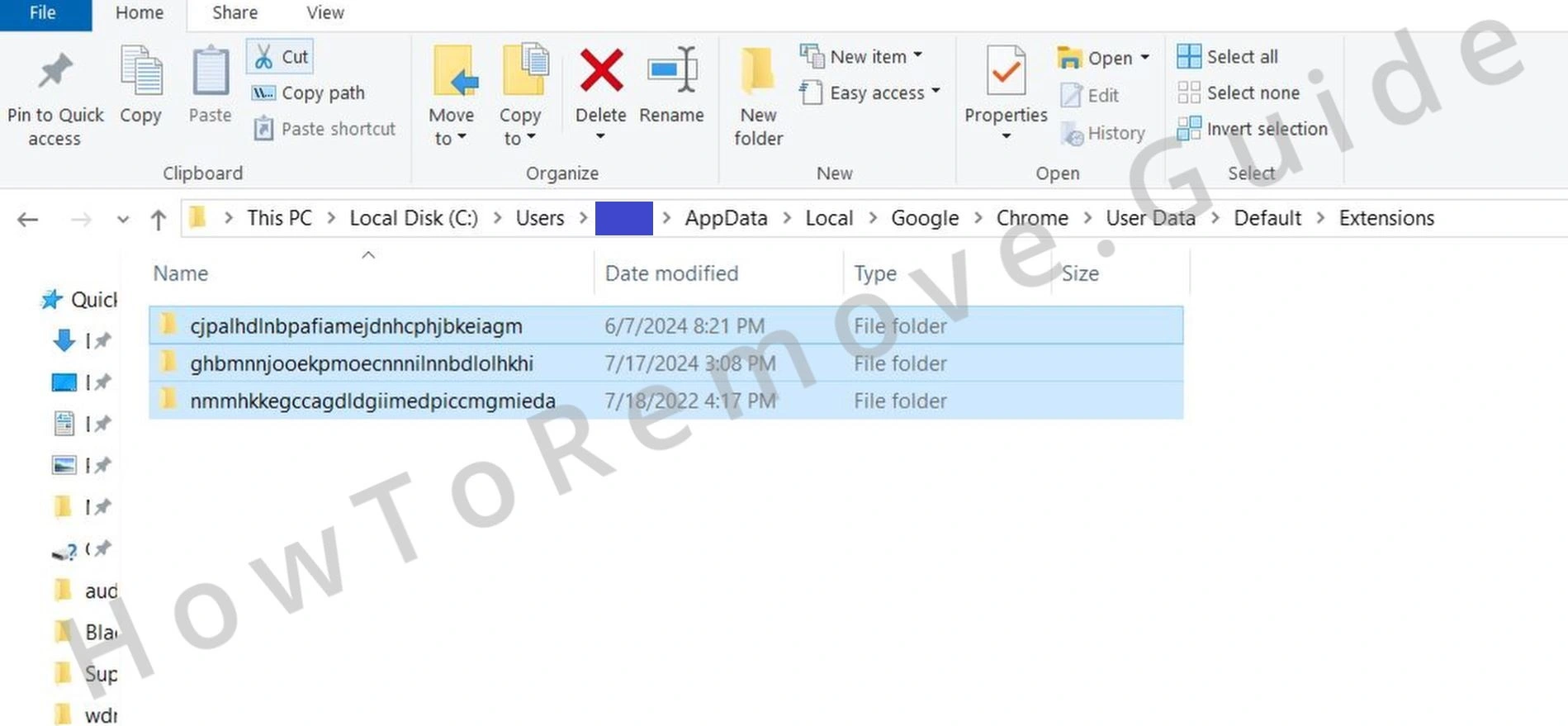 Use File Explorer to open:
C:\Users[Your Username]\AppData\Local\Google\Chrome\User Data\Default\Extensions
Each folder name is an extension ID. Compare IDs with your notes to locate the unwanted add-on. Avoid deleting legitimate entries. Create a temporary desktop backup before deleting to prevent mistakes. - 1.6
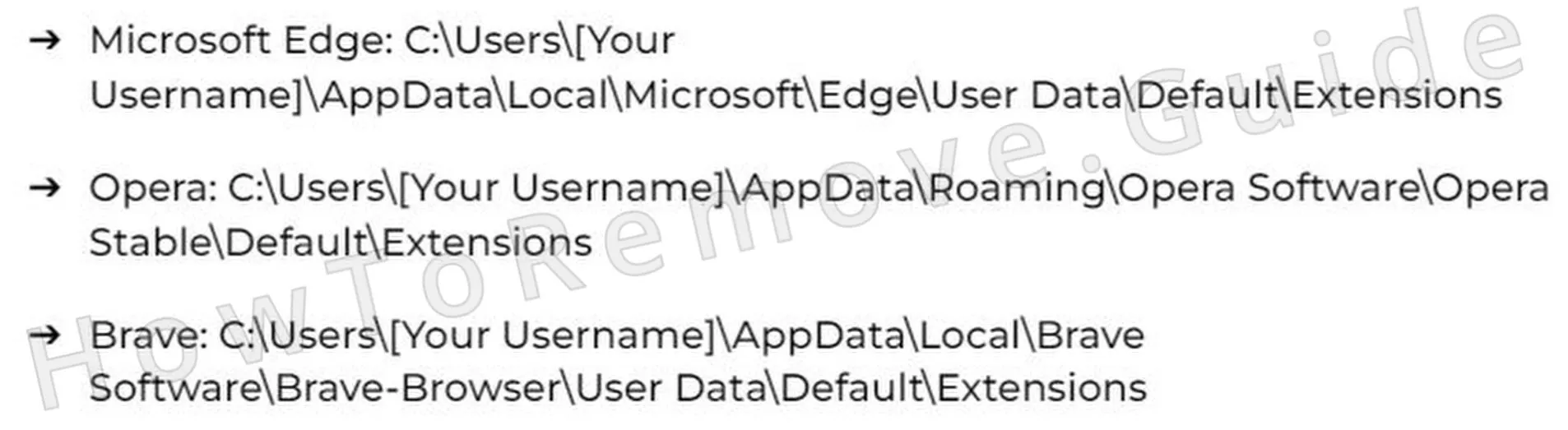 Using another Chromium-based browser such as Brave or Opera? Its extensions live under a similar path in AppData.
Confirm the extension ID and location before deleting any folder tied to the unwanted add-on.
Check the browser’s About page to ensure it’s fully closed so files unlock for deletion. - 1.7After removing the suspect folder, return to Extensions with Developer mode still enabled.
Confirm it’s gone. If it remains, delete it again and look for leftovers that can re-enable it.
Use Update in Developer mode to refresh and expose stealth reinstalls.
Get Rid of Nowosama.com Policies
Some policy entries are stored in the Windows Registry, where careless edits can cause instability. Target only keys tied to Nowosama.com and avoid sweeping changes unless you’re comfortable with registry work. This keeps Windows steady while stripping the enforcement layers that survive normal browser resets.
2. Delete Nowosama.com Policy Keys in the Registry
- 2.1Press Win + R, type regedit, and press Enter to open Registry Editor and begin removing Nowosama.com policy traces.
Before editing, open File > Export to create a backup.
Choose All under Export range and save it to Documents or another easy location. - 2.2Use Ctrl + F or Edit > Find to search for recorded policy names or extension IDs.
Click Find Next and remove exact matches in relevant keys.
Press F3 repeatedly until nothing remains in the HKCU and HKLM hives. - 2.3
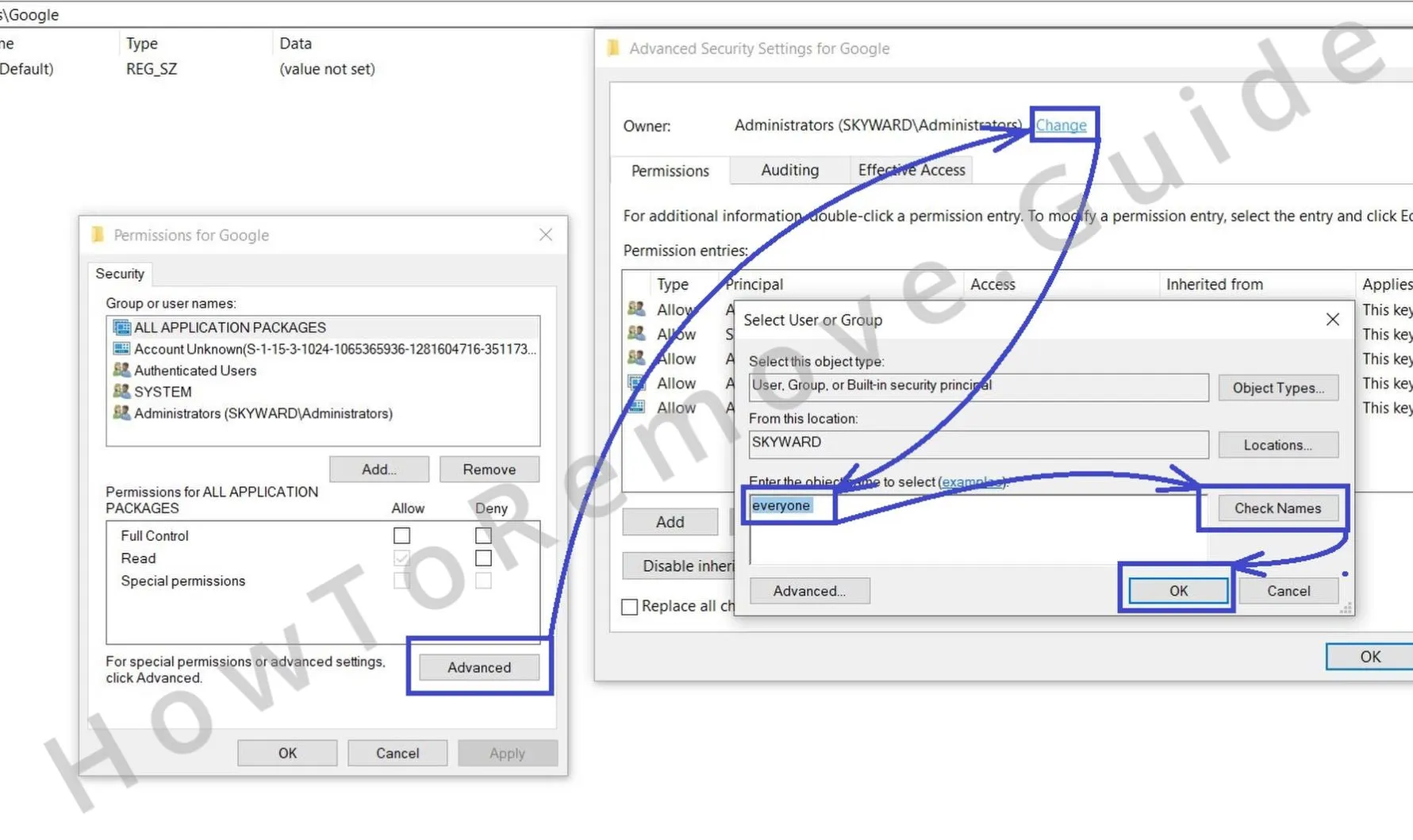 If a key can’t be deleted, right-click it and choose Permissions, then Advanced.
Under Owner, click Change, type Everyone, select Check Names, and confirm with OK.
Grant Full Control to Administrators and Users so the key and subkeys can be removed. - 2.4
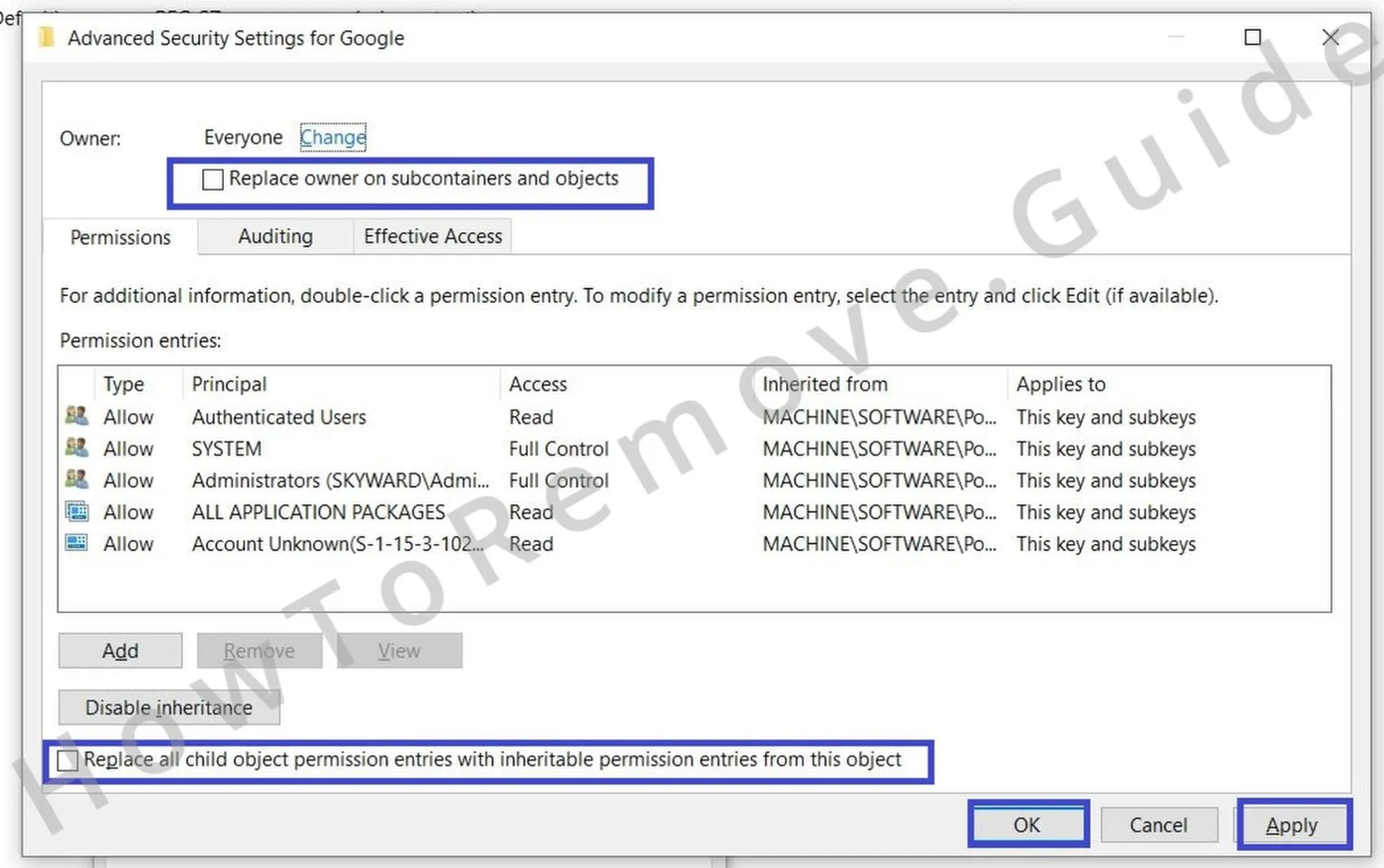 After taking ownership, enable Replace owner on subcontainers and objects and Replace all child object permission entries.
Click Apply, then OK. Reboot and check whether Managed by your organization still appears.
When clear, reopen regedit and repeat searches to confirm no policy values returned.
With ownership and permissions corrected, stubborn keys can be removed cleanly. This lowers the chance that policy data is restored at the next boot and helps prevent your browser settings from being reapplied without consent.
Alternative Tools to Delete Nowosama.com Enforced Policies
Occasionally a leftover service or scheduled task reapplies controls after cleanup. Use focused utilities and the policy consoles to clear the final traces linked to Nowosama.com without broad system changes. Apply these when the managed banner or forced settings return after a restart.
3. Additional Ways to Remove Nowosama.com Enforced Policies
- 3.1
 Open Group Policy Editor with Win + S, search Edit Group Policy, and review entries that could enforce settings for Nowosama.com.
In the left pane, expand Administrative Templates where browser rules are often defined.
Check both Computer Configuration and User Configuration to cover device-wide and per-user scopes. - 3.2
 Right-click Administrative Templates and choose Add/Remove Templates.
Remove templates you didn’t add to roll back restrictions on browser or system behavior.
Then review Policy states under Windows Components for Microsoft Edge or Google Chrome and set unwanted entries to Not Configured. - 3.3For Chrome, the standalone Chrome Policy Remover can detect and delete hidden policy files.
Download from a trusted source, then right-click the executable and choose Run as administrator so it has the required rights.
Open chrome://policy afterward and press Reload policies to confirm only expected items remain. - 3.4If security software or Windows Defender warns about the utility, select More info then Run anyway only when you trust the source.
When the tool finishes, restart the system and review Group Policy Editor and Registry Editor again to ensure policies are gone.
Also check Task Scheduler under Task Scheduler Library for jobs that might restore settings automatically.
Uninstall the Nowosama.com From Chrome, Edge, and Other Browsers
Sync, profile data, and cached files can quietly restore unwanted settings after sign-in or reboot. Confirm your changes persist across sessions so Nowosama.com does not return. Recheck defaults, permissions, and extensions for each profile to ensure nothing is being restored from cloud sync or background processes.
4. Clear Residual Browser Changes from Nowosama.com
- 4.1Open your browser’s Extensions or Add-ons page and rescan for items linked to Nowosama.com.
If something reappears or looks suspicious, click Remove – sync or a background script may reinstall components.
Open chrome://extensions or the equivalent page directly to avoid themed pages that could hide entries. - 4.2
 Open Clear browsing data from Settings. Set Time range to All time and select everything except Saved passwords.
Choose Clear data to remove cookies, cache, and other items that fuel pop-ups or redirects.
Repeat for each profile and enable Clear data on exit if quick reinfection attempts persist. - 4.3
 Go to Privacy and Security > Site settings.
Review permissions for camera, microphone, and notifications. Delete or Block any site you didn’t approve.
Open View permissions and data stored across sites to remove problematic origins in bulk. - 4.4
 Open Search engine settings and choose Manage search engines.
Remove unknown entries and ensure the default is Google, Bing, or DuckDuckGo.
Also review On-device search shortcuts or Site search where hijackers often add persistent custom entries. - 4.5Check on Startup and Appearance.
Remove unfamiliar URLs set as your homepage or new tab page so the hijacker cannot reassert itself via custom pages.
Finally, disable unwanted themes and restore the Default theme to rule out theme-based script injections between sessions.
Want to harden things further? Enable 2FA for important accounts, keep browser and extension auto-update on, and export bookmarks before trying a full Reset settings if symptoms return.
