

A Ren’Py installer virus is usually a fake or altered setup file that looks like a harmless game launcher, but quietly delivers malware after you run it. Recent threat research links many of these cases to the RenEngine loader hidden inside modified Ren’Py-based packages.
These infections are commonly pushed through cracked games, unofficial download pages, misleading ads, or shared archive links, often under names like Instaler.exe or similar. In some campaigns, the visible game can still appear to open, which makes the attack easier to miss at first.
We tested that SpyHunter successfully removes Renpy.infostealer* and we recommend using it. It will block Renpy.infostealer from reinstalling itself and it will make sure your device is clean from any malware.
 Try Free For 7 Days*
Buy now15% OFF if you buy straight without trial.
 OFFER
OFFERThe danger is not just the installer itself. Once active, the payload may collect passwords, browser cookies, email logins, and even wallet data, while some victims report hijacked Discord or webmail accounts soon after execution. That can turn one mistaken click into a broader account takeover.
The safest approach is to avoid third-party downloads and get Ren’Py only from its official site. If the cleanup process feels too technical to follow on your own, SpyHunter 5 can be used to remove unwanted programs and malware while you secure affected accounts.
RenPy Installer Virus Removal Guide
The tutorial below is divided into a short version and a full one for a reason. Start with the quick checks first, since they are faster and sometimes enough to remove the obvious parts of the infection. If the issue remains, move on to the complete RenPy Installer Virus procedure, which covers the areas that are easier to miss.
Quick Steps to Remove RenPy Installer Virus
- 1.1First, go to your downloads folder (This PC > Downloads), sort the items there by date, and see if any suspicious files have been downloaded recently. Found anything fishy? Delete it before continuing.
- 1.2Next, go to the Start Menu, navigate to Settings (the gear icon), and then to Apps.
- 1.3You’ll see all installed programs listed on that page – sort them by installation date and look for RenPy Installer Virus or anything else that looks suspicious, unfamiliar, or unwanted.
- 1.4If you find RenPy Installer Virus or another sketchy app, select it and start the uninstallation process. Be careful when following the uninstallation prompts so that you don’t let anything linked to the program remain on your PC.
-
1.5Afterward, look for the installation directory. You’ll often find it at
C:\UserNames\UserName\AppData\Local\Programs\, but it might also be elsewhere. - 1.6If you find the malware folder, remove it together with any leftover files that might still be in it.
After finishing the quick actions, restart your PC and check again for the unwanted application. That reboot gives Windows a clean chance to load without the removed items. If the app still shows up, do not assume you made a mistake – it usually means some deeper persistence points still need attention.
SUMMARY:
How to Fully Get Rid of RenPy Installer Virus
The full removal process starts with two basic preparations: making hidden files visible and installing a utility that can force-delete locked items. These steps are included first because RenPy Installer Virus may place components in concealed folders and keep certain files in use, which makes ordinary file removal unreliable.
1. Preparing for the RenPy Installer Virus Removal
- 1.1
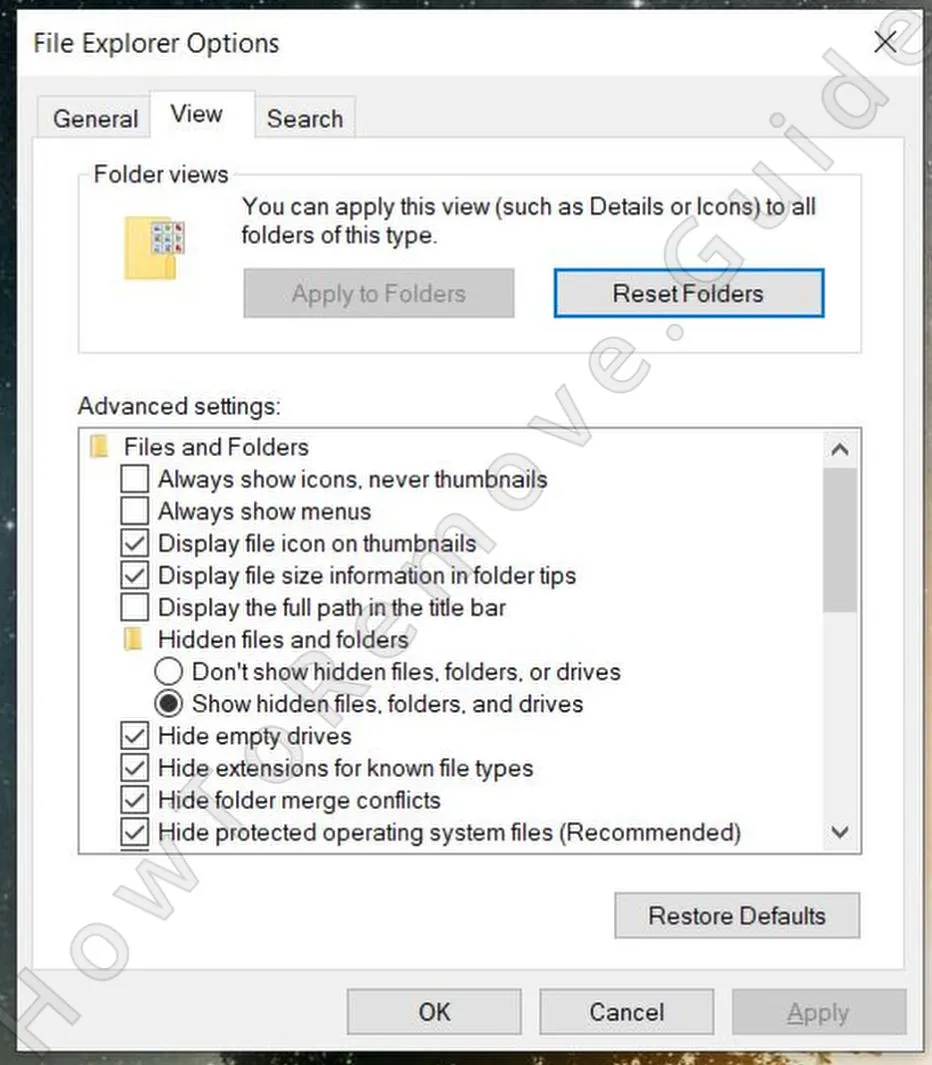 The first preparatory step you must perform is to enable the visibility of hidden files and folders.
Do this by searching for Folder Options in the Start Menu and selecting the View tab. Then activate “Show hidden files and folders” and save the change by clicking Apply and then OK. - 1.2Next, you’ll need to download and install a free utility called LockHunter It’s crucial because it lets you delete files locked by malicious processes.
It is completely understandable if you prefer to avoid extra programs and do everything yourself. In this case, though, a file-unlocker can make a real difference because some malicious files stay tied to running processes and will not delete normally until that lock is broken.
LockHunter is suggested because it is easy to install, does not bury the useful features behind registration, and can usually be ready within a few minutes. That makes it a practical helper for stubborn files without turning the guide into a lengthy setup process.
Remove RenPy Installer Virus Processes From the Task Manager
Now it is time to review Task Manager for processes that may be related to RenPy Installer Virus. There is not always one standard process name to look for, so use context instead of expecting an exact label. Suspicious entries often stand out through odd names, unusual activity, or a file location that does not match a legitimate Windows component.
2. How to Delete RenPy Installer Virus Processes in the Task Manager
-
2.1This is done through the Task Manager which you can open by pressing
Ctrl + Shift + Esc. - 2.2If it shows a simplified view, click More Details to expand it and see all running processes.
- 2.3
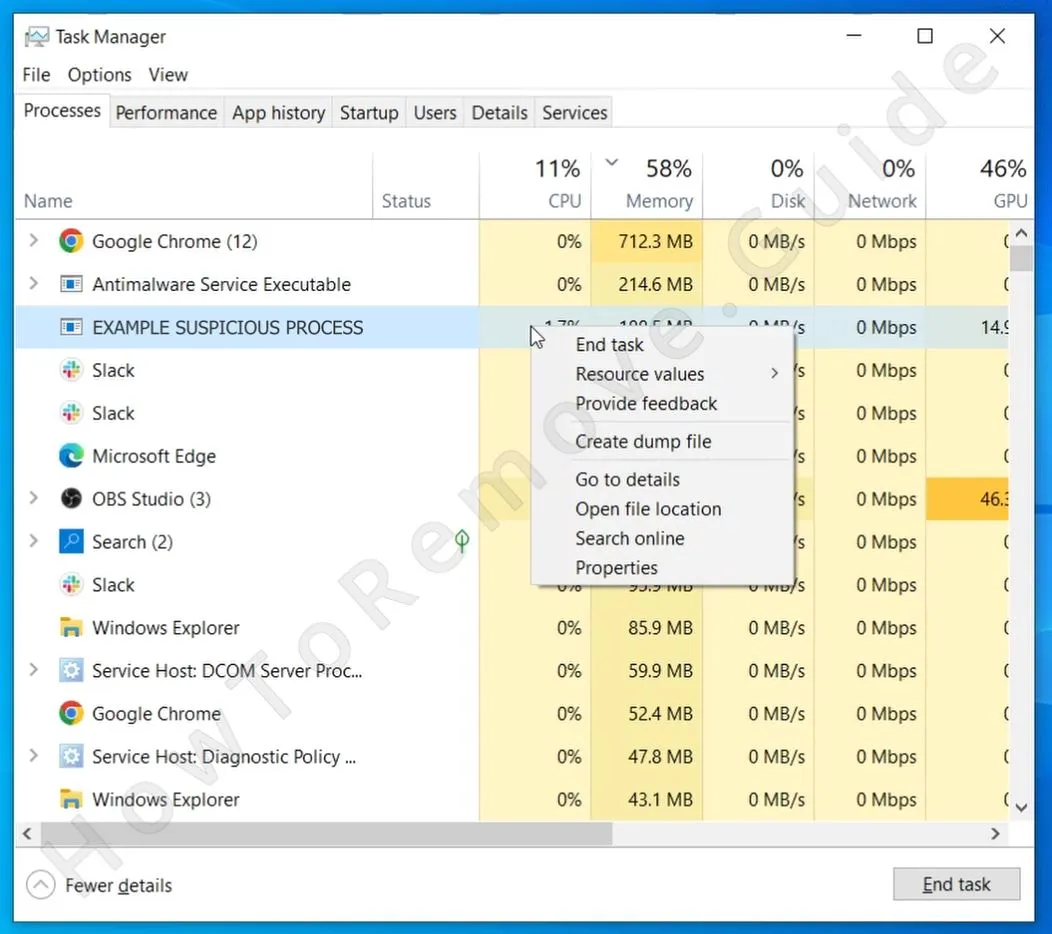 Sort the list of processes by how much Memory or CPU they are using. Then look out for any that are using unusually large amounts of either resource type and yet don’t seem related to any legitimate programs that you have on your PC.
Note: Don’t expect to find a rogue process named “RenPy Installer Virus“. Most forms of malware will hide their processes under innocent-looking names.
- 2.4For each dubious process, right-click it and select Open file location. This will lead you to a folder where the data used by this process is stored.
- 2.5You must delete that entire folder, but you’ll likely get an error when you attempt to do that because some of the files there are in use by the malware. The workaround is to use LockHunter: right-click the folder, select “What’s locking this folder?” from the context menu, and click Delete in the next window.
- 2.6After removing the files, go back to Task Manager, write down the name of the rogue process (you’ll need it later), then click it, and click the End Task button to quit it.
We tested that SpyHunter successfully removes Renpy.infostealer* and we recommend using it. It will block Renpy.infostealer from reinstalling itself and it will make sure your device is clean from any malware.
Try Free For 7 Days*
Buy now15% OFF if you buy straight without trial.
Delete RenPy Installer Virus Files
This stage covers the file search portion of the cleanup. Supporting files tied to RenPy Installer Virus can be spread across multiple directories, including temporary folders and locations inside the user profile, so a quick glance is not enough. Check each path carefully and stay thorough, since leftover files can keep the problem alive.
3. How to Get Rid of RenPy Installer Virus Files
-
3.1Start by examining the Startup folders at:
C:\ProgramData\Microsoft\Windows\Start Menu\Programs\StartupC:\Users\*Your Username*\AppData\Roaming\Microsoft\Windows\Start Menu\Programs\Startup -
3.2Search them for suspicious files, but if you aren’t what files are rogue, just delete everything in those folders except for the
desktop.inifile, which is a standard system file. -
3.3Next, inspect the
Program FilesandProgram Files (x86)in yourC:drive. Some malware apps will create folders there, so look for anything that looks linked to RenPy Installer Virus or that is otherwise unrecognized or out-of-place folders. Delete anything suspicious you may find. -
3.4Three other locations you must check are:
C:\Users\%user%\AppData\Local\C:\Users\%user%\AppData\Local\Programs\C:\Users\%user%\AppData\Roaming\Microsoft\Windows\Start Menu\Programs\
Again, if you notice anything fishy in them, it must be deleted. And if there’s a folder you aren’t sure about, it’s probably best to get rid of it. At worst, it will be something harmless linked to a legitimate program in your system. However, if you didn’t recognize its name right away, chances are it’s something you either don’t need or something that’s outright unwanted (like RenPy Instaler.exe). -
3.5
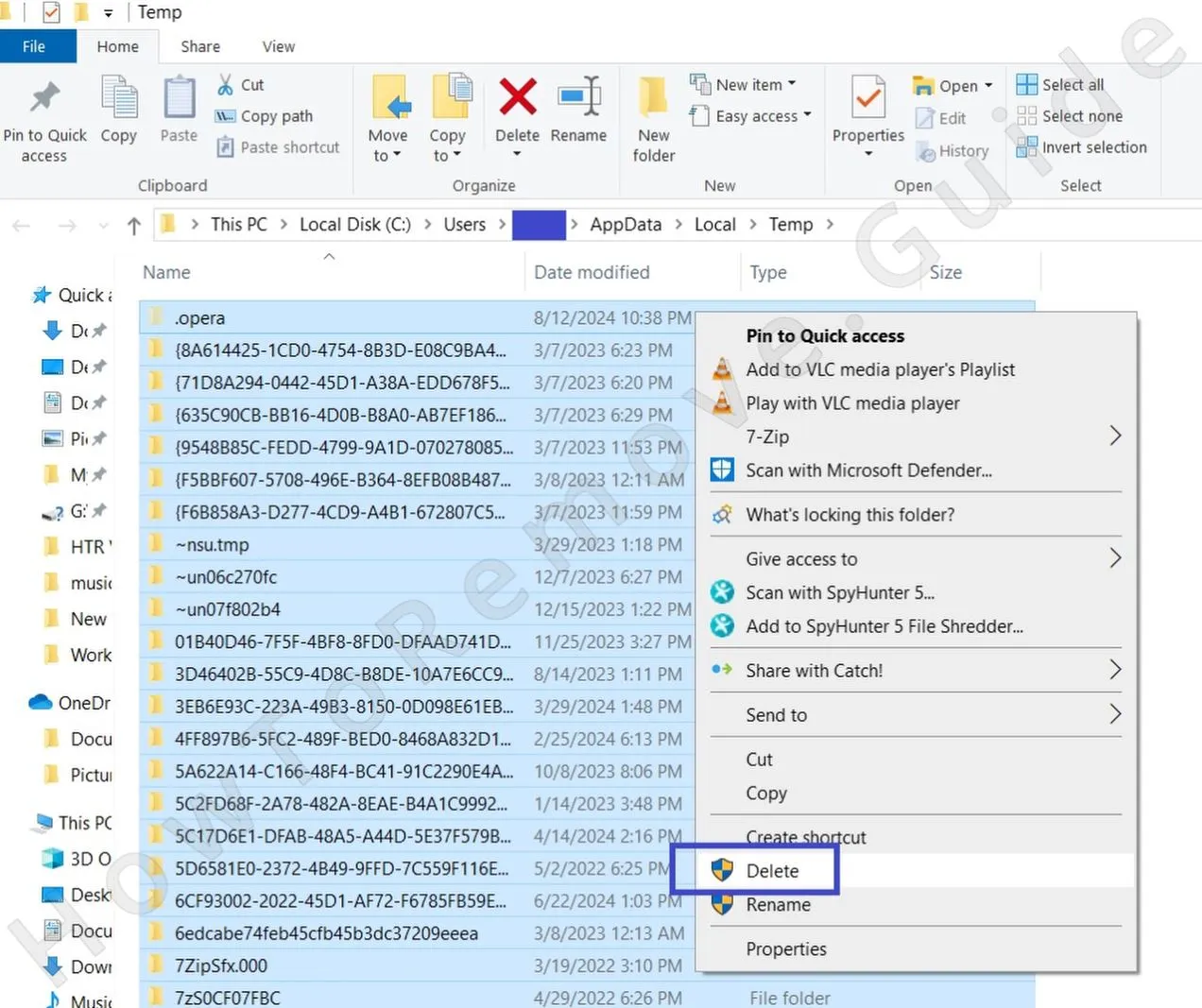 Finally, remember to clear the Temp folder. It’s located at
C:\Users\YourUsername\AppData\Local\Temp.
It stores only temporary files, which are all okay to delete. So, to save yourself some time spent looking for malware files, just Ctrl + A to select everything, and then press Delete from your keyboard to delete all of the folder’s contents.
Get Rid of RenPy Installer Virus Scheduled Tasks
The Task Scheduler check is here because persistence tasks are easy to forget and can undo the rest of your work. RenPy Installer Virus may create an entry that runs a script or executable automatically, allowing the infection to reappear after login or at a scheduled time. Removing that task helps prevent a silent reinstall.
4. Eliminate RenPy Installer Virus Scheduled Tasks
- 4.1
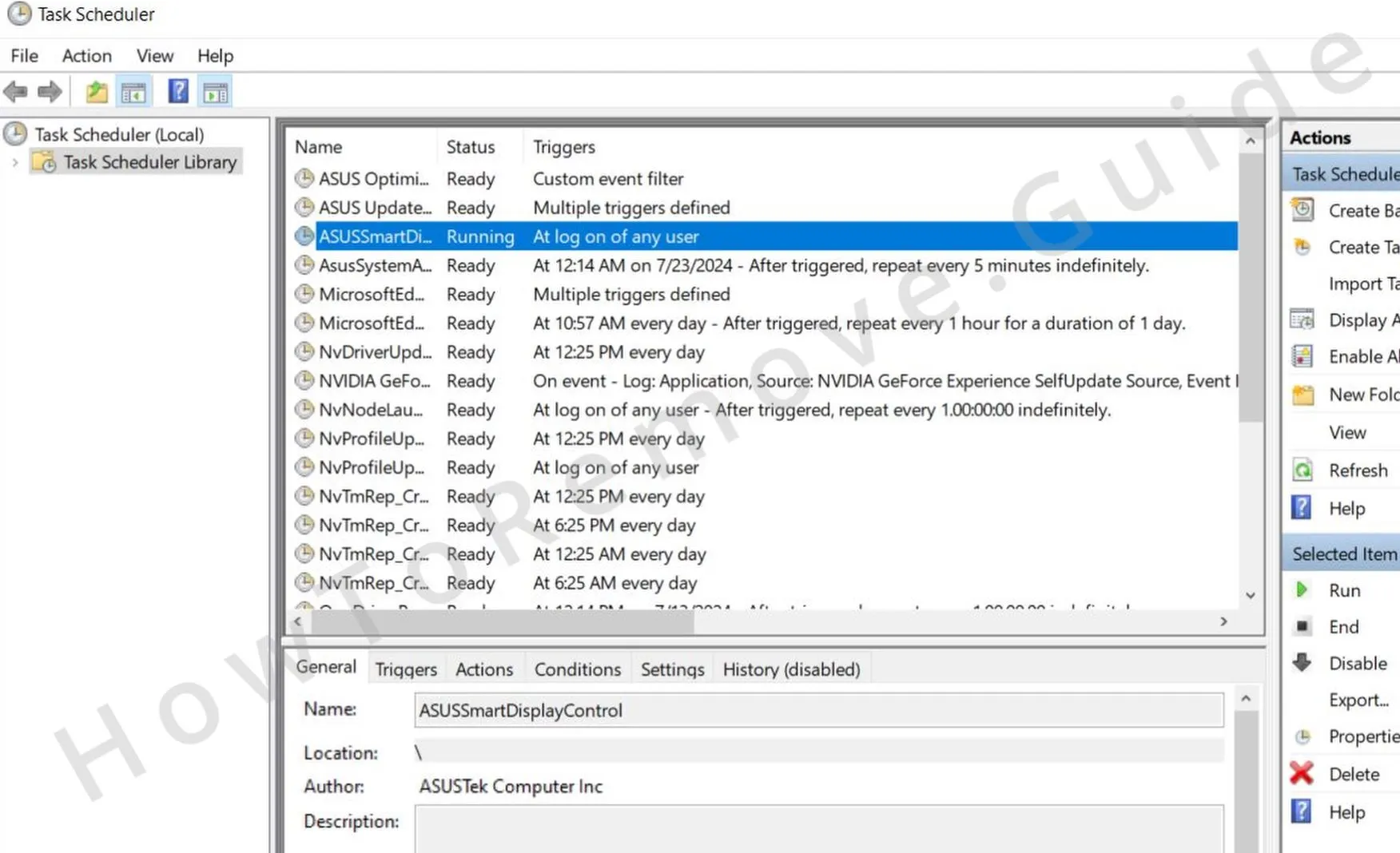 Open the Task Scheduler by searching for it in the Start Menu search bar. Then, one by one, review the scheduled tasks in the Task Scheduler Library.
 -
4.2For each task, double-click it and open the Actions tab, where you can learn what it is that the task is set to perform. Look for tasks that run unfamiliar executables, scripts, or anything located in the
AppDataorRoamingdirectories. - 4.3If you come across a task that executes anything suspicious, write down its file path, then right-click the task, and select Delete.
- 4.4After that, go to the file path you saved and delete the file that the task was set to run.
Uninstall the RenPy Installer Virus App Through the Windows Registry
Registry cleanup matters because Windows can still contain startup values and other references that point back to RenPy Installer Virus after the main files are gone. It is also one of the riskier steps if you do not have experience, since removing the wrong entry may affect normal software. For that reason, SpyHunter 5 remains the safer alternative for registry work.
5. Remove RenPy Installer Virus Through the Registry
- 5.1Type “regedit” in the Start Menu and hit Enter to go to the Registry Editor.
- 5.2Then click Edit > Find to open the search box and then type the exact name of whatever program you tried to uninstall during the quick steps at the start of the guide.
- 5.3Click Find Next and if a result comes up, click the registry key (folder) in the left panel that contains it and delete that key. Perform another search after each deleted key until there are no more results for that search query.
- 5.4Next, search for the name of any other programs you attempted to delete. Also search for the names of processes you ended in the Task Manager earlier in the guide.
-
5.5After you’ve deleted all relevant entries, manually navigate to these registry keys:
HKCU\Software\Microsoft\Windows\CurrentVersion\RunHKCU\Software\Microsoft\Windows\CurrentVersion\RunOnceHKLM\Software\Microsoft\Windows\CurrentVersion\RunHKLM\Software\Microsoft\Windows\CurrentVersion\RunOnceHKLM\Software\Microsoft\Windows\CurrentVersion\Policies\Explorer\RunHKCU\Software\Microsoft\Windows\CurrentVersion\Policies\Explorer\RunHKEY_LOCAL_MACHINE\Software\Microsoft\Windows\CurrentVersion\RunServicesHKEY_LOCAL_MACHINE\Software\Microsoft\Windows\CurrentVersion\RunServicesOnceHKEY_LOCAL_MACHINE\Software\Microsoft\Windows\CurrentVersion\RunOnce\SetupHKEY_LOCAL_MACHINE\SYSTEM\CurrentControlSet\services - 5.6Select each of these keys to reveal their contents in the right panel. Then look for values referencing RenPy Installer Virus or any unknown applications. Delete only the specific values linked to the malware and leave the keys that contain them intact.
