

Shift Browser may look like a harmless browser tool, something meant to make browsing cleaner or more private, but this is where I’d slow down. When an app starts acting outside what you agreed to, that’s a problem.
And this is why I’d treat it as a potentially unwanted program rather than some useful upgrade. It may run in the background, push changes you did not ask for, and make your browser feel like it belongs to someone else.
The big red flag is browser hijacking. If your homepage, new tab, or search engine suddenly changes, do not brush it off. That kind of change can funnel you toward sketchy search results, ads, fake warnings, and pages built to trick you.
We tested that SpyHunter successfully removes Shift App* and we recommend using it. It will block Shift App from reinstalling itself and it will make sure your device is clean from any malware.
 Try Free For 7 Days*
Buy now15% OFF if you buy straight without trial.
 OFFER
OFFERNow let’s talk about privacy, because this part matters. Shift may gather browsing history, search data, cookies, IP details, device information, and other identifiers, which means the issue is not just annoying pop-ups. It may be tracking you too.
So if Shift Browser, Pulse Browser or OneBrowser is already on your system, do not ignore it and hope it goes away. Follow the removal guide carefully, and if that feels too messy, run SpyHunter 5 to scan for unwanted programs.
Shift Browser Removal Tutorial
Use the short removal attempt first because it targets the common starting point for Shift Browser – an unwanted installed program. It takes less time than the full guide and may be enough. If the browser remains affected afterward, continue with the more complete process.
Quick Manual Removal for Shift Browser – Try This First
- 1.1Open your Start Menu and search for “Apps & Features”. This shows every installed program so you can spot potential threats.
- 1.2Sort the list by Install Date. Malware like Shift Browser often disguises itself as a recently added program, so this will help you pinpoint suspicious entries more quickly.
- 1.3Look for anything out of place – programs with strange names, bland or unprofessional icons, or software you don’t remember downloading.
- 1.4If you find a program that raises your suspicions, don’t hesitate. Click Uninstall and follow the prompts. Once that’s done, take it a step further by checking the installation directories for any leftover files.
- 1.5Delete anything that looks like it might be connected to the program you just removed.
After the quick method, reboot and check whether the browser behaves normally. If Shift Browser still triggers redirects, ads, or locked settings, proceed to the advanced guide because a remaining task, file, policy, or registry value may be restoring it.
SUMMARY:
How to Remove the Shift Browser Virus
The full procedure begins with SpyHunter 5 so you can attempt an automatic cleanup before changing system areas manually. This is optional, but strongly recommended for Shift Browser, because a scan may remove the infection in one pass and help you avoid riskier manual edits.
Fastest Removal Option: Use SpyHunter 5
- 1.1Click here to download and install the anti-malware tool on your PC.
- 1.2Start SpyHunter 5, click the Buy button and choose between starting your 7-days free trial or directly purchasing the tool.
If you choose to buy SpyHunter 5 now, you can use our discount code, “HTRG15“, for 15% off.
- 1.3
 Once you activate SpyHunter, click Start Scan Now, select the Full Scan option, and let the tool do its job.
 - 1.4
 Once the scan completes (it could take a while, so have patience), you’ll see all malware and other undesirables listed.
Click Next to review the detections and then click Next again to delete all rogue items.
Preparatory Steps for Removing Shift App
The first manual steps make hidden items visible and prepare a tool for files that Windows will not delete normally. Shift Browser may hide helper components in user-profile locations or keep files locked while active, so this preparation improves your chances of removing everything cleanly.
1. Shift App Removal Preparatory Steps
- 1.1
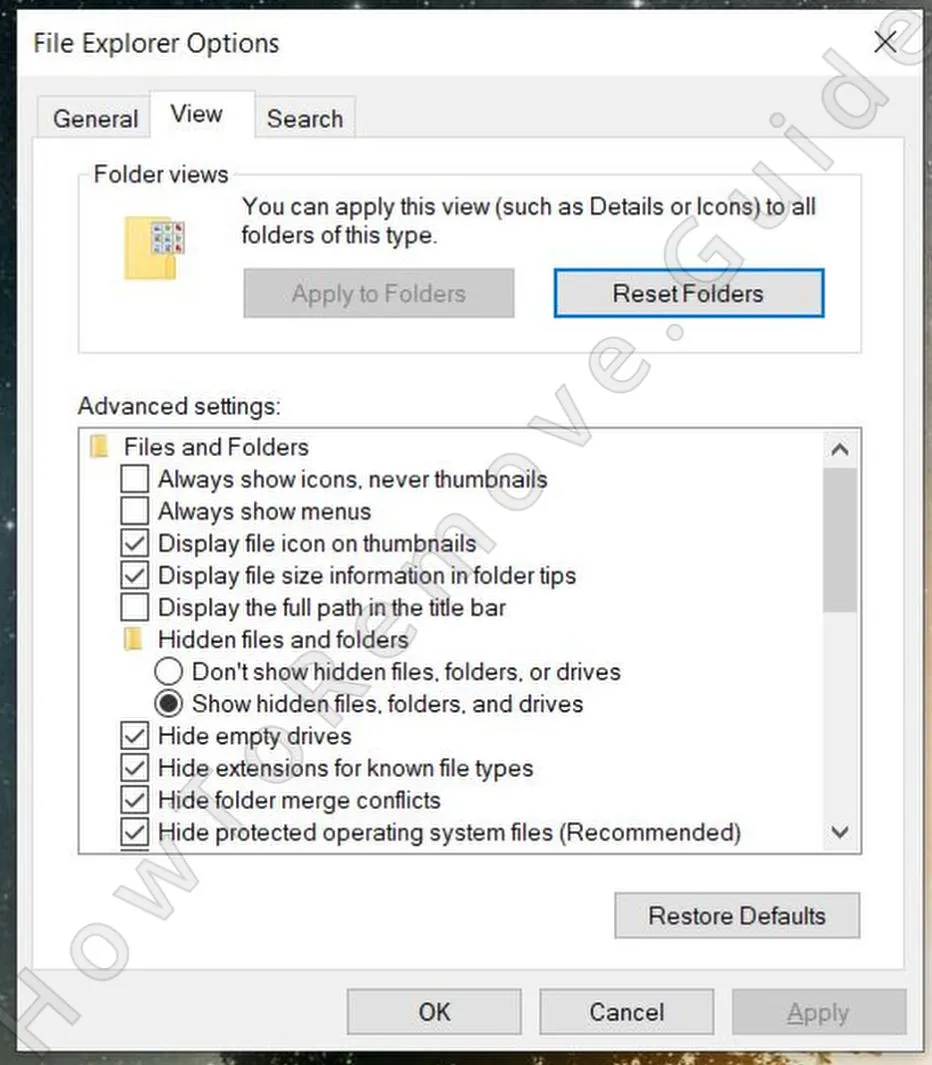 First, open your Start Menu again and search for “Folder Options”. Head to the View tab and check the box that says “Show hidden files, folders, and drives.” Don’t forget to click Apply and OK.
 - 1.2Next, download and install LockHunter – a free and powerful tool that can forcefully delete files that are being blocked by the malware.
LockHunter is recommended here for a practical reason: some adware-related files cannot be removed while a process is using them. If Shift Browser leaves such a file behind, this tool gives you a way to delete it instead of abandoning the cleanup.
Delete the Shift Browser Malware Files
A careful file search is necessary because adware components may not sit beside the visible app. Shift Browser can use multiple folders, including startup and temporary locations, to keep itself available. Inspect every path in this section and remove only items that appear connected to the unwanted software.
2. How to Delete Shift Browser Files
- 2.1With adware apps of this type, there are several locations where you are very likely to find related files. The first key directories to check are:
C:\Users\YourUsername\AppData\Roaming
C:\ProgramData\Microsoft\Windows\Start Menu\Programs\Startup
C:\Users\YourUsername\AppData\Roaming\Microsoft\Windows\Start Menu\Programs\Startup - 2.2
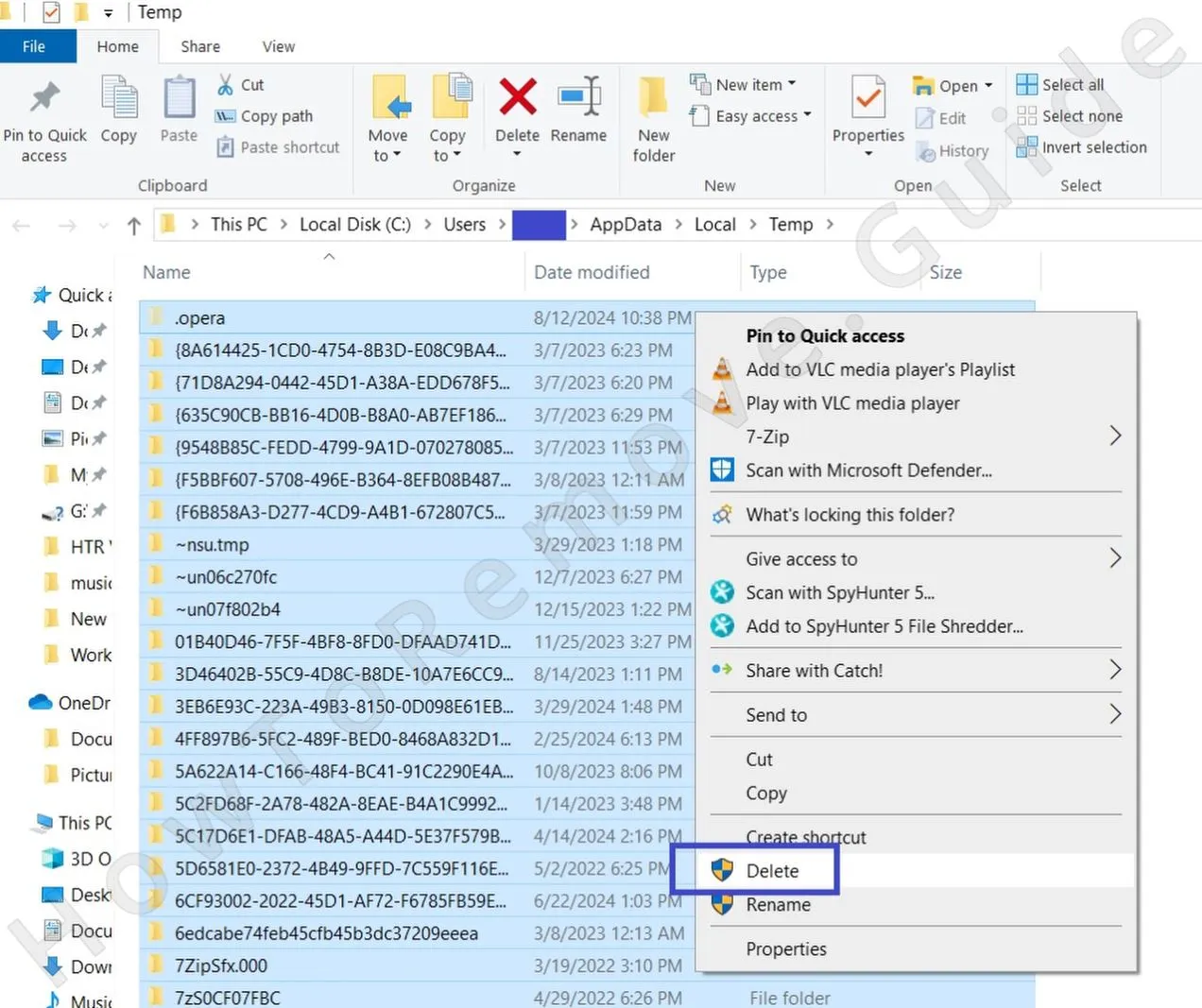 Once you’ve tackled those directories, visit the Temp folder at C:\Users\YourUsername\AppData\Local\Temp. This is like a junk drawer – most of what’s in here is disposable. Select everything (Ctrl + A) and delete it all. Don’t worry, you won’t lose anything important.
 - 2.3Finally, check the Program Files folders:
C:\Program Files
C:\Program Files (x86)
Be cautious here, as these folders contain legitimate software. However, if you see something that seems out of place, don’t ignore it – remove anything that feels suspicious.
Remove Shift Browser Malware Tasks From the Task Scheduler
Task Scheduler cleanup prevents a common comeback route. Shift Browser may create a task that runs a file, script, or web command after login or on a timer. If that entry remains, the adware can reappear even after its visible files have been removed.
3. How to Remove Shift Browser Entries From the Task Scheduler
- 3.1
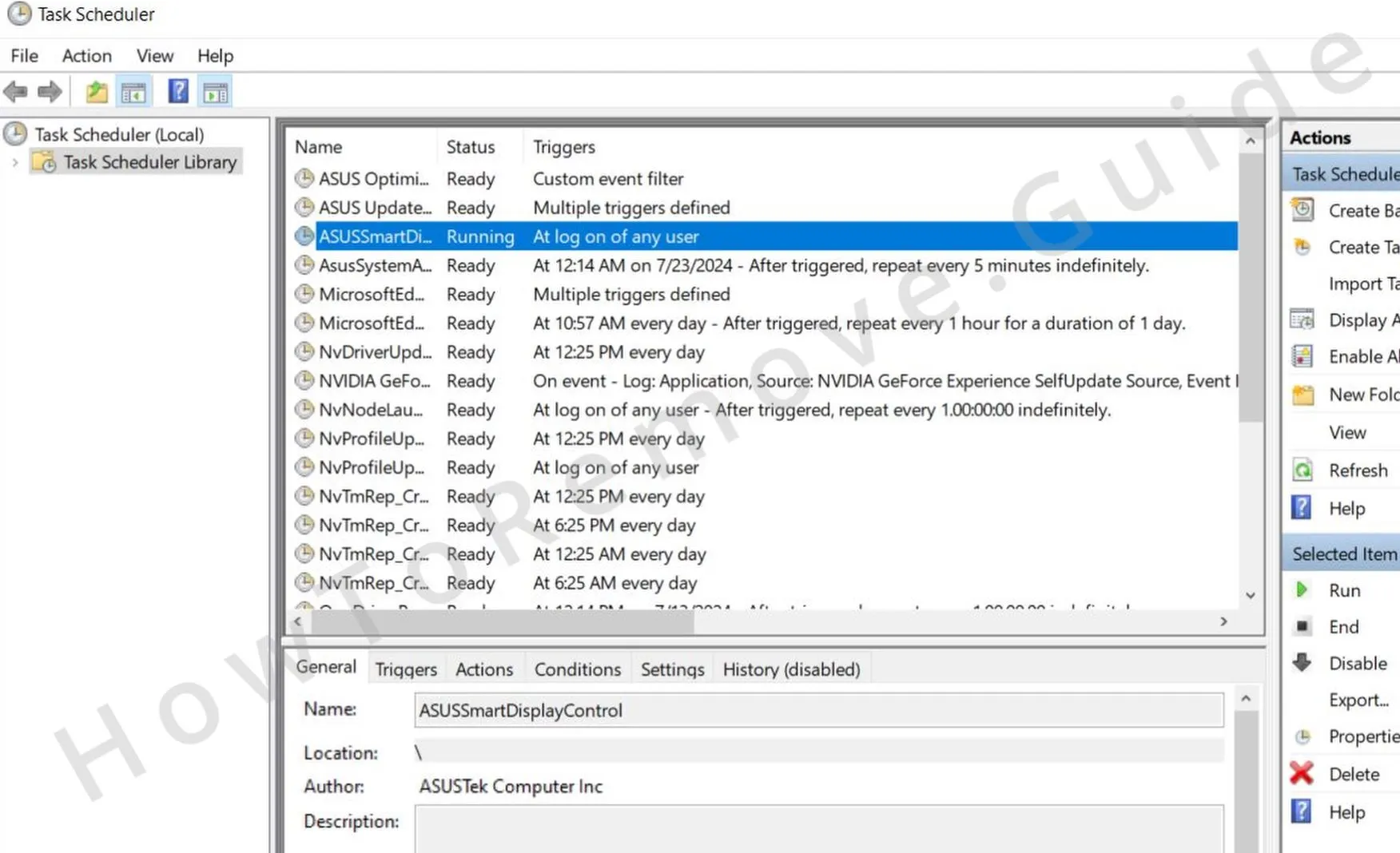 To access your scheduled tasks, type Task Scheduler in the Start Menu search, open the first thing, and click the TashScheduler Library in the top-left.
 - 3.2Go through each task one by one. Double-click to open a task and check its Actions tab. Be on the lookout for anything that launches sketchy .exe files or scripts or attempts to connect to unknown websites.
- 3.3If you spot a task like this, delete it immediately. It’s a tedious step, but missing even one rogue task could undo all your progress.
We tested that SpyHunter successfully removes Shift App* and we recommend using it. It will block Shift App from reinstalling itself and it will make sure your device is clean from any malware.
Try Free For 7 Days*
Buy now15% OFF if you buy straight without trial.
Get Rid of Shift Browser Through the System Registry
Registry entries can keep references to Shift Browser in places that normal uninstallers do not clean. This step can help, but it requires care because unrelated Registry items should not be touched. SpyHunter 5 is a valid safer alternative if you are unsure about manual registry decisions.
4. How to Remove Shift Browser Items From the Registry
- 4.1To remove Shift Browser’s fingerprints, open the Registry Editor by typing “regedit” into the Start Menu. Right-click it and choose Run as Administrator.
- 4.2Use the search function (Ctrl + F) to look for entries related to Shift Browser. When you find something suspicious, delete it, but be careful.
- 4.3
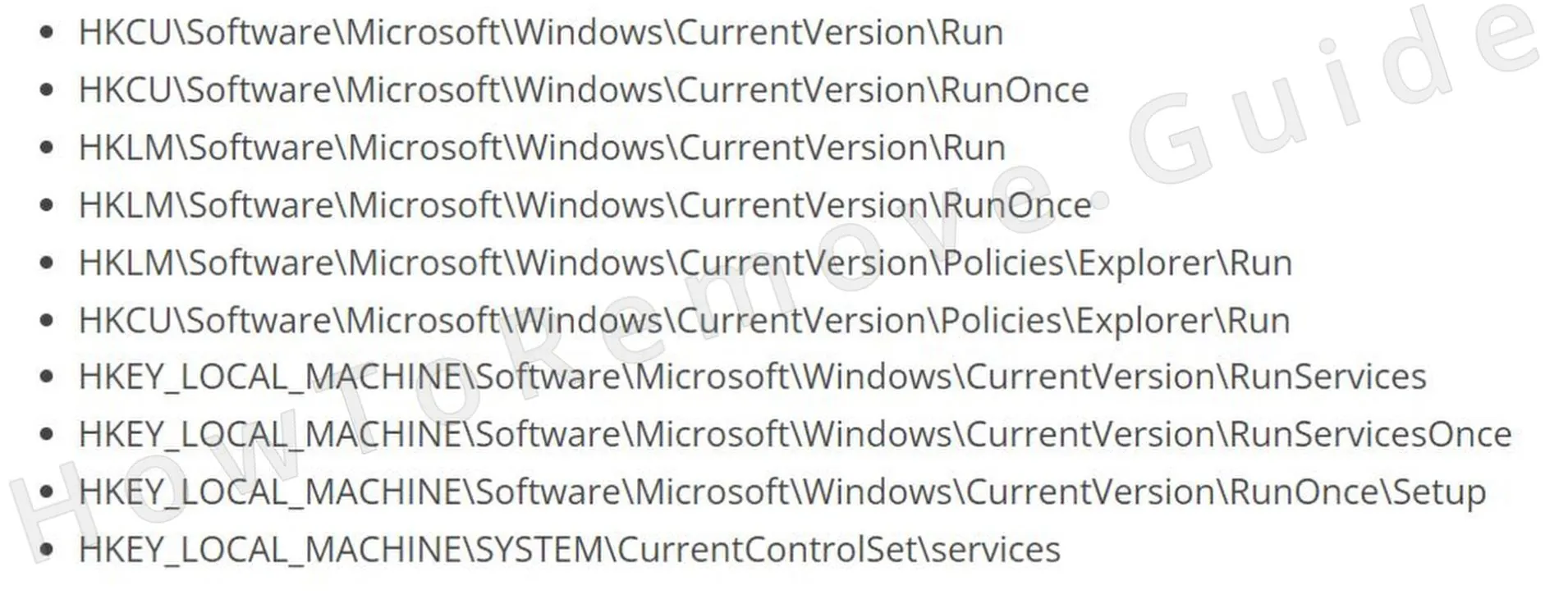 To be extra thorough, manually check these locations:
 - 4.4Look at the entries in the right panel and delete anything that seems off. However, do not delete the specific keys here (the items in the left panel).
Remove Shift Browser Policies
Rogue policies can make the browser ignore normal user choices. If Shift Browser added them, you may see managed messages, locked extensions, or search settings that revert after changes. Clear those policies first, then return to the browser settings for the final cleanup.
5. How to Remove Rogue Shift Browser Policies
- 5.1
 To fix this, open the Group Policy Editor by searching for it in the Start Menu. Navigate to Computer Configuration > Administrative Templates.
 - 5.2
 Right-click, select Add/Remove, and clear the list.
 - 5.3If you’re a Chrome user, consider using the free Chrome Policy Remover tool for a quicker fix. You just need to download the tool, run it with administrative privileges, and it will automatically clear any remaining policies from Chrome.
- 5.4And in case you get a warning from Windows, just ignore it by clicking More Info > Run Anyway. This tool is safe, so there’s nothing to worry about.
Uninstall Shift Browser From Your Browser
The browser cleanup is the last stage because it works best after policy restrictions are gone. Shift Browser may leave behind extensions, modified search engines, notification permissions, and startup-page entries. Removing each remaining trace helps restore normal browsing instead of only hiding the symptoms.
6. How to Remove Shift Browser From Your Browser
- 6.1Start with the Extensions section and uninstall anything you didn’t add yourself.
- 6.2
 Next, clear your browsing data under Privacy and Security. Choose the All Time range but keep your saved passwords intact.
 - 6.3
 Review your Site Settings and revoke permissions for websites you don’t recognize (check all permissions).
 - 6.4
 Then, check your default search engine. Make sure it’s set to something you trust. Also, remember to check the Manage Search Engines section and delete any unfamiliar search providers you may see there.
 - 6.5Finally, check the On Startup and Appearance sections. Look for suspicious URLs included there and delete anything you don’t trust.
