

CAPTCHAS are everywhere, right? And we are so used to solving them that we don’t even pay attention to them. We click the traffic lights or the motorbikes, we type numbers taken from fuzzy images, and it all feels routine to us. But what if a particular CAPTCHA asks you to press a keyboard combination and paste something within a system window on your screen to verify you are a human? Would this trigger any warnings in your mind?
Hopefully, you’d see such a CAPTCHA as a red flag, because this exact scenario describes the “Verify You Are a Human” scam, a modern phishing tactic that preys on unsuspecting users. It’s not just a nuisance; it’s a direct path to compromising your computer, your personal data, and your financial security. Here’s a deep dive into how this scam works, how to spot it, and what you can do to protect yourself.
Understanding the Verify You Are Human CAPTCHA Scam
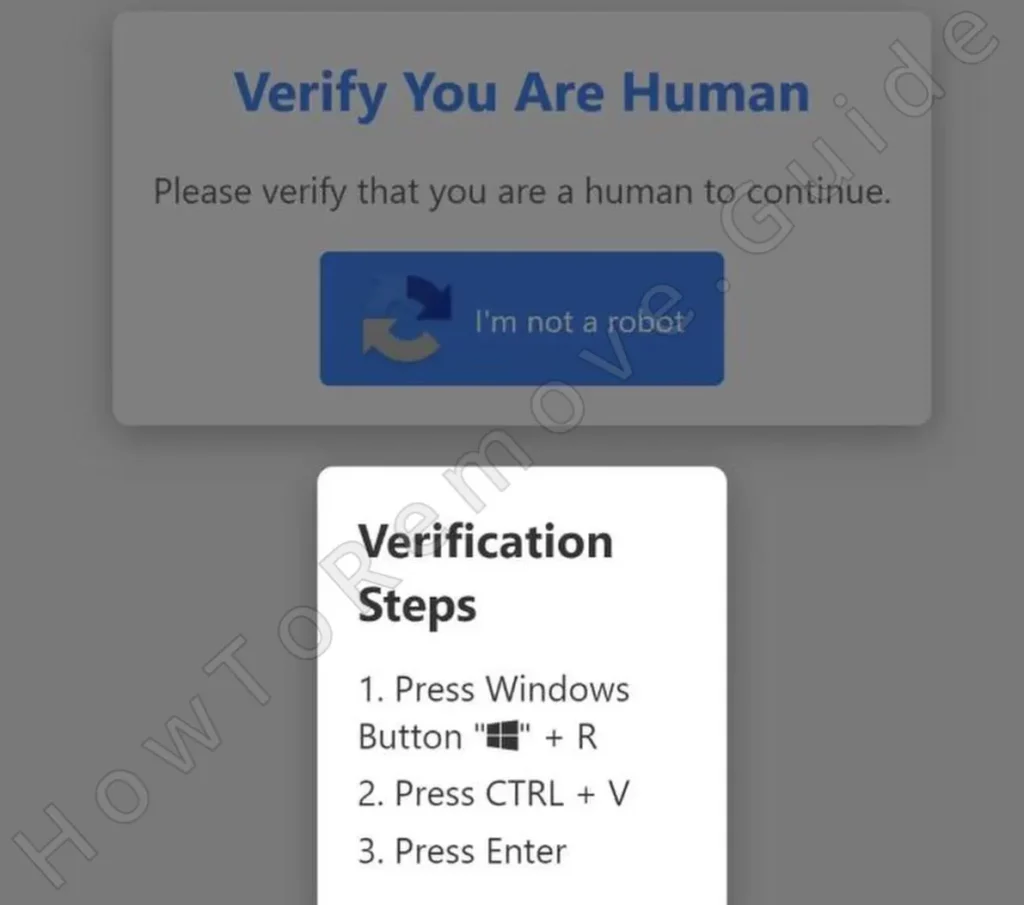
At its core, the “Verify You Are a Human” scam capitalizes on our familiarity with CAPTCHA systems and our instinct to comply with online prompts. A recent example involved a site called phallophilereviews, which pretended to offer niche content, like adult product reviews and tutorials.
Instead of a typical CAPTCHA, the site presented users with these instructions:
- Press
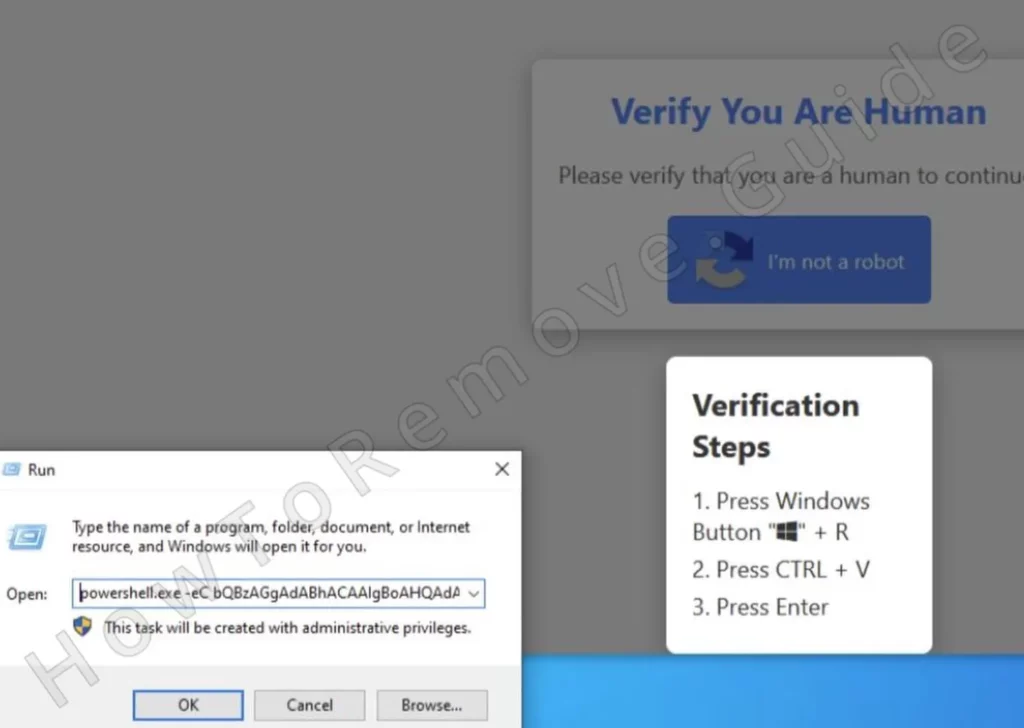
Win+Rto open the Run dialog box. - Paste a command automatically copied to your clipboard.
- Press Enter to execute the command.
Seems harmless at first glance, right? But here’s the catch: the command is a malicious script designed to download malware onto your computer. One of the most dangerous examples of this is the Lumma Stealer, a sophisticated piece of software engineered to harvest sensitive information.
Note that this scam has the potential to be a lot more harmful than a typical crypto scam like Fenotar or a text message scam such as EZDriveMA. Falling for the Verify You are a Human/Lumma scam actively results in malware getting installed on your PC, and the issues that could come from this are inumerable.
How the Verify You Are Human Lumma Stealer Virus Works
All it takes is for you to run the download command given to you by the Verify You Are Human CAPTCHA scam and you get the malware. Once installed, Lumma Stealer gets to work immediately. It’s an information-stealing malware that focuses on extracting critical data, including:
- Login credentials stored in your browser.
- Cryptocurrency wallets and related information.
- Personal identification numbers or other sensitive data.
Here’s the scary part: all this data is sent directly to the scammer’s servers, leaving you exposed to identity theft, drained bank accounts, and irreparable financial losses.
What to Do If You’ve Fallen Victim to the Verify You Are Human Scam
If you’ve accidentally followed the Verify You Are Human scam’s instructions, don’t panic. There are concrete steps you can take to mitigate the damage:
1. Disconnect from the Internet
This prevents further data exfiltration. Disconnecting immediately stops the malware from communicating with its server.
2. Check for Persistence Mechanisms
Some malware, like Lumma Stealer, ensures it restarts every time your computer boots. To check:
- Open Task Manager (
Ctrl+Shift+Esc) and review the Startup tab for unfamiliar programs. - Type Task Scheduler in the Start Menu, open it, and look for any suspicious tasks that might be linked to the malware (pay attention to the Actions tab of each task).
- Inspect the Windows Registry at these locations:
HKEY_LOCAL_MACHINE\Software\Microsoft\Windows\CurrentVersion\RunHKEY_CURRENT_USER\Software\Microsoft\Windows\CurrentVersion\Run
3. Perform a Malware Scan
There are many tools you can use here, but the one that I recommend is called SpyHunter 5. It has saved me numerous times from all kinds of malware, so you can’t go wrong with using it against threats like the Lumma infostealer.
 OFFER
OFFER4. Change Your Passwords
Assume that any passwords stored in your browser are compromised. Use a clean, secure device to update your credentials, starting with critical accounts like email and banking. Enable Two-Factor Authentication (2FA) wherever possible for added security.
5. Monitor Financial Activity
Check your bank statements and credit card activity regularly for unauthorized transactions. If you see anything suspicious, report it to your bank immediately.
6. Consider Reinstalling Windows
If the malware persists or your computer behaves abnormally, perform a clean reinstall of Windows. Use a bootable USB drive to ensure no remnants of the infection remain.
The Verify You Are Human Scam – Warning Signs to Watch For
To protect yourself from scams similar to the Verify You Are Human one, it’s essential to recognize the red flags that scams like this one rely on. Here are the most common indicators:
1. Unusual CAPTCHA Requests
Legitimate CAPTCHAs don’t require users to open system utilities like the Win+R prompt or execute commands. If a site asks you to do anything beyond clicking images or checking a box, it’s a major red flag.
2. Clipboard Manipulation
The scam tries to copy malicious code to your clipboard automatically. If you notice your clipboard content changing without your input, close the site immediately.
3. Pressure and Panic
Scammers rely on urgency to bypass your critical thinking. Messages like “verify now to continue” or “action required immediately” are designed to make you act without questioning.
4. Suspicious Website Design
In this case, the site phallophilereviews had a legitimate-sounding name but lacked polish. Poor design, broken links, or overly niche content are all clues that something isn’t right.
What Makes The Verify You Are Human Scam So Dangerous?
Many victims of the Verify You Are Human scam don’t realize the danger because the CAPTCHA requirement feels so routine. In one instance, a user browsing for niche content encountered the fraudulent CAPTCHA and, without much thought, followed the instructions. It was only after running the command that they started to suspect something was wrong.
Thankfully, users with stricter browser settings, like Firefox’s enhanced privacy mode, reported that the malicious command couldn’t be copied to their clipboard. This saved them from further harm, proving that even small preventative measures can make a big difference.
Staying Safe in the Future
Falling victim to a scam like this is a wake-up call, but it doesn’t have to happen again. Here are some preventative measures to keep you safe:
1. Be Skeptical of Unusual Requests
No legitimate CAPTCHA will ask you to execute system commands. If you encounter this, close the site immediately and report it.
2. Use a Secure Browser
Browsers like Firefox with strict privacy settings can block clipboard manipulations and malicious scripts, adding an extra layer of protection.
3. Stay Educated on Scams
Scammers evolve their tactics constantly. Familiarize yourself with common social engineering tricks, like creating urgency or using technical jargon to intimidate users.
4. Install Trusted Security Software
Invest in reliable antivirus software with real-time protection. Keep it updated to detect new threats as they emerge.
5. Update Your System Regularly
Outdated software is vulnerable to exploits. Regular updates close security gaps and keep your system protected.
Conclusion
The “Verify You Are a Human” scam is a stark reminder of how cybercriminals exploit our habits and trust in routine online interactions. By mimicking everyday processes like CAPTCHA verification, they trick users into running malicious commands that compromise personal data and security.
If you’ve fallen victim, act quickly: disconnect, scan your system, and secure your accounts. And for the future, stay skeptical, keep your software updated, and educate yourself about emerging scams. In the ever-evolving world of cybersecurity threats, vigilance and proactive measures are your best defenses.

Leave a Reply