
OMACP

Home ยป Mobile Threats ยป OMACP

Omacp on Android

Omacp on Android is an application that is used to configure cellular activity on smartphones with MediaTek processors. However, sometimes it acts as an Android virus that usually enters your device from unauthorized sources, causing adverse effects. Omacp on Android can steal your data, slow down your phone, and make it vulnerable to hacking. It can also affect your messaging app, system apps, and storage.
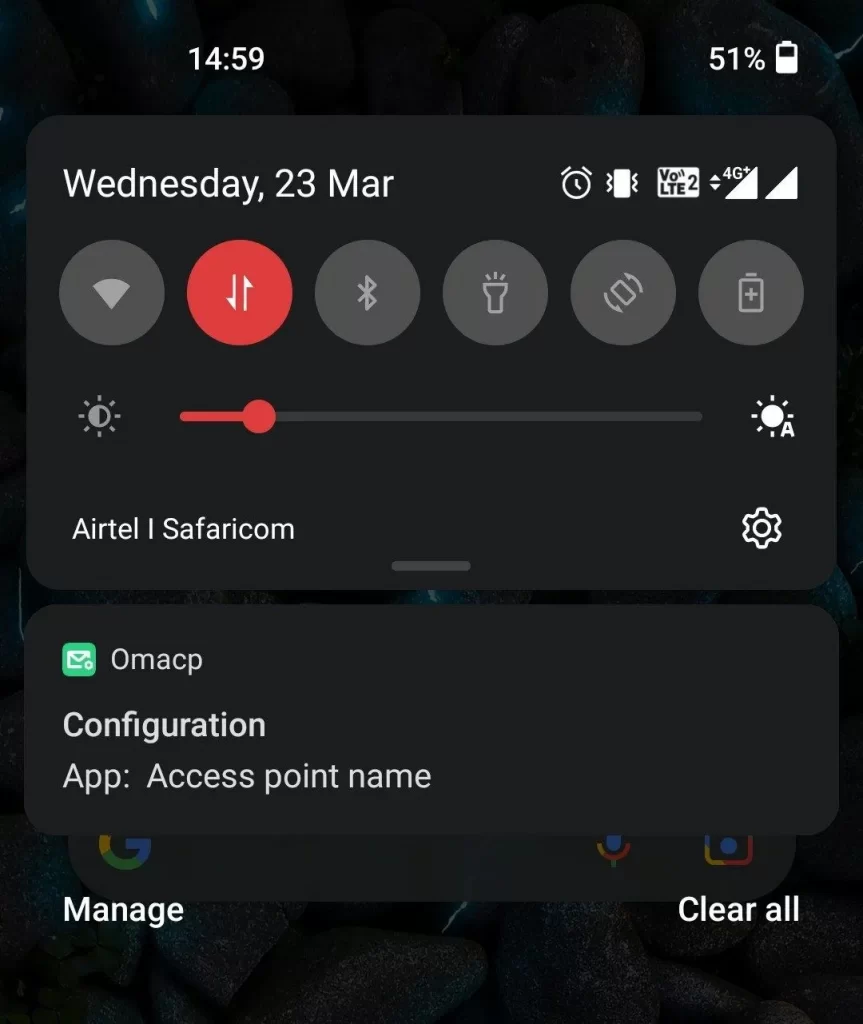
Omacp on Android
The OMACP virus app

Is Omacp dangerous?

Omacp can be dangerous if it is installed from a malicious link or a pop-up ad. These sources can inject malware into your device and compromise your security and privacy. Omacp can also consume a lot of data, battery, and memory on your phone. It can interfere with your normal functions and cause errors or crashes.

Omacp app

Omacp app is the legitimate application that comes pre-installed on some Android devices with MediaTek processors. It is responsible for configuring the network settings and the SIM card on your phone. The app is not harmful by itself, but it can be exploited by hackers or malware to send you fake configuration messages or notifications. These messages or notifications can trick you into installing malicious software or giving away your personal information.

What is Omacp?

Omacp means Open Mobile Alliance Client Provisioning and is a standard that defines how mobile devices can be configured remotely by network operators or service providers. Omacp allows you to receive configuration messages or notifications that can update your settings for internet, multimedia, email, or other services on your phone. These messages or notifications are usually sent by your network operator or service provider when you insert a new SIM card or change your plan. However, in some cases, such notifications can be exploited by scammers to compromise devices with malware.

Omacp configuration message

Omacp configuration message is a message that contains the settings for a specific service or feature on your phone. It is usually sent by your network operator or service provider when you need to update your settings. However, the Omacp configuration message can be legitimate or fake, therefore, users need to pay close attention to it. A legitimate message will have a valid sender ID, a clear subject, and a confirmation request and if you receive anything different from that, you need to carefully check your system for potential danger.
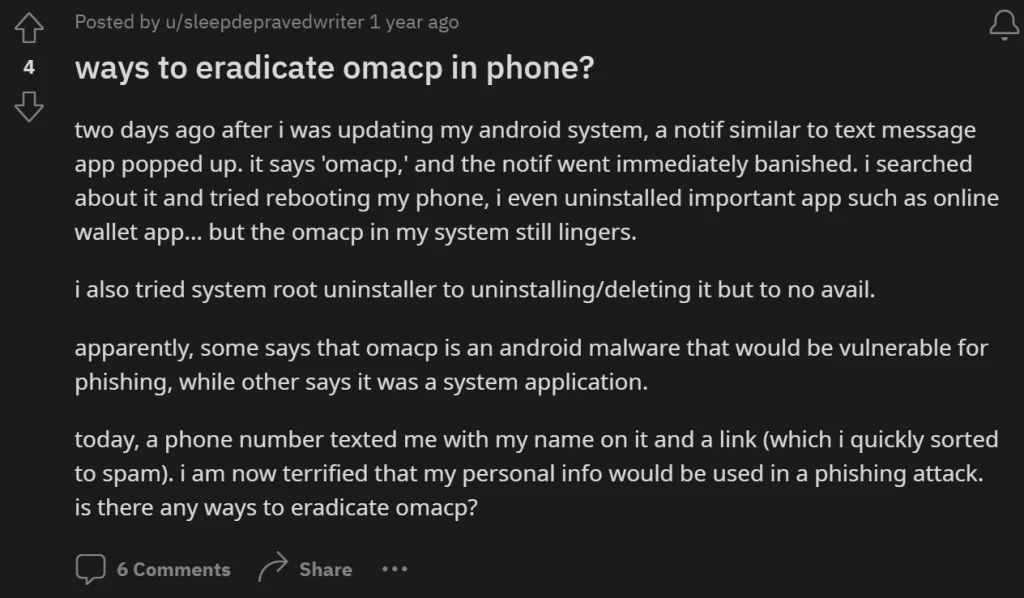
A user from Reddit seeking help to remove Omacp

Omacp notification

Unlike the legitimate Omacp notification, a fake notification will have a suspicious icon, a vague title, and a malicious link or attachment, which should not be clicked without being carefully checked. The original Omacp notification can be enabled or disabled on your phone. To enable or disable it, you can go to Settings > Apps > Omacp > Notifications and toggle the switch. You can also block or allow specific senders or services from sending you configuration messages or notifications. This, however, is not possible if you are dealing with a fake notification and your only option to deal with it is to remove it.

SUMMARY:

Name Omacp
Type Mobile threat

How to delete Omacp

If you have an iPhone virus, please use our iPhone Virus Removal guide.

If you have a Mac virus, please use our How to remove Ads on Mac guide.

If you have a Windows virus, please use our Windows Virus Removal guide.

If you have an Android virus, continue with the guide below.

Step1

Whether you use the default “Internet” App for browsing or a different browser like Chrome you need to go to:
Settings/More/Application Manager/All
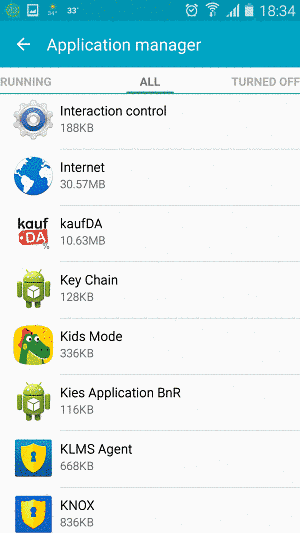
Locate the Browser/App in question and tap on it.

Step2

Now the method is effectively the same for users using both “Internet” and Chrome/Other Browsers, yet for more clarity we have provided instructions for both:

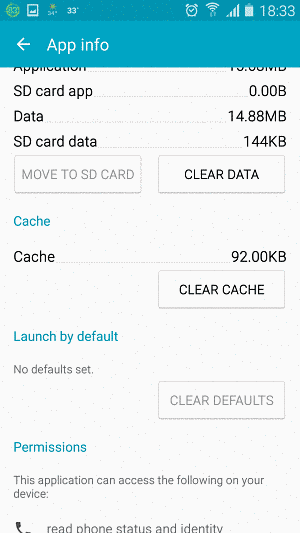
For “Internet” Browser Users:

Tap the Force Stop button.
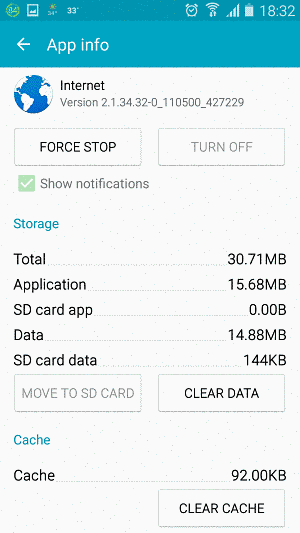
Now tap the Clear Data and Clear Cache Buttons.
For Google Chrome Users:

Click on  Force Stop.
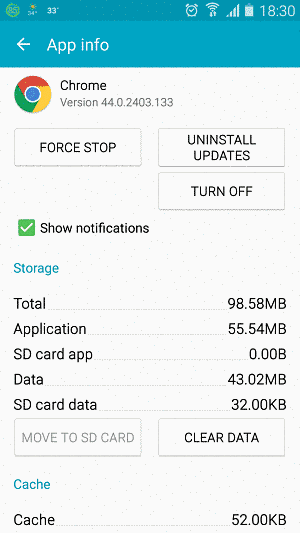
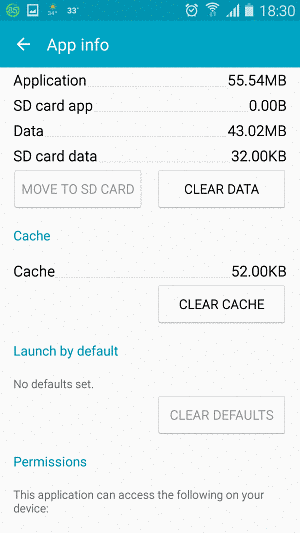
Then click on Clear Data and Clear Cache.
Step3

Restart your Browser. It might be a good idea to Reboot your Android device, just in case.

  • Important!

If you are still seeing Ads in your browser, it is likely they are generated by the websites you visit and there is nothing you can do about it.

However, if you are seeing Adverts outside of your internet browser, then one of your installed Apps contains the problematic Adware. In this case you need to take a look at this guide.

Did we help you? Please, consider helping us by spreading the word!


One response to “OMACP”
  1. Maureen Theodos Avatar
    Maureen Theodos

    HI’
    I appreciate the help, every so often I come across an app in system settings that wasn’t there before’ this I can be certain because I go thru my apps (system apps to ) on a regular for a few yrs now due to catching my apps from other apps stores 4 in general suddenly switched to {installed from Google Play store } it was an accidental catch ,but has since turned into a daily battle with an entity of insane intrusiveness from Google ,I can’t say for sure ,I only know for certain that any app I get from either Galaxy { when I had access to Samsung Galaxy }or Amazon they always get hijacked and reinstalled from the play store causing me to grow a great bit of distain for anything google .
    Can you answer a question for me? if you will ?
    Is Google or anyone working in the interest of Google allowed to interfer with
    1. Phone set up ?
    2. The installation of apps from a store other than play store ?
    3.Take over a devices system which includes but not limited to
    phone,messages, files and photos
    I ask this because for the past 5 yrs I have not been able to access my files from anywhere other than Google Files if I try I get a message that I have no app that can open said file ,when I most certainly do except that they suddenly become unuseful do to them mysteresly being shaded out or I get the repeated message that said app stopped working close or see app info.
    this has caused great distress in using any device ,I have tried not signing into Google on my devices but if I get apps from another app store when I go to open them I get a page that usually says ( oops page not working or GET THIS FROM PLAY STORE or SIGN IN to use even if I do not get it from play store .
    I am at a lost an I dread using any of my devices , I also am questioning the integrity Of Google and their climb to the number 1 spot within the wide world web was it done legit or by hijacking apps like I catch on a weekly basis ,sometimes they get uninstalled and reinstalled from play store within the hour other times it takes a day or so but they always get hijacked that and the fact that I can not use other apps other than those from the play store and now I find I cannot install a vpn, no matter if I get a new phone or tablet its as if whatever it is is attached to my Google account .
    I could go on and on but I will spare you ,I am sure your time is precious ,I do appreciate any light you can shed on this I am now considering going to Apple not because I prefer apple I do not I love Samsung as well as Android however I have convinced myself that Google does not have that much freedom with Apple as it does with Android as well as Samsung , I also was wondering ..Is Samsung aware that this is even happening and if so why is it allowed ?
    I no longer enjoy the illussion of choice ,I have watched Google swoop in and take over more setups than I care to remember ,knocks Samsung set up completely out of the way and once signed in to my Google account Google swoops in and spreads itself out thruout my device comadering the heart of my phone which is the Phone/Messeges/Files /Photos and the forever struggle to use any browser that is not Google ,somehow someway Google finds its way there but not before making sure it gives itself every permission available and sliding over to the yes in the
    modify device and picture in picture and on top of page ,I can slide it over to NOT ALLOWED but before long sometimes before I even leave the page I see it slide back over to ALLOWED
    again let me thank you for taking the time to read this ,that is if you even get it,I have been on support pages before and have seen something letting me know it was being controlled by Google ,I would start in Samsung support but end in Google .
    I can not stress enough how this gets to me , the fact that I have no control over ,my device is more than frustrating its on a level higher than disturbing again I ask is this even allowed ?
    I do not believe it is , but lets face it Google does what it wants.
    I have given thought to opening a forum and beginning a public conversation about this I strongly believe this has to be addressed
    a 3rd thank you ,I greatly appreciate the chance to unload what has become a daily challenge for me and the use of any device’
    wishing you a peaceful 4th of July.

Leave a Reply

Your email address will not be published. Required fields are marked *