

ProtectGuard Browser, is a Windows program that may appear after a suspicious “security update” style prompt or after something was installed without clear permission. A common sign is a bar at the top of the screen claiming ProtectGuard Browser is missing and directing users to protectguard.me.
This does not automatically prove that passwords or documents have been stolen, but it is not something to ignore. The behavior points to unwanted software that can add browser-related components, services, and local user-data folders while remaining hard to find in the normal Installed Apps list.
I would treat ProtectGuard Browser, similar to Pulse Browser and EpiBrowser, as a potentially unwanted program, especially if it appeared suddenly or survived a basic uninstall. Its leftover files and browser data may keep cluttering the system, causing alerts, redirects, strange Chrome-related behavior, or privacy worries that are difficult for non-technical users to judge.
We tested that SpyHunter successfully removes ProtectGuard Browser* and we recommend using it. It will block ProtectGuard Browser from reinstalling itself and it will make sure your device is clean from any malware.
 Try Free For 7 Days*
Buy now15% OFF if you buy straight without trial.
 OFFER
OFFERThe removal guide below explains what to check and how to clean the system safely. If the manual process feels too complex or you are not confident editing Windows settings, you can use SpyHunter 5 to scan for unwanted programs and remove remaining threats automatically.
ProtectGuard Browser Removal Tutorial
Begin with the shorter walkthrough first because it targets the most common app-based traces of ProtectGuard Browser and only takes a few minutes. When it works, you avoid the longer cleanup. When it does not, move straight to the full guide further down and continue with the more thorough steps.
Quick Manual Removal for ProtectGuard Browser – Try This First
- 1.1Open your Start Menu and search for “Apps & Features”. This shows every installed program so you can spot potential threats.
- 1.2Sort the list by Install Date. Malware like ProtectGuard Browser often disguises itself as a recently added program, so this will help you pinpoint suspicious entries more quickly.
- 1.3Look for anything out of place – programs with strange names, bland or unprofessional icons, or software you don’t remember downloading.
- 1.4If you find a program that raises your suspicions, don’t hesitate. Click Uninstall and follow the prompts. Once that’s done, take it a step further by checking the installation directories for any leftover files.
- 1.5Delete anything that looks like it might be connected to the program you just removed.
When you finish, restart the computer and browse normally for a little while. If the ads, redirects, or strange browser behavior are gone, the quick cleanup was enough. If the problem shows up again, continue with the complete removal guide below.
SUMMARY:
| Name | ProtectGuard Browser |
| Type | Adware |
| Detection Tool |
Some threats reinstall themselves if you don’t delete their core files. We recommend downloading SpyHunter to remove harmful programs for you. This may save you hours and ensure you don’t harm your system by deleting the wrong files. |
How to Remove the ProtectGuard Browser Virus
The next step is optional, but it is still the fastest and least demanding way to deal with ProtectGuard Browser. A full SpyHunter 5 scan may remove the infection completely, which means you might not need to work through the manual checks, file searches, registry edits, and browser repairs that follow.
Fastest Removal Option: Use SpyHunter 5
- 1.1Click here to download and install the anti-malware tool on your PC.
- 1.2
 Start SpyHunter 5, click the Buy button and choose between starting your 7-days free trial or directly purchasing the tool.
If you choose to buy SpyHunter 5 now, you can use our discount code, “HTRG15“, for 15% off.
- 1.3
 Once you activate SpyHunter, click Start Scan Now, select the Full Scan option, and let the tool do its job.
 - 1.4
 Once the scan completes (it could take a while, so have patience), you’ll see all malware and other undesirables listed.
Click Next to review the detections and then click Next again to delete all rogue items.
Preparatory Steps for Removing ProtectGuard Browser
If you want to remove ProtectGuard Browser manually, do these preparation steps before searching for files. They reveal hidden folders and add a force-delete utility, both of which matter because adware often hides support files in less obvious places and keeps some of them locked while related processes are still running.
1. ProtectGuard Browser Removal Preparatory Steps
- 1.1
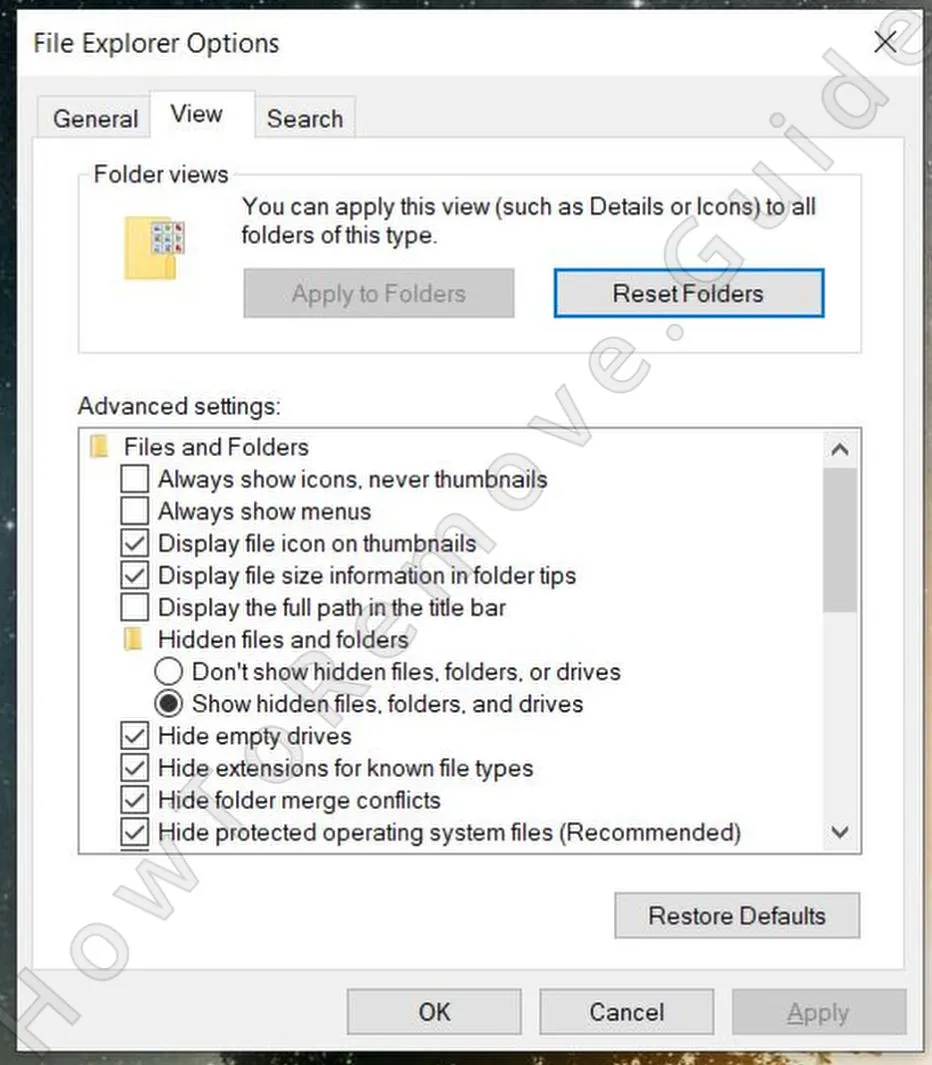 First, open your Start Menu again and search for “Folder Options”. Head to the View tab and check the box that says “Show hidden files, folders, and drives.” Don’t forget to click Apply and OK.
 - 1.2Next, download and install LockHunter – a free and powerful tool that can forcefully delete files that are being blocked by the malware.
Many people would rather not add another program during troubleshooting, but LockHunter is worth making an exception for here. It is free, easy to remove later, and especially useful when Windows refuses to delete a suspicious file because some background process is still using it.
Delete the ProtectGuard Browser Virus Files
Files connected to ProtectGuard Browser are not always kept in one clear location. Helper items may appear in user folders, roaming data, temp directories, or program paths, so go through each location carefully. A partial cleanup often leaves enough behind for the unwanted activity to return after a reboot.
2. How to Delete ProtectGuard Browser Files
- 2.1With adware apps of this type, there are several locations where you are very likely to find related files. The first key directories to check are:
C:\Users\YourUsername\AppData\Roaming
C:\ProgramData\Microsoft\Windows\Start Menu\Programs\Startup
C:\Users\YourUsername\AppData\Roaming\Microsoft\Windows\Start Menu\Programs\Startup - 2.2
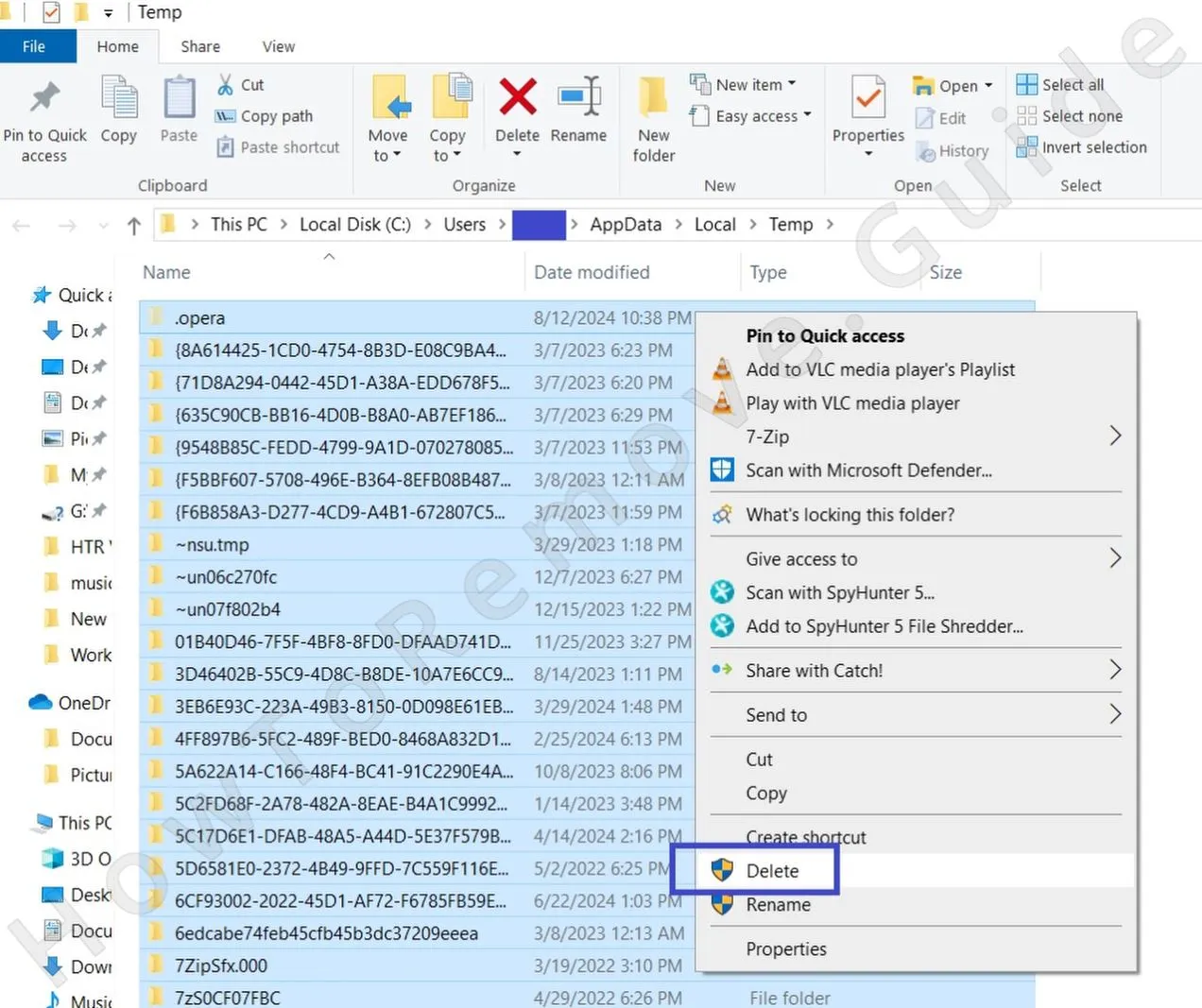 Once you’ve tackled those directories, visit the Temp folder at C:\Users\YourUsername\AppData\Local\Temp. This is like a junk drawer – most of what’s in here is disposable. Select everything (Ctrl + A) and delete it all. Don’t worry, you won’t lose anything important.
 - 2.3Finally, check the Program Files folders:
C:\Program Files
C:\Program Files (x86)
Be cautious here, as these folders contain legitimate software. However, if you see something that seems out of place, don’t ignore it – remove anything that feels suspicious.
Remove ProtectGuard Browser Malware Tasks From the Task Scheduler
A lot of users skip Task Scheduler, but that is a mistake when dealing with ProtectGuard Browser. A single malicious task can reopen unwanted processes, restore deleted files, or reapply browser changes after startup. Checking this area closes off one of the easiest ways the infection can come back.
3. How to Remove ProtectGuard Browser Entries From the Task Scheduler
- 3.1
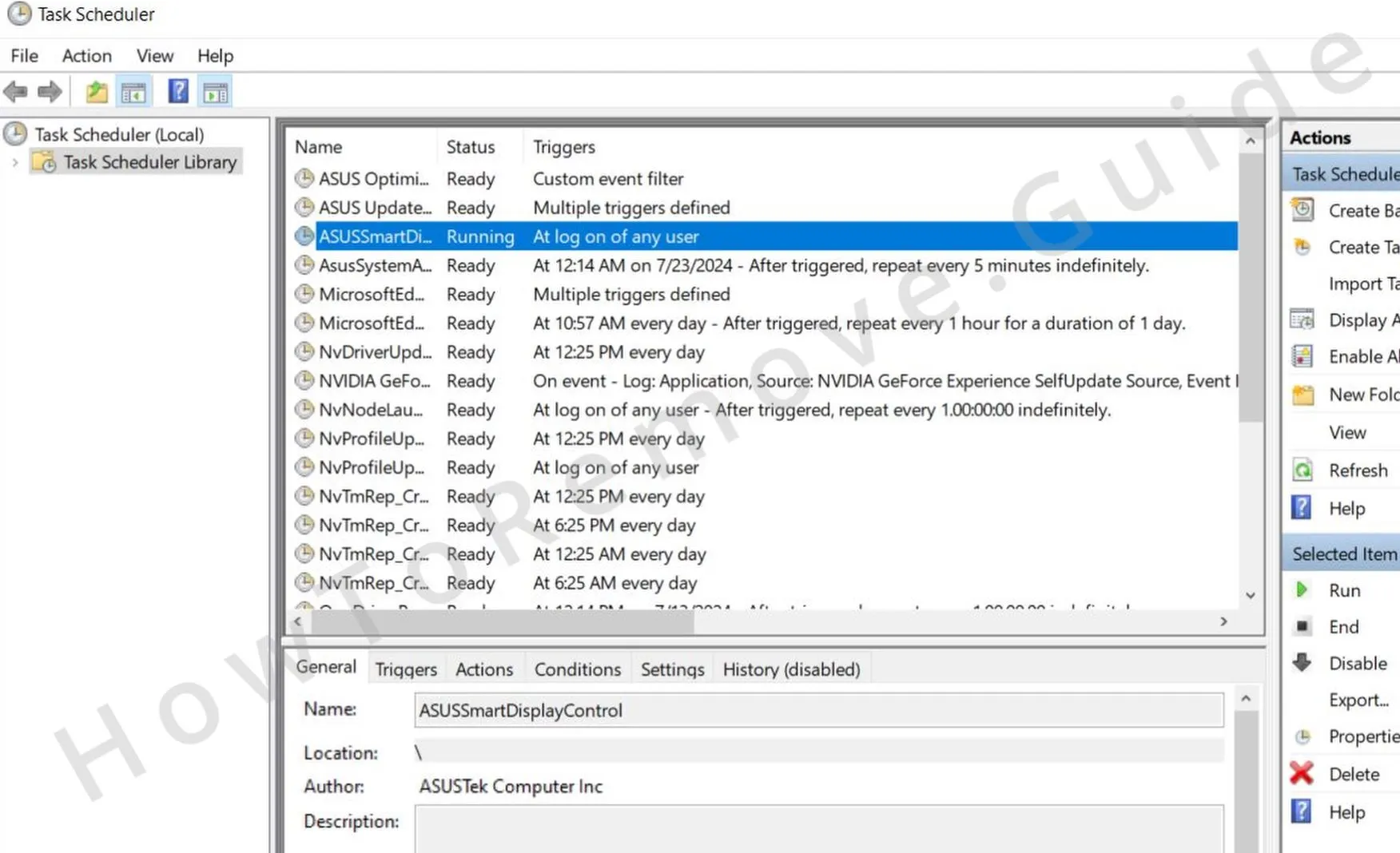 To access your scheduled tasks, type Task Scheduler in the Start Menu search, open the first thing, and click the TashScheduler Library in the top-left.
 - 3.2Go through each task one by one. Double-click to open a task and check its Actions tab. Be on the lookout for anything that launches sketchy .exe files or scripts or attempts to connect to unknown websites.
- 3.3If you spot a task like this, delete it immediately. It’s a tedious step, but missing even one rogue task could undo all your progress.
Get Rid of ProtectGuard Browser Through the System Registry
The Registry is another place where ProtectGuard Browser can leave traces such as startup entries and policy-related values. This part is important, but it also requires caution because removing the wrong key can affect normal Windows behavior. If you are not comfortable editing the Registry, SpyHunter 5 is the safer option.
4. How to Remove ProtectGuard Browser Items From the Registry
- 4.1To remove ProtectGuard Browser’s fingerprints, open the Registry Editor by typing “regedit” into the Start Menu. Right-click it and choose Run as Administrator.
- 4.2Use the search function (Ctrl + F) to look for entries related to ProtectGuard Browser. When you find something suspicious, delete it, but be careful.
- 4.3
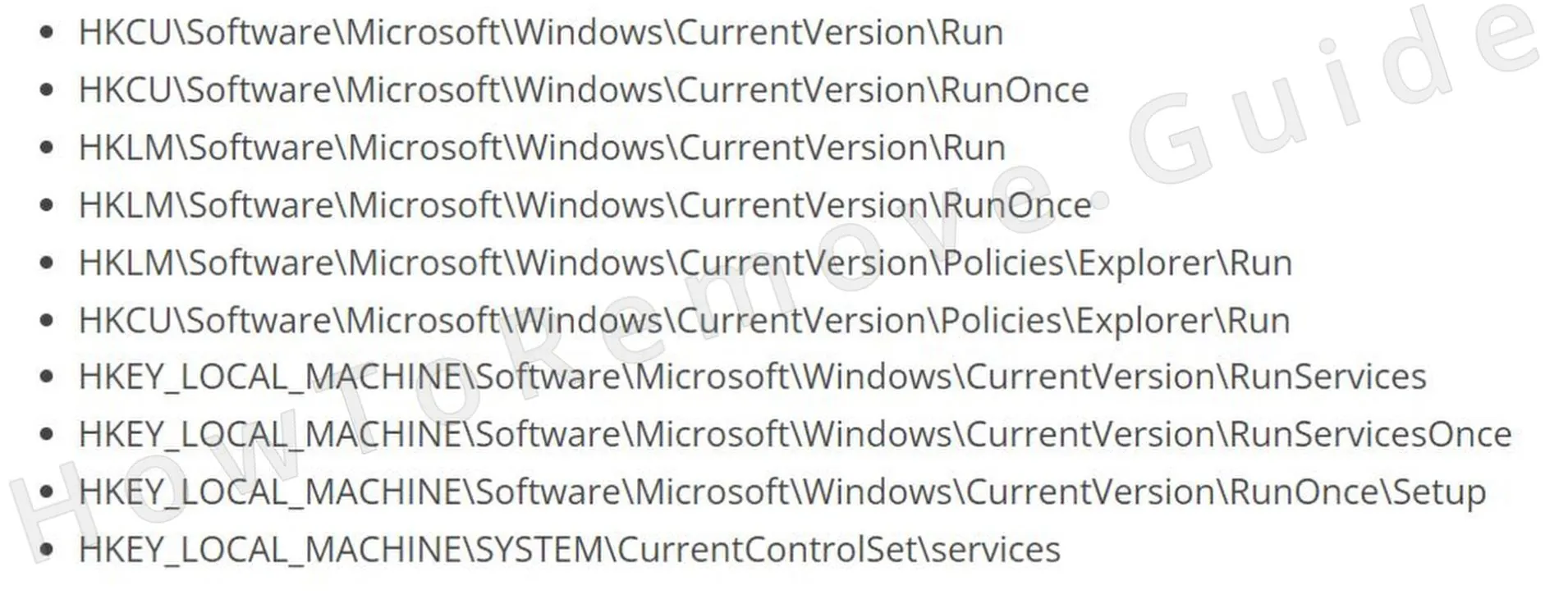 To be extra thorough, manually check these locations:
 - 4.4Look at the entries in the right panel and delete anything that seems off. However, do not delete the specific keys here (the items in the left panel).
Remove ProtectGuard Browser Browser Policies
Browser policies are often the reason ProtectGuard Browser keeps controlling the homepage, search engine, extensions, or other settings even after obvious files have been removed. Until those policies are cleared, the browser may continue to enforce unwanted changes and may still display “managed by your organization.”
5. How to Remove Rogue ProtectGuard Browser Policies
- 5.1
 To fix this, open the Group Policy Editor by searching for it in the Start Menu. Navigate to Computer Configuration > Administrative Templates.
 - 5.2
 Right-click, select Add/Remove, and clear the list.
 - 5.3If you’re a Chrome user, consider using the free Chrome Policy Remover tool for a quicker fix. You just need to download the tool, run it with administrative privileges, and it will automatically clear any remaining policies from Chrome.
- 5.4And in case you get a warning from Windows, just ignore it by clicking More Info > Run Anyway. This tool is safe, so there’s nothing to worry about.
Uninstall ProtectGuard Browser From Your Browser
This is the last browser repair stage, and it works best only after the policy entries linked to ProtectGuard Browser are gone. The checks here cover several settings for a reason: leaving behind one extension, permission, search provider, or startup page can be enough for the unwanted behavior to continue.
6. How to Remove ProtectGuard Browser From Your Browser
- 6.1Start with the Extensions section and uninstall anything you didn’t add yourself.
- 6.2
 Next, clear your browsing data under Privacy and Security. Choose the All Time range but keep your saved passwords intact.
 - 6.3
 Review your Site Settings and revoke permissions for websites you don’t recognize (check all permissions).
 - 6.4
 Then, check your default search engine. Make sure it’s set to something you trust. Also, remember to check the Manage Search Engines section and delete any unfamiliar search providers you may see there.
 - 6.5Finally, check the On Startup and Appearance sections. Look for suspicious URLs included there and delete anything you don’t trust.
