

If you’re seeing strange malware warnings that seem to come from McAfee, Norton, or another familiar antivirus name (even though you may not have it installed), don’t rush to click anything. Take a moment to check the source, because it’s almost certainly not legitimate. Does the notification come from “Your PC is infected with 18 viruses!” or something similar? If it does, the PC isn’t infected by malware, but there’s likely a hijacker in your browser.
What’s actually happening is that the “Your PC is infected with 18 viruses!” browser hijacker has seized control of your web experience and is now generating these misleading warnings. I’ve encountered this kind of thing before with pests like McAfee pop up and PcAppStore, so I’m familiar with their tactics. The critical thing to remember here is to not engage with these startling notifications because clicking them could open the door to genuine threats or online scams.
We tested that SpyHunter successfully removes "Your PC is infected with 18 viruses!"* and we recommend using it. It will block "Your PC is infected with 18 viruses!" from reinstalling itself and it will make sure your device is clean from any malware.
 Try Free For 7 Days*
Buy now15% OFF if you buy straight without trial.
 OFFER
OFFEROf course, you’ll want to stop these annoying and possibly dangerous disruptions, but how do you do that? You’ll first want to check your browser for any odd extensions linked to “Your PC is infected with 18 viruses!”, but that’s often not enough so additional steps are likely required. I’ll guide you through the entire removal process in the follow-up tutorial, so check it out if you’re eager to get rid of “Your PC is infected with 18 viruses!”.
“Your PC is infected with 18 viruses!” Removal Tutorial
“Your PC is infected with 18 viruses!” is a malicious program, and its removal can either be swift and simple or prolonged and tricky. For some, it vanishes in moments, while others face a relentless struggle. Begin with the straightforward solutions. If “Your PC is infected with 18 viruses!” persists, prepare for a more intensive purge.
Quick Steps to Remove “Your PC is infected with 18 viruses!”
- 1.1Access the Start Menu, enter “Apps & Features” into the search bar, and hit Enter. This reveals a complete list of installed applications, enabling you to pinpoint and discard unwanted ones. Confirm you possess administrative rights to bypass any limitations during the process. This ensures you maintain total authority over the removal.
- 1.2Arrange the application list by the date they were added to quickly detect potential malware. Suspicious software often shows up as newly installed, making it simpler to identify oddities. Concentrate on entries from when you first detected the malware’s activity. This narrows the scope of threats and accelerates eradication.
- 1.3Examine the list thoroughly. Watch for unfamiliar applications, especially those with odd titles, generic symbols, or ones you don’t remember adding. Flag anything questionable for closer scrutiny. Note any apps tied to obscure or unknown developers. This guarantees no harmful software slips through unnoticed.
- 1.4When an app raises red flags, click it and choose to remove it. Rely on your instincts, as malware frequently hides behind vague or authentic – sounding names. Complete the prompts shown on – screen and reboot your system if instructed. Restarting halts any lingering operations tied to the program.
- 1.5Go to C:\Program Files and C:\Program Files (x86), find the directory tied to the removed app, and erase any leftover files by hand. Reboot your machine and check if “Your PC is infected with 18 viruses!” is gone. If it lingers, stay calm – further methods and tools are ready to wipe it out completely. Look for strange system behavior or pop – ups post – restart to confirm its absence.
Lastly, restart the PC, use it for a while, and see if you notice any traces of the “Your PC is infected with 18 viruses!” malware. If the rogue app continues to bother you, try the more advanced steps shown next.
SUMMARY:
| Name | “Your PC is infected with 18 viruses!” |
| Type | Adware |
| Detection Tool |
Some threats reinstall themselves if you don’t delete their core files. We recommend downloading SpyHunter to remove harmful programs for you. This may save you hours and ensure you don’t harm your system by deleting the wrong files. |
Important! Read Before Continuing
“Your PC is infected with 18 viruses!” isn’t malware that departs with a polite request. Some stages demand problem – solving know – how, and if technology isn’t your strength, it might feel overwhelming. That’s where specialized tools like SpyHunter 5 come in – they handle the tough parts effortlessly, leaving you with a spotless system.
How to Remove the “Your PC is infected with 18 viruses!” Virus
Did the fast solutions fall short? Time for detailed manual extraction. Start by making hidden files visible. Then, secure admin rights to tackle locked items. “Your PC is infected with 18 viruses!” digs in deep, safeguarding its vital components. Miss this prep, and your efforts are futile. Do it correctly from the outset, or it’s here to stay.
1. “Your PC is infected with 18 viruses!” Removal Preparatory Steps
- 1.1
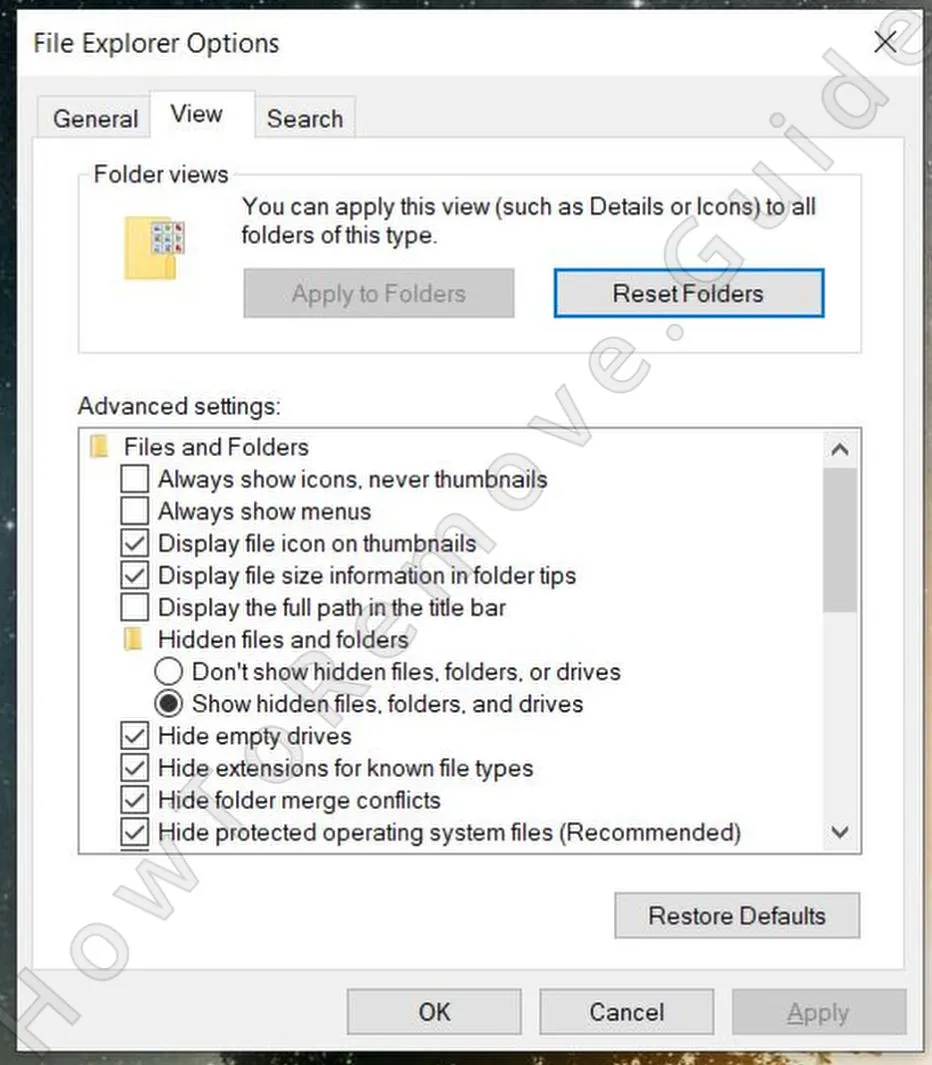 To uncover concealed files, launch File Explorer, head to the View section, and select Options (or Folder Options, depending on your Windows version). In the pop – up, switch to the View tab and activate “Show hidden files, folders, and drives.” Hit Apply, then OK, to make all sneaky malware files detectable.
 - 1.2Malware often secures its files, so grab LockHunter – a no – cost utility that forcibly removes resistant items. Install it now, as it’ll prove vital for deleting stubborn files later. Though some shy away from extra tools during cleanup, LockHunter is a must – have here. It’s reliable, free, and sheds light on locked files and their processes, easing the task of ousting persistent threats.
I know that some users prefer not to install any third-party apps when troubleshooting, but in this case, LockHunter is non-negotiable. Besides, as I mentioned, it’s totally free.
Delete the “Your PC is infected with 18 viruses!” Virus Files
“Your PC is infected with 18 viruses!” doesn’t idly await removal. It stashes its components in critical system spots to ensure survival. If you don’t hunt down and destroy every piece, the adware resurfaces as if untouched. Be meticulous. Overlook a single file, and you’re back at square one.
2. How to Delete “Your PC is infected with 18 viruses!” Files
- 2.1Launch File Explorer and explore these paths:
C:\Users\YourUsername\AppData\Roaming
C:\ProgramData\Microsoft\Windows\Start Menu\Programs\Startup
C:\Users\YourUsername\AppData\Roaming\Microsoft\Windows\Start Menu\Programs\Startup
Proceed slowly. Delete anything with bizarre filenames, unfamiliar icons, or suspect traits to clear out possible malware traces. Use the File Explorer search tool to jump to specific folders fast, ensuring no harmful remnants linger. - 2.2
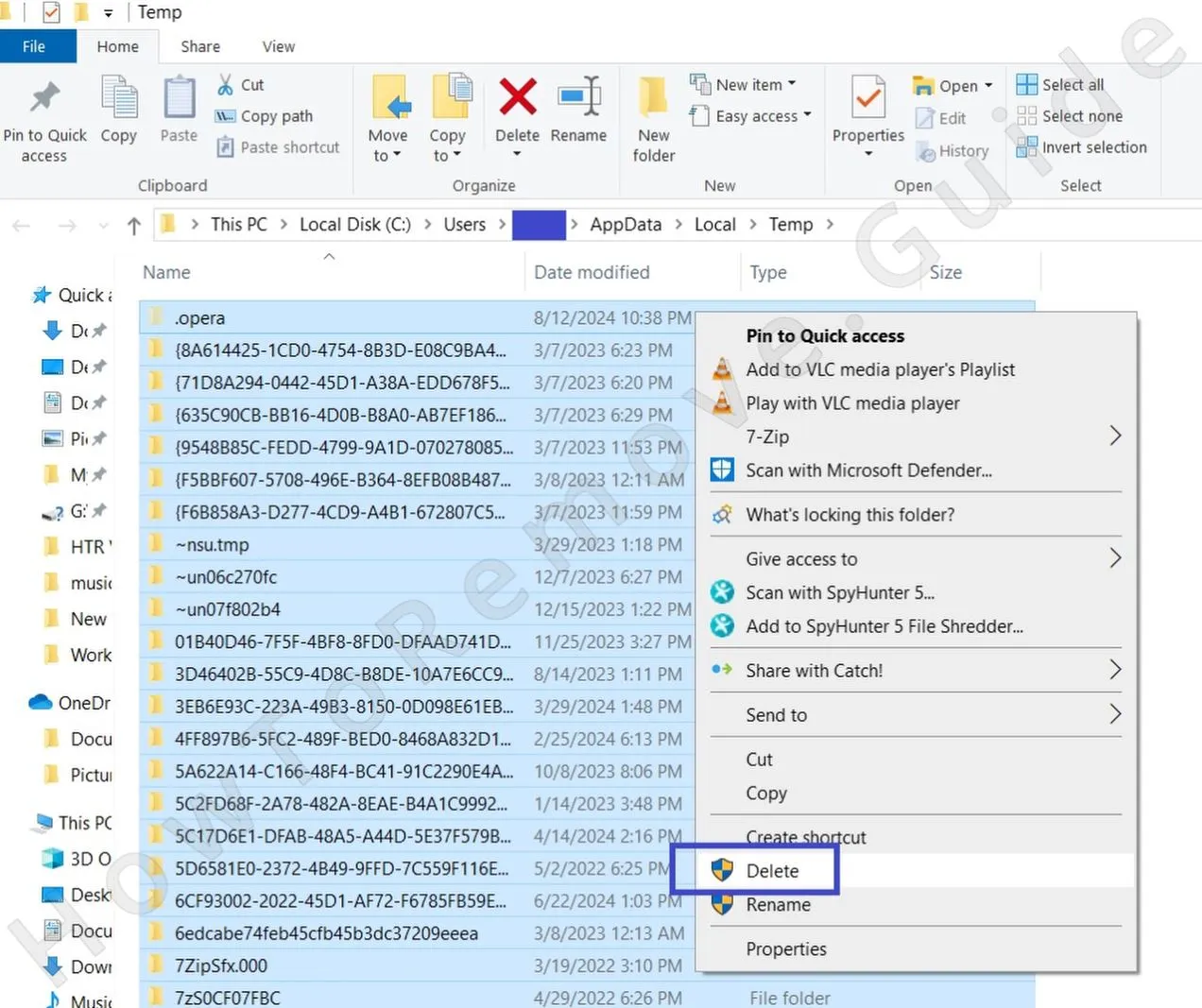 Next, purge the Temp directory:
Head to C:\Users\YourUsername\AppData\Local\Temp
Hit Ctrl + A to highlight everything
Tap DeleteWiping this won’t damage your system – it’s just temporary storage, and malware loves hiding there to evade notice. Clearing it might even boost performance while stripping away short – term malware signs.
- 2.3Move to C:\Program Files and C:\Program Files (x86). Most contents here are safe, but malware can camouflage itself. If anything looks fishy, look it up online. If it’s proven harmful, erase it to dodge future trouble.
Remove “Your PC is infected with 18 viruses!” Malware Tasks From the Task Scheduler
Many overlook the Task Scheduler during malware purges, and “Your PC is infected with 18 viruses!” exploits that gap. It plants tasks to silently resurrect itself, even after you think it’s vanquished. Ignore these, and the adware sneaks back without a trace.
3. How to Remove “Your PC is infected with 18 viruses!” Entries From the Task Scheduler
- 3.1
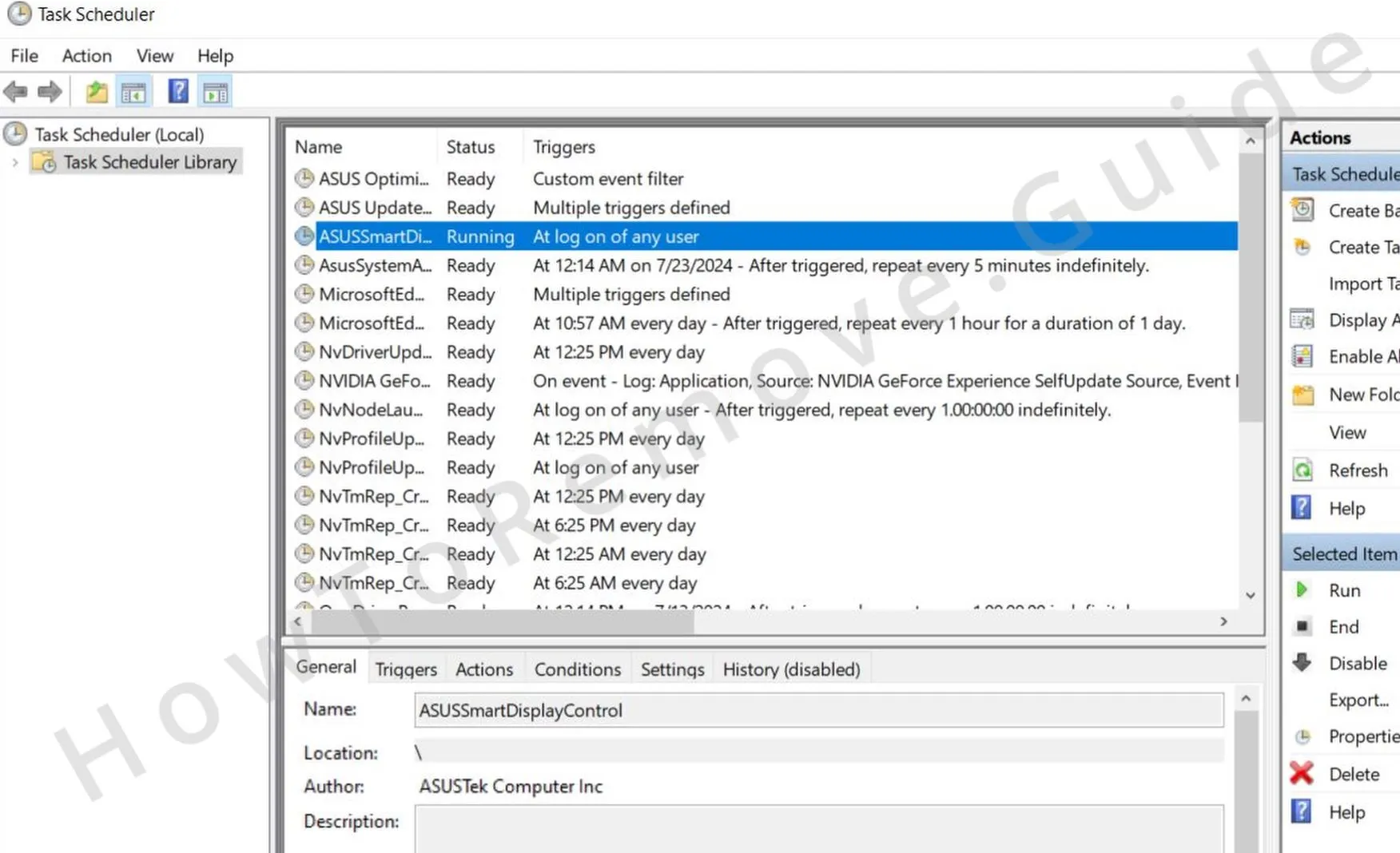 From the Start Menu, search for Task Scheduler, hit Enter, and go to Task Scheduler Library to inspect all planned tasks possibly tied to the malware. Seek out tasks with weird names or ones set up when the malware emerged to spot the culprits.
 - 3.2Scrutinize each task. In the Actions tab, see if any trigger a dubious .exe or script. If so, jot down its location and remove the task to break the malware’s cycle. Watch for tasks tied to startups or odd timings to halt automatic runs.
- 3.3Visit the file path you recorded and erase the linked file to stop the malware from rebuilding or launching again. Use LockHunter if it’s locked tight, ensuring total elimination.
Get Rid of “Your PC is infected with 18 viruses!” Through the System Registry
“Your PC is infected with 18 viruses!” doesn’t stop at files – it burrows into the Windows Registry to anchor itself. You must erase every hint of it, but a misstep could crash your system. Unsure? Let a tool take over. Otherwise, scrub those entries before the malware digs in deeper.
4. How to Remove “Your PC is infected with 18 viruses!” Items From the Registry
- 4.1Enter “regedit” in the Start Menu, then launch the top result with admin privileges to open the Registry Editor with full editing power. Admin mode ensures you can tweak settings freely, giving you complete registry control.
- 4.2Press Ctrl + F, input “Your PC is infected with 18 viruses!”, and start the search. Remove any related entries you find. Keep hunting until no remnants appear, but take care not to erase unrelated items to keep your system stable. This wipes out all malware traces.
- 4.3
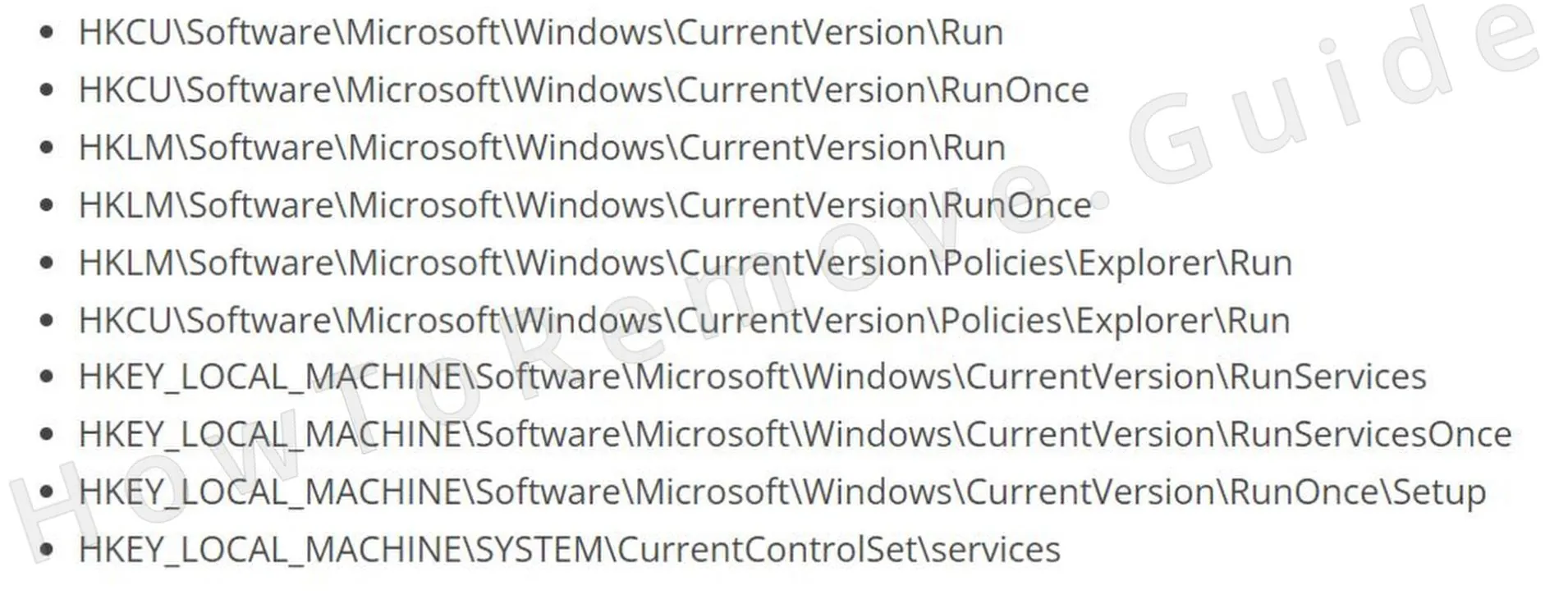 Check these registry spots by hand to catch any sneaky or leftover entries tied to the malware, ensuring nothing escapes your cleanup.
 - 4.4If a folder mentions “Your PC is infected with 18 viruses!”, delete the data in the right – hand pane, but leave the keys on the left intact to avoid breaking your system accidentally. This keeps errors at bay.
Remove “Your PC is infected with 18 viruses!” Browser Policies
Notice “Managed by your organization” in your browser? That’s “Your PC is infected with 18 viruses!” in charge. It locks your homepage, search, and options, blocking changes. The solution? Manually dismantle its policies. Until then, the adware rules your browser – time to reclaim it.
5. How to Remove Rogue “Your PC is infected with 18 viruses!” Policies
- 5.1
 From the Start Menu, type “Edit Group Policy,” pick the first option, and go to:
Computer Configuration > Administrative Templates to tweak policy settings. This is crucial for lifting browser limits set by the malware and restoring control. - 5.2
 Right – click Administrative Templates, choose Add/Remove, and empty the list. Only your intentional additions should stay, ensuring no rogue rules persist to re – enforce malware constraints.
 - 5.3Chrome users can grab the free Chrome Policy Remover tool. Run it with admin rights to instantly reset policies and lift malware – imposed limits, streamlining the restoration of browser defaults.
- 5.4If Windows flags the Policy Remover, select “More Info” then “Run Anyway” to proceed. It’s secure and vital for getting your browser back to normal.
Uninstall “Your PC is infected with 18 viruses!” From Your Browser
Ditching its policies isn’t the end – “Your PC is infected with 18 viruses!” has tampered with your browser settings too. Skip a full reset, and it retains a foothold. Check every setting, revoke shady permissions, and fix the mess. Miss this, and it could creep back. Wrap it up right.
6. How to Remove “Your PC is infected with 18 viruses!” From Your Browser
- 6.1Eliminate odd extensions – visit your browser’s Extensions menu and ditch anything unrecognized to clear out possible malware add – ons. Look for ones with poor ratings or no feedback to ensure nothing harmful stays.
- 6.2
 Wipe browsing data – head to Privacy and Security, pick “All Time,” and erase everything but passwords to scrub away malware leftovers. This clears cached scripts and stops re – infection.
 - 6.3
 Examine Site Settings – cancel access for sketchy sites the malware may have authorized. Look for ones with overreaching permissions like notifications or camera use to block unauthorized control.
 - 6.4
 Verify search engine settings – switch to a reliable engine and delete any odd URLs that might reroute your searches, preventing hijacks by unknown defaults.
 - 6.5Check On Startup and Appearance options – confirm no strange URLs are set to load automatically, keeping the browser free of malware influence at launch.
