

Premier Opinion is a survey-themed adware/PUP that sneaks in through bundled installers and then hijacks attention with recurring setup prompts and survey pop-ups. Many victims never remember installing which is typical for this rogue app.
The most common clues that indicate its presence include surprise “PremierOpinion Setup” windows, aggressive survey dialogs on shopping sites, and sluggish browsing.
Another hallmark tell is its persistence: it drops a fresh setup.exe in new Temp folders on a schedule, so the prompt keeps coming back after you close or delete it. This guide explains what it is, why it keeps returning, and how to get rid of it safely.
What Is Premier Opinion?
Think of Premier Opinion as an adware masquerading as a research panel and not a classic self-replicating virus. It presents itself as a way to “influence brands” for rewards, but its practical footprint is aggressive advertising, survey injection, and data harvesting typical of PUPs.
So technically it’s not a virus (and has been explicitly called out as not a trojan). Yet, it’s stilll a potentially unwanted program tied to other rogue names like VoiceFive Inc., with a lineage that includes RelevantKnowledge. It targets Windows primarily, but deceptive installers also exist for macOS. Earlier builds were seen as browser add-ons for IE/Chrome/Firefox.
Its standout traits are stealthy install via bundling and stubborn persistence. On Windows it commonly plants itself under C:\Program Files (x86)\Common Files\ in oddly named folders (often following an ObjectObjectLetter pattern, e.g., variants with “Velvet”), runs under unrelated process names, and spawns Temp`setup.exe` repeatedly. Some cases show a “Survey” process, residual Services entries, and likely Scheduled Task triggers.
How Dangerous Is the Premier Opinion Pop-up?
The risk linked to Premier Opinion and its popups is twofold: privacy and stability. Once installed, Premier Opinion can track IP address, visited sites and interactions, search terms, videos watched, online purchases, form data, uploaded/downloaded content, and software/hardware details – data that can be personally identifiable, raising identity-theft and profiling concerns.
Like other persistent adware (e.g., SuperCopy, and SpacePop.exe), it can degrade system and browser performance, clutter sessions with pop-ups, and open the door to additional unwanted software via the same bundling channels. Even when visible prompts are closed, the parent component may respawn installers until it’s fully eradicated.
We tested that SpyHunter successfully removes Premier Opinion* and we recommend using it. It will block Premier Opinion from reinstalling itself and it will make sure your device is clean from any malware.
 Try Free For 7 Days*
Buy now15% OFF if you buy straight without trial.
 OFFER
OFFERHow to Remove PremierOpinion
Premier Opinion may look like a harmless survey tool, but it clings to your system with deceptive persistence. Some users see it vanish after a single uninstall, while others battle endless setup pop-ups. Begin with quick removal steps – if it keeps regenerating from Temp folders, prepare for deeper manual cleanup.
Quick Steps to Remove Premier Opinion
- 1.1Open the Start Menu, type Apps & Features, and press Enter. This will bring up a list of all installed software. From here, you can identify and uninstall any suspicious entries. Make sure you have administrator rights, or you’ll hit permission walls during the process.
- 1.2Sort the installed apps by date. Malicious software tends to appear right around the time you first noticed something wrong. This sort order helps you narrow your attention to the most relevant programs and get rid of anything that doesn’t belong.
- 1.3Go through the list carefully. Watch out for strange application names, non-standard characters, or unknown developers. If something looks off and you didn’t install it yourself, it deserves scrutiny. Make a note of anything questionable in case you need to investigate further.
- 1.4Once you’ve spotted a potential threat, select it and click Uninstall. Don’t assume it’s harmless just because the name sounds generic. Follow the removal prompts exactly, and if the system asks for a reboot, go ahead. A fresh restart clears temporary remnants that may otherwise persist.
- 1.5Now, go to C:\Program Files and C:\Program Files (x86). Check for any leftover folders tied to the program and delete them. After another reboot, verify whether Premier Opinion is still active. If it reappears or your browser starts acting up again, it means there’s more cleanup to do – don’t stop here.
SUMMARY:
Important! Read Before Continuing
Don’t expect Premier Opinion to remove itself willingly. Some parts of this process require you to be comfortable navigating system-level settings. If you’re not confident making those changes manually, a trusted removal tool like SpyHunter 5 can handle everything with minimal effort on your part.
How to Remove the Premier Opinion Virus
When the setup prompt keeps coming back every few hours, it’s time for full disinfection. Before deleting anything, make hidden files visible and ensure you can access system folders like Common Files. Premier Opinion’s locked executables and decoy process names make proper prep essential for a complete wipe.
1. Premier Opinion Removal Preparatory Steps
- 1.1
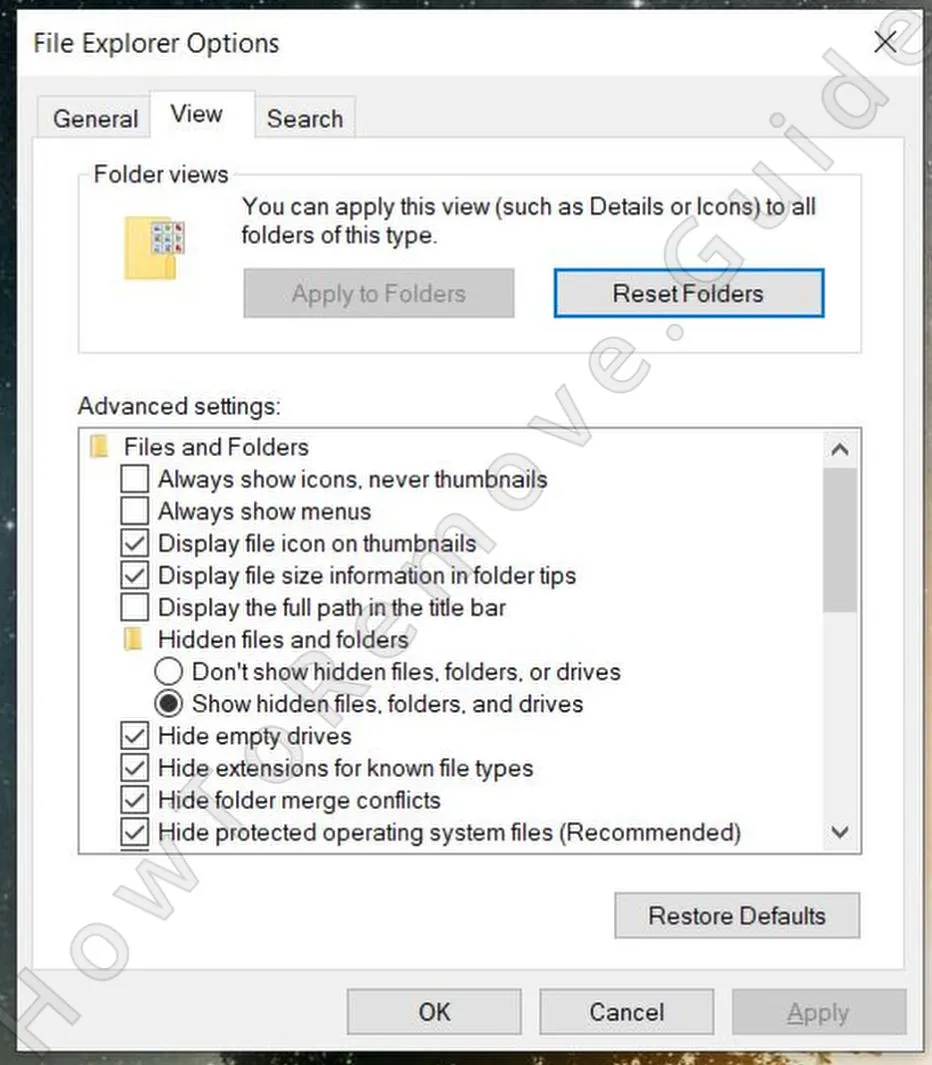 Launch File Explorer, go to the View tab, and click on Options (or Folder Options, depending on your version of Windows). Switch to the View tab in the popup and enable Show hidden files, folders, and drives. Click Apply, then OK. This ensures no buried malware components escape detection.
 - 1.2Adware like Premier Opinion sometimes locks its own files to avoid deletion. Download LockHunter – a free, lightweight tool that can identify and forcefully delete locked files. It’s not optional in cases like this. You’ll need it to remove protected remnants that a normal delete won’t touch.
I know that some users prefer not to install any third-party apps when troubleshooting, but in this case, LockHunter is non-negotiable. Besides, as I mentioned, it’s totally free.
Delete the Premier Opinion Virus Files
Premier Opinion doesn’t sit idle – it hides in Program Files (x86)\Common Files under strange folder names like CityVelvetL or FeelGoodVelvetG, constantly spawning new setup.exe files in Temp. Miss even one of these, and it will reinstall itself. Track every file, every folder, and erase them completely to break its loop.
2. How to Delete Premier Opinion Files
- 2.12.1 – Clean Out Key System Locations
Use File Explorer to check these locations:
C:\Users\YourUsername\AppData\Roaming
C:\ProgramData\Microsoft\Windows\Start Menu\Programs\Startup
C:\Users\YourUsername\AppData\Roaming\Microsoft\Windows\Start Menu\Programs\Startup
Remove anything that looks suspicious – unfamiliar executables, random-named folders, or files created around the infection time. Use the Explorer search bar to get there faster. - 2.2
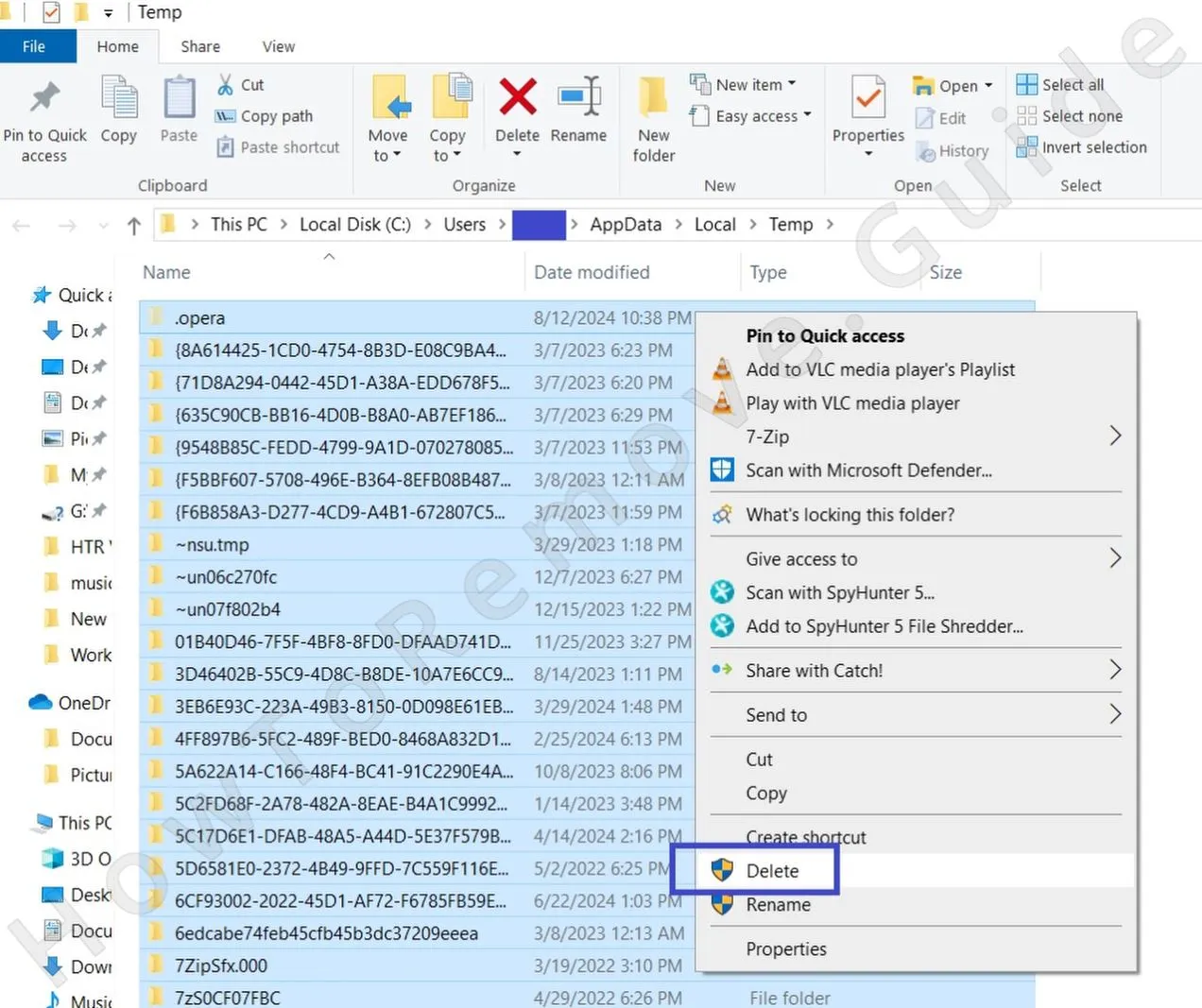 Navigate to:
C:\Users\YourUsername\AppData\Local\Temp
Hit Ctrl + A, then press Delete to remove everything. These are all temporary files -nothing vital lives here. Malware often hides short-term payloads in this directory, and clearing it is a smart move anyway. - 2.3Check both C:\Program Files and C:\Program Files (x86). Legit programs dominate these locations, but adware can disguise itself. If you see a directory that doesn’t belong, or you confirm it’s tied to Premier Opinion, remove it.
- 2.4When you find a file that won’t delete, right-click it and select What’s locking this file? from LockHunter. Then click Delete It!. This tool will unlock and remove files the malware tries to protect -a crucial step in full removal.
Uninstall Premier Opinion Through the Task Scheduler
Next comes persistence control. Premier Opinion often schedules hidden triggers that re-launch its setup.exe hourly or on reboot. Even if you’ve deleted its folders, these tasks can silently resurrect it. Clearing these scheduled entries ensures the adware finally stops reinstalling itself behind your back.
3. How to Remove Premier Opinion Entries From the Task Scheduler
- 3.1
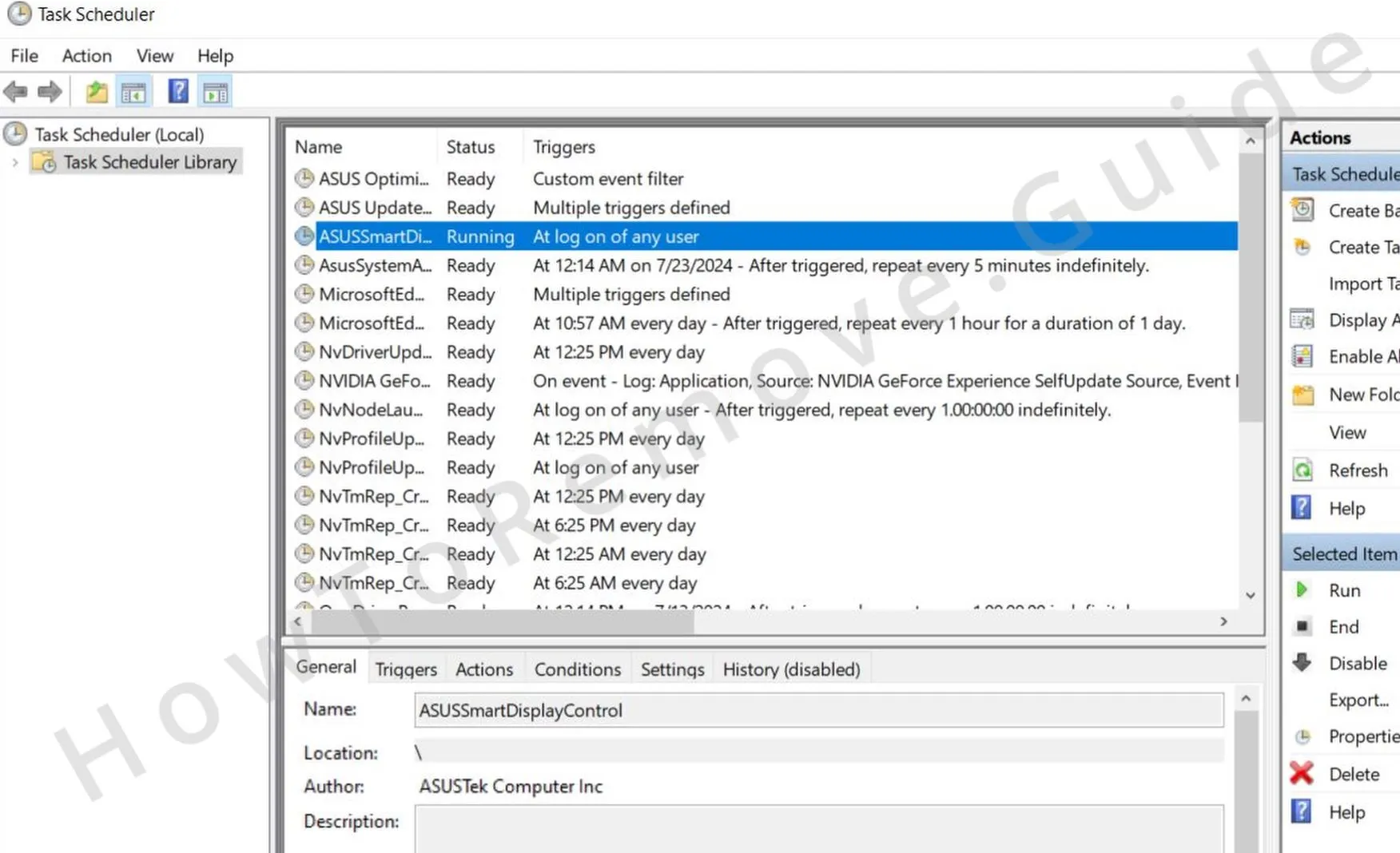 Click the Start Menu, type Task Scheduler, and hit Enter. Once open, expand the Task Scheduler Library. Go through the list methodically, focusing on tasks created around the time Premier Opinion showed up. Look out for unfamiliar names or tasks with strange authorship.
 -
3.2Click into each suspicious task and navigate to the Actions tab. If the task is launching a weird
.exe, a script, or pointing to a folder you don’t recognize -you’ve likely found part of the infection chain. Note down the file path associated with the action, then delete the task immediately to break the loop. - 3.3Use the path you copied in the previous step to locate and remove the file that task was set to launch. If it refuses to delete, fall back on LockHunter to force the process. This step kills any ability the malware has to reactivate itself via scheduled automation.
Get Rid of Premier Opinion Through the System Registry
The Registry is Premier Opinion’s last stronghold. It can hide startup and service references there, ensuring the adware launches before you even log in. Carefully locate and remove every PremierOpinion or oddly named entry tied to its fake “Survey” process – this step cuts off its power at the root.
4. How to Remove Premier Opinion Items From the Registry
- 4.1Open the Start Menu, type regedit, and right-click the result to select Run as administrator. This opens the Registry Editor with the privileges you need to modify protected keys. Without admin rights, you won’t be able to remove certain deeply embedded entries.
- 4.2Once inside, press Ctrl + F, type Premier Opinion, and hit Enter. Let the system search through the registry. When it finds a result, confirm it’s related to the adware, then delete the entry. Use F3 to continue the search and repeat the process until no results remain. Don’t delete anything unless you’re absolutely sure it’s part of the infection.
- 4.3
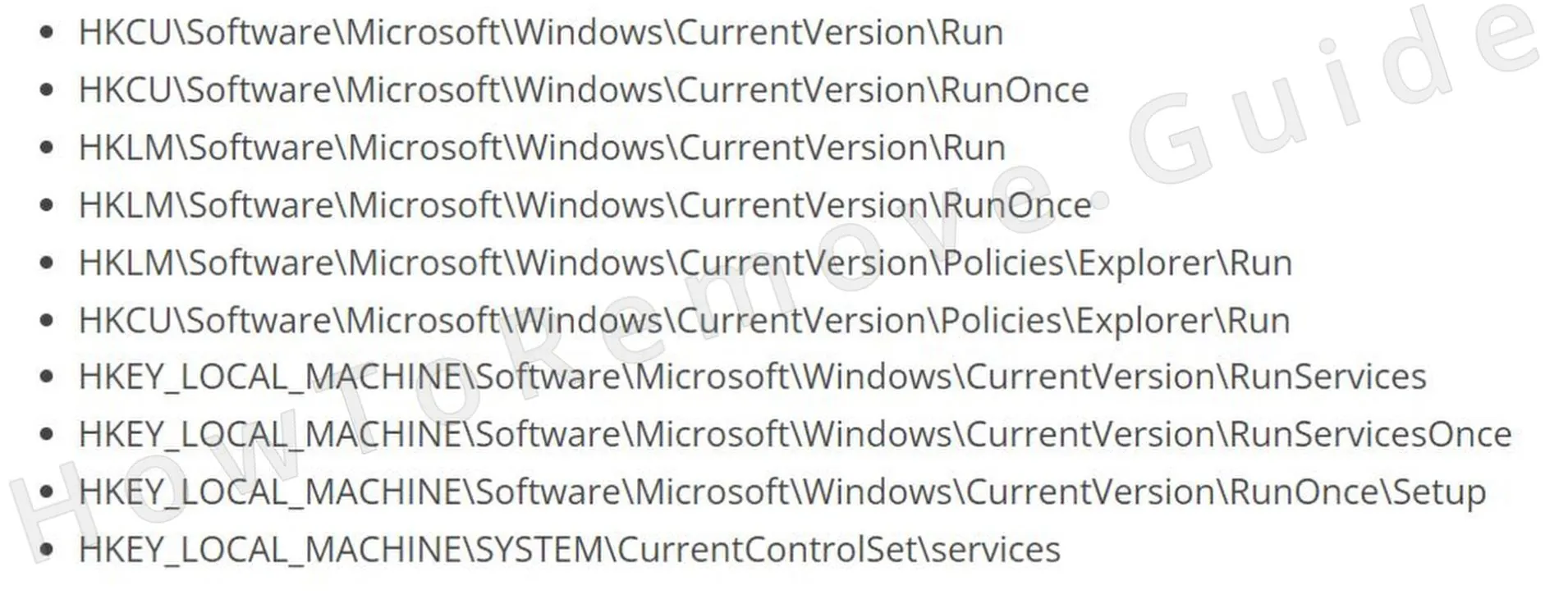 To catch anything the search might miss, manually navigate to these high-risk locations.
In each of these, examine the right-hand panel for any entries that reference Premier Opinion, unknown executables, or strange paths.
- 4.4If you find a suspicious entry, right-click it and choose Delete. Be careful -only remove individual values from the right panel.
Do not delete entire folders (registry keys) unless you’re absolutely sure they serve no valid system function. That discipline is what separates a clean fix from a broken OS.
How to Delete Premier Opinion Browser Policies
Premier Opinion doesn’t stop at Windows – it can impose Chrome or Edge policies that block settings changes and enforce redirects. If your browser shows “Managed by your organization,” that’s the adware talking. Clearing these hijacked policies restores your freedom to control your browser again.
5. How to Remove Rogue Premier Opinion Policies
- 5.1
 Click Start, type Edit Group Policy, and select the top result. Once open, navigate to:
Computer Configuration > Administrative Templates
This is where policy rules are stored. Premier Opinion may have written in restrictions here to stop you from adjusting browser behavior -we’re about to wipe them out. - 5.2
 Right-click Administrative Templates, select Add/Remove Templates, and clean out anything you didn’t personally configure. Only official, intentional policies should be present. If something looks unfamiliar or unnecessary, remove it. This clears malware-pushed controls that limit what your browser can do.
 - 5.3If you’re using Google Chrome, download the Chrome Policy Remover Tool and run it as an administrator. This utility resets all local Chrome policies to factory defaults, wiping out restrictions placed by Premier Opinion. It’s quick, safe, and effective.
- 5.4If Windows flags the Chrome Policy Remover when you try to run it, click More Info, then Run Anyway.
The tool is safe, and this step is essential for restoring full browser access. Ignore this, and the hijacker may keep parts of your browser under lock and key.
Uninstall Premier Opinion From Your Browser
Final sweep: browsers. Even after deleting system files, Premier Opinion may leave corrupted add-ons, altered homepages, or injected survey scripts. Resetting your browsers and removing suspicious extensions ensures no lingering code keeps spawning ads or fake surveys once the core infection is gone.
6. How to Remove Premier Opinion From Your Browser
- 6.1Open your browser and head to the Extensions section. In Chrome, that’s chrome://extensions/. Review every installed extension – if you don’t recognize it or it has no reviews, vague branding, or weird permissions, remove it. Adware loves hiding here under innocent names.
- 6.2
 Next, wipe out cached junk. In Chrome, go to Settings > Privacy and Security > Clear browsing data. Set the time range to All Time, and clear everything except your saved passwords (unless you’re sure they’re backed up). This helps remove tracking scripts and cached malware code.
 - 6.3
 Still in Privacy and Security, open Site Settings. Go through the list and remove permissions for any unfamiliar or sketchy websites – especially if they’re allowed to show notifications, access your camera/microphone, or modify system settings. These backdoors can be exploited to reintroduce Premier Opinion or other threats.
 - 6.4
 Navigate to Search Engine Settings and check which engine is set as default. If you see anything other than a trusted provider (like Google, DuckDuckGo, or Bing), change it immediately. Remove any strange URLs or entries from the list.
 - 6.5Finally, go to Settings > On startup and Settings > Appearance. Make sure no unknown URLs are listed to launch automatically. Reset your homepage and new tab settings if needed. This guarantees Premier Opinion won’t hijack your browser the next time you open it.
How to Avoid Premier Opinion in the Future
Most users already know the basics: avoid shady download sites, pirated programs, and suspicious email links. Still, Premier Opinion shows how easy it is to install adware without realizing it. It doesn’t come through obvious “click here” scams – it hides in free software bundles, deceptive installers, and fake “survey” offers that look legitimate. To avoid another run-in with Premier Opinion or similar PUPs, here’s what actually works:
- Disable automatic downloads
Go to your browser’s settings and enable the option that forces it to always ask where to save files before downloading. Premier Opinion often piggybacks on download managers from popular freeware sites like download.com or softonic.com. If every file must be manually approved and placed, bundled payloads can’t slip in unnoticed. - Choose Custom installations
When installing any free software, skip “Quick” or “Typical” setup options. Always use “Custom” or “Advanced.” This exposes bundled items like Premier Opinion before they install and lets you decline them outright. Legitimate installers won’t hide extra programs – unwanted ones will. - Use enhanced browser protection
In Chrome, Edge, or similar browsers, activate advanced security features under Privacy and Security > Security. Enable “Enhanced protection” and “Always use secure connections.” This adds early warnings about suspicious downloads and redirects.
Lastly, don’t forget about the value of ad-blockers. They don’t just clean up websites; they also block the deceptive pop-up ads and redirects that distribute adware like Premier Opinion. Combined with good browsing hygiene, this makes it far harder for bundled survey software to ever reach your system.

Leave a Reply